Tax Portal MCP Server
The flow
Overview
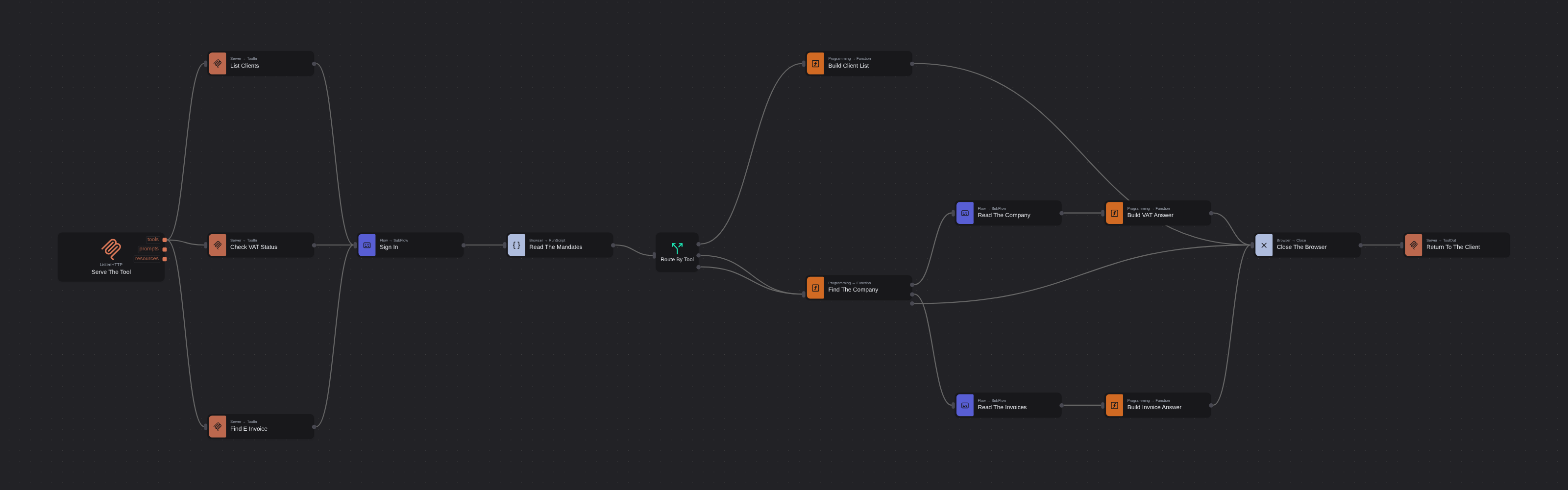
Serves an ordinary RPA automation to an AI assistant as MCP tools, so a model can ask a question of a system it could never sign into. One Listen HTTP node makes the flow a stateless MCP server; three Tool In nodes declare the contracts a model reads, with no arguments, one required argument and one optional. Behind them a sign in subflow answers a government portal's tax number, password and one-time code from the vault, and two more subflows read VAT returns, penalties and electronic invoices off the page. The caller is given a bearer token and nothing else, and Tool Out's Is Error flag lets the flow refuse a company it holds no mandate for instead of returning an empty answer the model will fill in for itself.
Tax Portal MCP Server
Every AI assistant now has a browser, and every one of them stops at the same place: a login with a one-time code. This template is about getting past it, and the thing that gets past it is a robot.
The flow turns an ordinary RPA automation into an MCP server. An assistant connects to it, reads three tool descriptions, and calls the one it needs — while the robot behind them signs into a government portal, reads two tables and hands back fields. The assistant is given a bearer token and nothing else: it never sees the tax number, the password or the code, and it could not sign in if you asked it to.
The portal is frs.robomotion.online, a public Robomotion training system with no API, a three-part login and twelve client companies behind it. Nothing about it is friendly, which is exactly why it is worth automating.
What Tax Portal MCP Server can do
- Turn any flow into an MCP server on a port, with Listen HTTP and nothing else
- Publish several tools from one server, each with its own name, description and parameters
- Run stateless, so no session id is issued and any robot running the flow can answer any call
- Refuse an unauthorised request with a bearer token from your vault, before it reaches MCP
- Answer a two-factor login from the vault, without the caller ever seeing a secret
- Tell the model a call failed, with Tool Out's Is Error, so it says it does not know instead of inventing an answer
Behind the scenes
The contract is three panels. A model never sees the canvas. It sees each Tool In node's name, description and parameter table, and nothing else about the flow reaches it. The three here are deliberately three different shapes: list_clients takes no arguments at all, check_vat_status takes one required company, and find_einvoice adds an optional counterparty. Give the descriptions real care — they are the only reason a model picks one tool over another, and the example inside a parameter description is what tells it what a value looks like.
Every call starts the same way, so all three tools wire into one Sign In subflow: open the browser, take the credentials out of the vault, type them, answer the code. A Switch then routes on msg.tool, which Tool In puts on the message for you.
One node finds and routes. Find The Company has three outputs: the VAT question, the invoice question, and a company this account holds no mandate for. That third port is the one that matters. It sets msg.is_error, Tool Out marks the result as a tool error, and the assistant says it cannot tell you rather than returning something the model will paper over.
Navigation clicks the portal's own links. The portal is a single-page app: a full page load makes it re-hydrate its session, the first render is signed out, the route guard bounces, and the page the next node reads has no table on it. Open Link is used exactly once, to reach the login.
Two details in the Function nodes were learned by running this, not reading it. The portal renders its column headings in capitals, so columns are looked up without caring about case. And its amounts read 23,453.54 — comma for thousands — so parsing them the European way multiplies every figure by a hundred.
Setup Guide
-
Install the package.
Robomotion.MCP0.6.0 or later, for the Bearer Token, Call Timeout and Stateless options. -
Create three vault items. A Login item with the portal's tax number as the username and its password, an API Key item holding the one-time code, and a second API Key item holding a bearer token of your own choosing (
openssl rand -hex 32is a good one). Bind the first two inside the Sign In subflow and the third to Serve The Tool.The demo logins are printed on the portal's own sign-in page.
FD-990000001 / Training2026! / 550690is the service account, which is the one a robot should use. -
Grant the robot access to the vault. Admin Console > Robots > your robot > vault access. Without it every Get Item fails.
-
Run the flow on a robot. Nothing appears to happen: it has bound the port and is waiting.
-
Connect an assistant.
claude mcp add --transport http frs http://127.0.0.1:8080/mcp \ --header "Authorization: Bearer <your token>" claude mcp list -
Ask it something in English. "Is Oceanic Imports behind on VAT?" — no tool named, no argument filled in.
Customization
- Point it at your own portal. The URLs live in Open The Portal and the two reader subflows; the selectors are
data-testidXPaths in the Sign In subflow. Everything else is unchanged. - Add a tool. Drop another Tool In on the tools port, give it a name, a description and a parameter table, and add a branch to Route By Tool. Nothing else has to change.
- The one-time code. This training portal's code is fixed, so it can live in the vault. A real portal rotates it: generate it with the
Robomotion.2FApackage from the shared secret, the way an authenticator does, or have a chat assistant ask a person for it once. - Serve it beyond localhost. Behind a tunnel or reverse proxy, turn on Allow Proxy Host — the transport otherwise refuses a forwarded Host header with a bare 403. Set Allowed Origins for browser-based clients.
- Call Timeout defaults to 120 seconds because RPA is slow. Every path must reach a Tool Out, or the caller waits that long and gets a timeout naming the tool.
Requirements
- Robomotion Robot with
Robomotion.MCP0.6.0 - A vault the robot can read, with the three items above
- An MCP client. Claude Code is used here; any client that speaks Streamable HTTP will do
More AI templates
See all 11 →- Book Shipments in Plain EnglishBooks a morning's shipments on a carrier website that has no API, from six numbered steps written in plain English. The Browser Act node follows the steps page by page: it reads what is on the screen, and Jev, TypeSafe's decision model on OpenRouter, picks every next move, including which service each customer's note asks for. No step names a button or a field. Jev never writes text, so its output tokens cost nothing, and below a confidence of 0.55 the robot touches nothing and hands the order to a person. Every booking is proven in code before it counts: a new tracking number, on a page that names that order.
- Website Pitch BuilderFinds a shop that has no website and builds it one. Google Maps is searched through the scrape.do API, the listings are filtered down to businesses with a phone, enough reviews to prove they have customers, and no real site of their own - a Facebook page or a Wix subdomain counts as no site - and the best one is scored out. Its opening hours, ten best reviews and four public domain photographs are gathered, and a DeepSeek Agent writes a single self-contained page from that brief and nothing else. A real browser then photographs the page, and the screenshot and a CSV row are mailed to you. Google Maps has no email column, so the packet comes to you with the shop's phone number in it, and a person makes the call.
- Clinic Support AssistantA customer support assistant for a website, served to the page as one MCP tool. A visitor and a signed-in patient are answered by two different Hermes Agents, and the difference is not a prompt or a flag, it is two wires: the visitor's agent is wired to the practice documents and to nothing else, so nothing on that side of the canvas can reach a patient record whatever the model is asked. The signed-in tools take no arguments at all. They read the record number the website established from a session cookie, so the model cannot name a patient, and every turn is written to a dialog log the practice can read in the morning.
- Conversational Order AssistantA conversational chat assistant that takes a return in whatever order the customer explains it. An LLM Agent asks for whatever is missing, and an ordinary automation wired to its tools port looks the order up mid conversation and hands the answer back.
- Guided Returns DeskA guided chat assistant that opens a product return, one question at a time. Uses Chat Assistant widget nodes for the questions, checks the order number while the customer is still in the conversation, and loops back to the question when it does not recognise one instead of throwing an exception.
- Knowledge Base EndpointAsk your own documents a question over HTTP. A Robomotion Knowledge Base is indexed by a workspace agent on your machine and searched locally by the robot; one Query Knowledge Base node returns the passages that answer a question, each with the document and heading it came from. Http In and Http Out turn the flow into a service anything can call, and a Min Score fence means it answers "I could not find that" instead of inventing something. Ships four sample documents and a thirty-line Python client.