Guided Returns Desk
The flow
Overview
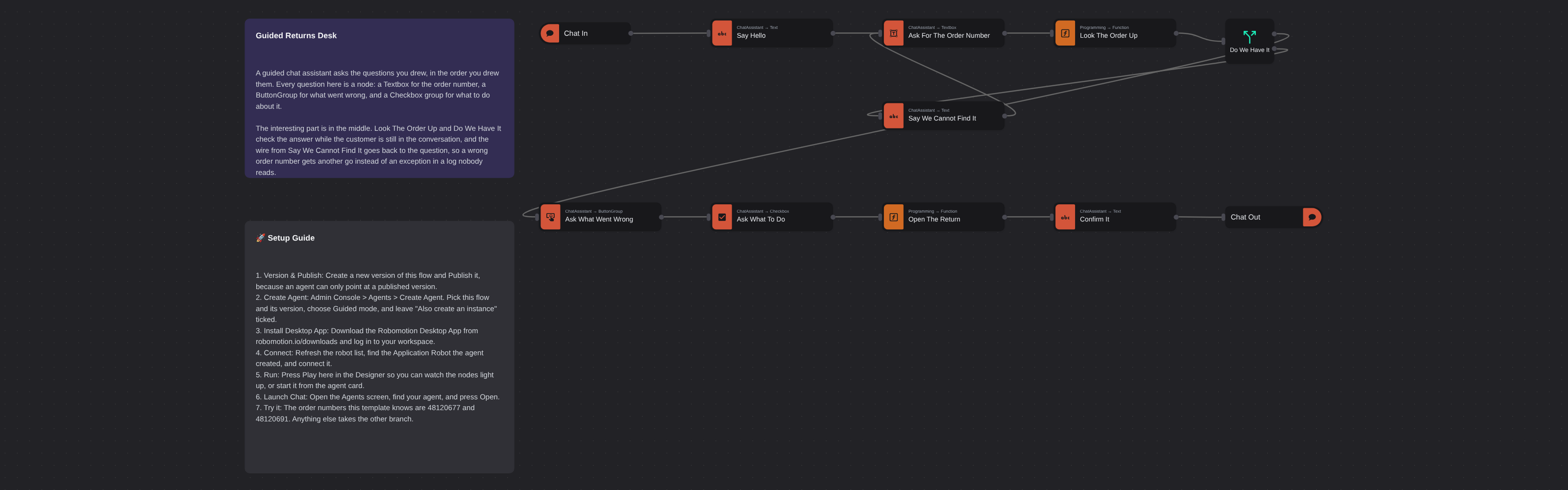
A guided chat assistant that opens a product return, one question at a time. Uses Chat Assistant widget nodes for the questions, checks the order number while the customer is still in the conversation, and loops back to the question when it does not recognise one instead of throwing an exception.
Guided Returns Desk
Guided Returns Desk is a chat assistant that opens a product return by asking for exactly what it needs, one question at a time. Every question is a node you can see on the canvas: a Textbox for the order number, a ButtonGroup for what went wrong, and a Checkbox group for what to do about it.
It is a good starting point for any intake where the process is fixed and you need the answers to be exact: a returns desk, a support request, a booking, an onboarding form that has to be filled in properly the first time.
What Guided Returns Desk can do
- Ask a fixed sequence of questions through the Chat Assistant UI, in the order you drew them
- Constrain the answers at the widget: a maximum length on the order number, three buttons for the reason, tick boxes where more than one answer is allowed
- Check an answer against your own data while the customer is still in the conversation
- Say what is wrong in plain language and ask again, instead of failing into a log
- Read the whole return back with a reference, and close the session
Behind the scenes
Chat In is the trigger, because the person opening the chat is the input. A Text node says the first line, and a Textbox node draws an input and stops the flow until it is answered. Look The Order Up checks the answer against a small table, and Do We Have It splits on the result: an order we recognise goes on to the buttons and the tick boxes, and one we do not goes to Say We Cannot Find It, whose wire runs back to the question so the customer gets another go.
With three answers collected, Open The Return builds a reference and a summary, a Text node reads it back, and Chat Out ends the session and releases the robot for the next person.
A widget hands its answer back as an object, not a string, which is the thing people get wrong most often. The flow reads msg.order.value, never msg.order. Checkbox groups and multi-select button groups give an array.
Setup Guide
- Version & Publish: Create a new version of this flow and Publish it, because an agent can only point at a published version.
- Create Agent: Go to Admin Console > Agents > Create Agent. Pick this flow and its version, choose Guided mode, and leave "Also create an instance" ticked. That mints an Application Robot with the agent's name.
- Install Desktop App: Download the Robomotion Desktop App from robomotion.io/downloads and log in to your workspace.
- Connect: Refresh the robot list, find the new Application Robot, and connect it. An Application Robot runs one flow and nothing else.
- Run: Press Play here in the Designer so you can watch the nodes light up, or start it from the agent card.
- Launch Chat: Open the Agents screen, find your agent, and press Open. Anyone you send that link to can answer, with no account of their own.
Try it
The order numbers this template knows are 48120677 and 48120691. Type anything else and the flow takes the other branch, tells you it cannot find that order, and asks again.
Customization
Look The Order Up is the node to replace first. It holds two orders in a literal so the template runs with no setup; in a real desk this is a database query, an API call, or a browser automation against your order system. Everything downstream only needs it to set msg.match and msg.known.
The questions themselves are properties. Open Ask What Went Wrong or Ask What To Do and edit Custom Labels to change the options, or drag in a Dropdown, a Datepicker or an Upload File node from the Chat Assistant library to ask for something else.
Note that ButtonGroup and Checkbox are guided mode only — the nodes refuse to run in a conversational agent, where the asking is the model's job.
More AI templates
See all 11 →- Book Shipments in Plain EnglishBooks a morning's shipments on a carrier website that has no API, from six numbered steps written in plain English. The Browser Act node follows the steps page by page: it reads what is on the screen, and Jev, TypeSafe's decision model on OpenRouter, picks every next move, including which service each customer's note asks for. No step names a button or a field. Jev never writes text, so its output tokens cost nothing, and below a confidence of 0.55 the robot touches nothing and hands the order to a person. Every booking is proven in code before it counts: a new tracking number, on a page that names that order.
- Website Pitch BuilderFinds a shop that has no website and builds it one. Google Maps is searched through the scrape.do API, the listings are filtered down to businesses with a phone, enough reviews to prove they have customers, and no real site of their own - a Facebook page or a Wix subdomain counts as no site - and the best one is scored out. Its opening hours, ten best reviews and four public domain photographs are gathered, and a DeepSeek Agent writes a single self-contained page from that brief and nothing else. A real browser then photographs the page, and the screenshot and a CSV row are mailed to you. Google Maps has no email column, so the packet comes to you with the shop's phone number in it, and a person makes the call.
- Clinic Support AssistantA customer support assistant for a website, served to the page as one MCP tool. A visitor and a signed-in patient are answered by two different Hermes Agents, and the difference is not a prompt or a flag, it is two wires: the visitor's agent is wired to the practice documents and to nothing else, so nothing on that side of the canvas can reach a patient record whatever the model is asked. The signed-in tools take no arguments at all. They read the record number the website established from a session cookie, so the model cannot name a patient, and every turn is written to a dialog log the practice can read in the morning.
- Conversational Order AssistantA conversational chat assistant that takes a return in whatever order the customer explains it. An LLM Agent asks for whatever is missing, and an ordinary automation wired to its tools port looks the order up mid conversation and hands the answer back.
- Knowledge Base EndpointAsk your own documents a question over HTTP. A Robomotion Knowledge Base is indexed by a workspace agent on your machine and searched locally by the robot; one Query Knowledge Base node returns the passages that answer a question, each with the document and heading it came from. Http In and Http Out turn the flow into a service anything can call, and a Min Score fence means it answers "I could not find that" instead of inventing something. Ships four sample documents and a thirty-line Python client.
- Tax Portal MCP ServerServes an ordinary RPA automation to an AI assistant as MCP tools, so a model can ask a question of a system it could never sign into. One Listen HTTP node makes the flow a stateless MCP server; three Tool In nodes declare the contracts a model reads, with no arguments, one required argument and one optional. Behind them a sign in subflow answers a government portal's tax number, password and one-time code from the vault, and two more subflows read VAT returns, penalties and electronic invoices off the page. The caller is given a bearer token and nothing else, and Tool Out's Is Error flag lets the flow refuse a company it holds no mandate for instead of returning an empty answer the model will fill in for itself.