Book Shipments in Plain English
The flow
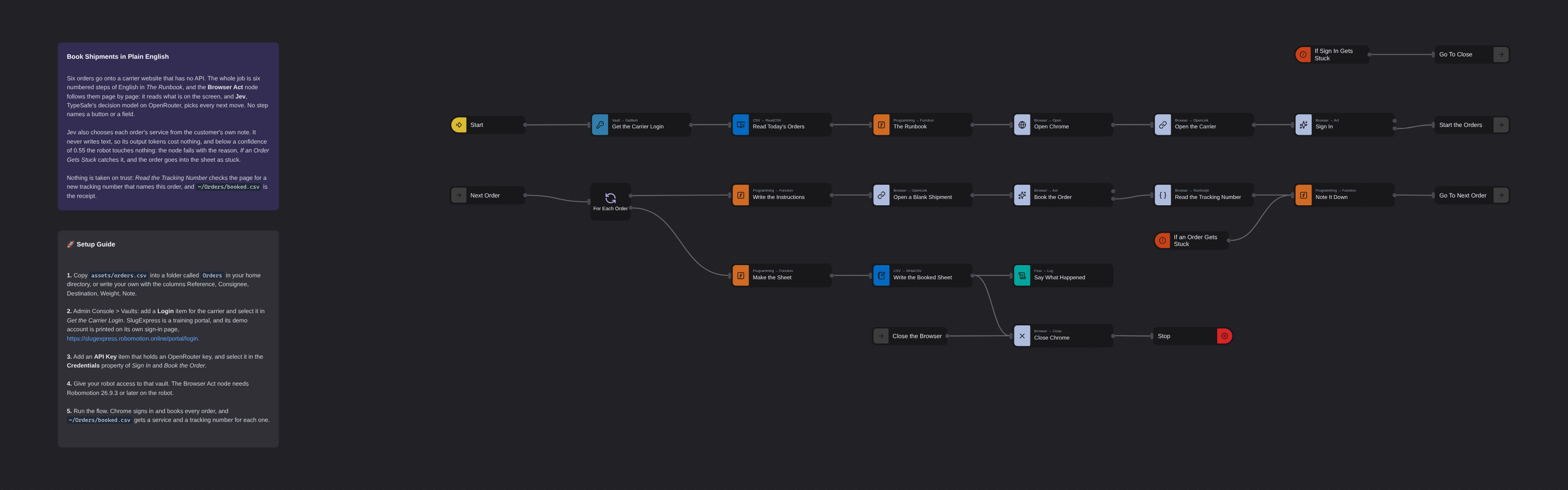
Overview
Books a morning's shipments on a carrier website that has no API, from six numbered steps written in plain English. The Browser Act node follows the steps page by page: it reads what is on the screen, and Jev, TypeSafe's decision model on OpenRouter, picks every next move, including which service each customer's note asks for. No step names a button or a field. Jev never writes text, so its output tokens cost nothing, and below a confidence of 0.55 the robot touches nothing and hands the order to a person. Every booking is proven in code before it counts: a new tracking number, on a page that names that order.
Book Shipments in Plain English
Book Shipments in Plain English books a morning's orders on a carrier website that has no API. Six orders come in as a CSV, each with a consignee, a destination, a reference, a weight and a note from the customer about how soon they need it. Normally a person types them in one at a time and reads every note to choose the service. Here the robot does it from six numbered steps written in plain English.
Watch the video
The instructions live in one node, The Runbook, and nothing else lives there: enter the consignee, choose the destination, enter the reference, choose the service from what the customer wrote, enter the weight, create the shipment. The Browser Act node follows them page by page. It reads what is on the screen, and Jev, TypeSafe's decision model, picks every next move through OpenRouter: which field, which option, when to go on, when it is done. Not one step names a button, a field or a page, so a redesigned form does not break the flow.
Jev does not write text. It is given the page and a list of allowed answers and returns one of them with a probability for every option, so it cannot invent an answer and every move carries a number the robot can act on. That is also why it is cheap: output tokens cost nothing, and a decision pays for its input alone. In our runs a whole six-order batch took 55 decisions and cost $0.0086 on OpenRouter's own meter.
What Book Shipments in Plain English can do
- Drive a real website from a numbered runbook in plain English, with no selectors anywhere in the flow
- Choose each order's shipping service from the customer's own words: Standard when they are in no hurry, Express for this week, TurboSlug when something has stopped until the part arrives
- Type logins and order values without ever showing them to the model: it chooses a label, and the robot types the value
- Stop and mark an order as stuck when a decision falls below a confidence of 0.55, instead of guessing
- Prove every booking in code, from the page itself, before it counts
- Write a booked sheet with a service, a tracking number and a result for every order
Behind the scenes
The flow reads a login from the vault and today's orders from ~/Orders/orders.csv, opens Chrome on the carrier, and a first Act node signs in with a one-line goal: Sign in to the business portal. Its Values are two labels, the sign-in email and the sign-in password. Only the labels reach the model; the robot substitutes the values when it types. When it is done, Start the Orders jumps to the order loop. If it cannot sign in, the node fails with the reason, If Sign In Gets Stuck catches it, and Go To Close goes straight to closing the browser, before a single order is touched.
Then a loop runs over the orders. Write the Instructions fills the runbook's {destination}, {note} and {consignee} from the order and sets the values the Act node may type. Open a Blank Shipment loads an empty form, so no order ever starts on the previous order's confirmation page. Book the Order is the second Act node, given the whole runbook as its goal. On every turn it takes a snapshot of the visible, enabled elements, stamps each one with an index, and asks Jev one question with every head at once: the operation (click, type, select, scroll, wait, done or blocked) and the target for each. The answer is always an index into the table the robot built, and the robot checks it against the page before it touches anything.
The runbook says what finished looks like: the goal is done when the page shows a shipping label addressed to {consignee}. That line matters. A done-condition that names this order is what stops the model from declaring an order finished on the page the last one left behind.
Jev saying done is still only the model's belief. Read the Tracking Number runs in the page and looks for the carrier's tracking number format, and checks that the page names this order's consignee and reference. Note It Down counts an order as booked only when all of that holds and the tracking number is new. An order the Act node could not finish fails with the reason; If an Order Gets Stuck catches it and it lands in the sheet as exactly that, while the loop goes on to the next order. When the loop ends, Make the Sheet builds the table, Write the Booked Sheet saves it as ~/Orders/booked.csv, and Say What Happened logs how many orders were booked, in how many decisions and how many seconds of model time.
Setup Guide
- Put the orders in place: copy
assets/orders.csvinto a folder calledOrdersin your home directory, so the flow finds~/Orders/orders.csv. Your own orders need the same columns: Reference, Consignee, Destination, Weight, Note. - Add the carrier login: Admin Console > Vaults, add a Login item and select it in Get the Carrier Login. SlugExpress is a training portal, and its demo accounts are printed on its own sign-in page: https://slugexpress.robomotion.online/portal/login.
- Add an OpenRouter key: put an OpenRouter API key into a Vault item (type: API Key) and select it in the Credentials property of both Sign In and Book the Order. Their Provider (OpenRouter) and Decision Model (
typesafe/jev-1.13) are already set. - Give your robot access to that vault. The Browser Act node needs Robomotion 26.9.3 or later on the robot.
- Run the flow. Chrome opens on the carrier, signs in and books every order in turn.
~/Orders/booked.csvgets a service, a tracking number and a result for each one, and the log says how many decisions it took.
Customization
Change the job by changing a sentence. Everything the robot does on the website is in The Runbook. Add a step, reword one, or change the policy that maps a note to a service, and the next run follows it. Keep each step to one thing and state the policy right where it is used: in testing, a service rule written far from the step that needed it was followed with much lower confidence.
Say what finished looks like, for this item. A generic the shipment is created lets the model finish on a page left over from the previous order. Name something that only this item's success page shows.
Tune the gate in the Act node's Min Confidence (0.55 by default). Raise it for work that is expensive to undo; anything below it fails the node without a click, and the Catch takes it from there.
Give it more steps in Max Steps for a longer form; the run stops with a reason when the budget is spent, rather than looping.
Point it at another site by changing the two addresses in Open the Carrier and Open a Blank Shipment, the goal in Sign In, and the runbook. Keep the proof in Read the Tracking Number specific to that site: it is the one place the flow knows what a finished booking looks like.
Use a chat model instead of Jev by choosing it as the Decision Model. It works, and it can write free text into a field, but it is slower, bills for every token it writes, and its confidence is self-reported rather than calibrated.
More AI templates
See all 11 →- Website Pitch BuilderFinds a shop that has no website and builds it one. Google Maps is searched through the scrape.do API, the listings are filtered down to businesses with a phone, enough reviews to prove they have customers, and no real site of their own - a Facebook page or a Wix subdomain counts as no site - and the best one is scored out. Its opening hours, ten best reviews and four public domain photographs are gathered, and a DeepSeek Agent writes a single self-contained page from that brief and nothing else. A real browser then photographs the page, and the screenshot and a CSV row are mailed to you. Google Maps has no email column, so the packet comes to you with the shop's phone number in it, and a person makes the call.
- Clinic Support AssistantA customer support assistant for a website, served to the page as one MCP tool. A visitor and a signed-in patient are answered by two different Hermes Agents, and the difference is not a prompt or a flag, it is two wires: the visitor's agent is wired to the practice documents and to nothing else, so nothing on that side of the canvas can reach a patient record whatever the model is asked. The signed-in tools take no arguments at all. They read the record number the website established from a session cookie, so the model cannot name a patient, and every turn is written to a dialog log the practice can read in the morning.
- Conversational Order AssistantA conversational chat assistant that takes a return in whatever order the customer explains it. An LLM Agent asks for whatever is missing, and an ordinary automation wired to its tools port looks the order up mid conversation and hands the answer back.
- Guided Returns DeskA guided chat assistant that opens a product return, one question at a time. Uses Chat Assistant widget nodes for the questions, checks the order number while the customer is still in the conversation, and loops back to the question when it does not recognise one instead of throwing an exception.
- Knowledge Base EndpointAsk your own documents a question over HTTP. A Robomotion Knowledge Base is indexed by a workspace agent on your machine and searched locally by the robot; one Query Knowledge Base node returns the passages that answer a question, each with the document and heading it came from. Http In and Http Out turn the flow into a service anything can call, and a Min Score fence means it answers "I could not find that" instead of inventing something. Ships four sample documents and a thirty-line Python client.
- Tax Portal MCP ServerServes an ordinary RPA automation to an AI assistant as MCP tools, so a model can ask a question of a system it could never sign into. One Listen HTTP node makes the flow a stateless MCP server; three Tool In nodes declare the contracts a model reads, with no arguments, one required argument and one optional. Behind them a sign in subflow answers a government portal's tax number, password and one-time code from the vault, and two more subflows read VAT returns, penalties and electronic invoices off the page. The caller is given a bearer token and nothing else, and Tool Out's Is Error flag lets the flow refuse a company it holds no mandate for instead of returning an empty answer the model will fill in for itself.