Website Pitch Builder
The flow
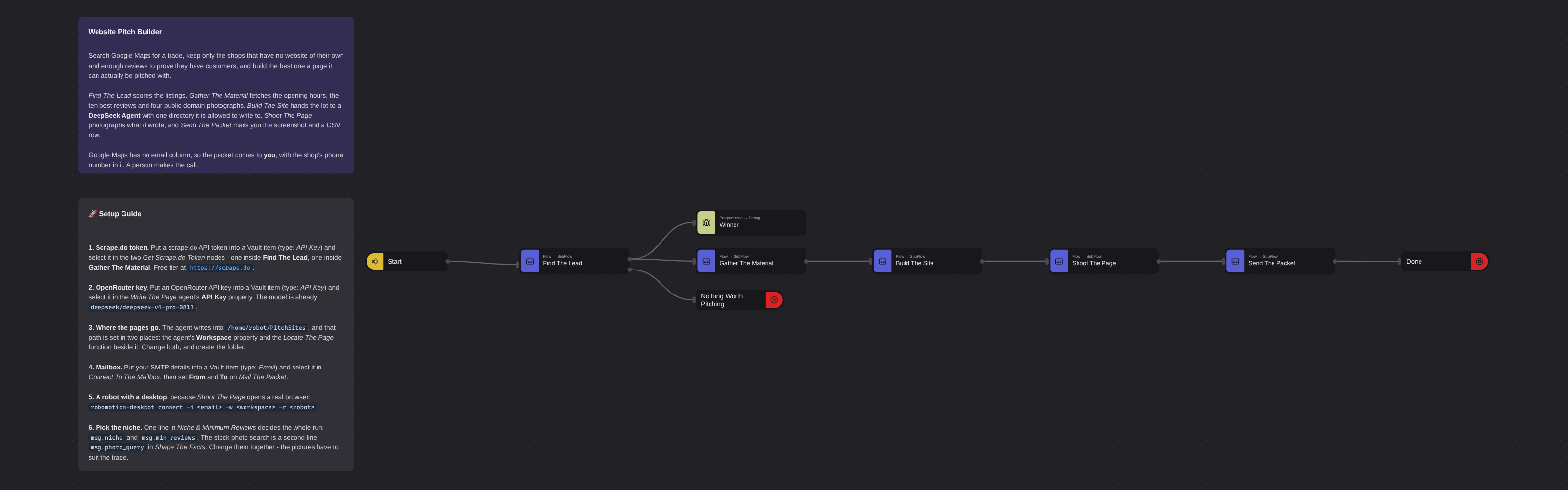
Overview
Finds a shop that has no website and builds it one. Google Maps is searched through the scrape.do API, the listings are filtered down to businesses with a phone, enough reviews to prove they have customers, and no real site of their own - a Facebook page or a Wix subdomain counts as no site - and the best one is scored out. Its opening hours, ten best reviews and four public domain photographs are gathered, and a DeepSeek Agent writes a single self-contained page from that brief and nothing else. A real browser then photographs the page, and the screenshot and a CSV row are mailed to you. Google Maps has no email column, so the packet comes to you with the shop's phone number in it, and a person makes the call.
Website Pitch Builder
There is a whole genre of video about this. Search Google Maps for a trade, find the shops with no website, have a coding agent build one, send the owner a screenshot, charge about a thousand dollars. This template is that machine, built on a canvas, with the part those videos leave out left in.
It searches Google Maps through the scrape.do API, keeps only the listings that have a phone number, enough reviews to prove the shop has customers, and no real website of their own, and scores what is left. It then gathers everything the map knows about the winner — the full week of opening hours, the ten highest-rated reviews word for word, and four public domain photographs — and hands that brief to a DeepSeek Agent with one directory it is allowed to write to. The agent writes a single self-contained HTML file. A real browser opens it, photographs it, and the screenshot goes out by mail with a CSV row.
Five subflows, so the main canvas reads as a sentence: find the lead, gather the material, build the site, shoot the page, send the packet.
What Website Pitch Builder can do
- Search Google Maps for any trade in any city, through an API that needs no browser
- Tell a real website from a placeholder — a Facebook page, a Wix subdomain, a
business.siteor a Yelp listing all count as no site - Score the qualifying shops and pick one, rather than dumping a list on you
- Read a place's opening hours and its best reviews, then write a page whose every claim traces back to them
- Find photographs that are actually free to use, and credit them with the licence string the API returned
- Photograph the finished page the way a person would see it, and mail you the picture
Behind the scenes
Find The Lead is where the whole run is decided. One Function node carries two lines — the niche and the review floor — and everything downstream follows from them. The scrape.do token comes out of a Vault item and is assembled into the request URL by a Function, because the Maps API takes its token as a query parameter and has no header form: the key is never typed into a node property, so it cannot be read off one either.
Pick Best Prospect is the interesting node. "No website" is not one condition. A listing that points at a Facebook page, a Wix subdomain or a Google mini site has exactly the same gap as one with nothing at all, so the test is a host list, not a null check. A shop also has to have a phone (it is the only channel that exists) and at least min_reviews reviews, and what survives is scored rating × log₁₀(reviews + 1) — which prefers a 4.6 with two hundred reviews over a 5.0 with three. The node has two outputs: a winner, or nothing, and nothing is a normal outcome for a niche that was a bad idea.
Gather The Material calls the Maps place and reviews endpoints for the winner, then searches Openverse for photographs with license=cc0. It takes the first four results in the order the API returns them and copies each one's license string verbatim into the brief, because a licence is data, not prose.
Build The Site writes the prompt and hands it over. The agent gets the brief as JSON and a hard set of rules: invent nothing, no prices, no founding date, no email address, quote the four reviews word for word, use all four photographs in the order given, one file, all CSS inline, under 10 KB. It has one directory it may write to and one tool it needs.
Shoot The Page sets a 1280×1000 window, opens the file the agent wrote, waits eight seconds for the remote photographs to arrive, and screenshots it.
Send The Packet builds a CSV row — shop, phone, address, rating, reviews, score, niche, the placeholder site it was listed with, and where the page and the screenshot are — writes it to disk, and mails both files to you.
Google Maps has no email column. Not on the search, not on the place, not on the reviews. A shop with no website usually has no work email either, which is the step nobody in that genre of video mentions. So the packet does not go to the shop. It comes to you, with the phone number in it, and a person decides whether that call is worth making. The robot does not find you a customer — it finds you the ten minutes before the phone call.
Setup Guide
-
A scrape.do token. Sign up at scrape.do and put the token into a Vault item of type API Key. Select it in both Get Scrape.do Token nodes — one inside Find The Lead, one inside Gather The Material.
-
An OpenRouter key. Put it into a Vault item of type API Key and select it in the Write The Page agent's API Key property. The Custom Model is already set to
deepseek/deepseek-v4-pro-0813; Base URL is OpenRouter's. -
A folder for the pages. The template writes into
/home/robot/PitchSites, named in two places: the agent's Workspace property and the Locate The Page Function beside it. Change both to a directory that exists on your robot. -
A mailbox. Put your SMTP host, port, username and password into a Vault item of type Email, select it in Connect To The Mailbox, and set From and To on Mail The Packet.
-
A robot with a desktop, because Shoot The Page opens a real browser:
robomotion-deskbot connect -i <email> -w <workspace> -r <robot> -
Pick your niche in Niche & Minimum Reviews inside Find The Lead:
msg.niche = 'shoe repair Los Angeles';
msg.min_reviews = 20;
Then change
msg.photo_queryin Shape The Facts to match — a page about a cobbler wants pictures of leather shoes, not of whatever the last niche was. -
Run it. The Dev Console shows the winner as soon as Find The Lead returns, and the page lands in the folder about a minute later.
Customization
Change the trade and the city in one line. That is the only edit most runs need, and it is the line worth thinking hardest about: the niche decides whether twenty listings yield one lead or none.
Loosen or tighten the filter in Pick Best Prospect. placeholderHosts is the list of things that do not count as a website — add a regional site builder or a directory that is common where you are searching. min_reviews is the proof-of-customers floor.
Change the scoring on the same node. rating × log₁₀(reviews + 1) balances quality against evidence; a plain reviews sort chases the busiest shop instead.
Rewrite the brief in Write The Brief to change what gets built. The prompt is ordinary JavaScript building an array of lines, so the rules are readable and editable — the sections are where the page goes, what goes on it, what must not appear, how it should look, and the size limit.
Swap the model on the agent node. Anything OpenRouter serves will do; the flow does not care which one wrote the file.
Do more than one shop by looping Pick Best Prospect over the qualifying list instead of returning the best. Everything downstream already works one lead at a time.
Send it somewhere else. The mail nodes are the last three in Send The Packet — replace them with a Google Sheets append, a Slack message, or a CRM call, and the CSV row is already shaped for it.
Requirements
- Robomotion.DeepSeekAgent 0.7.5
- A robot with a desktop session, since a real browser opens on it to photograph the page
- A scrape.do account for the Google Maps API, and an OpenRouter key for the agent
- An SMTP mailbox the robot can send through
- Outbound network access from the robot to scrape.do, Openverse, OpenRouter and the photograph hosts
More AI templates
See all 11 →- Book Shipments in Plain EnglishBooks a morning's shipments on a carrier website that has no API, from six numbered steps written in plain English. The Browser Act node follows the steps page by page: it reads what is on the screen, and Jev, TypeSafe's decision model on OpenRouter, picks every next move, including which service each customer's note asks for. No step names a button or a field. Jev never writes text, so its output tokens cost nothing, and below a confidence of 0.55 the robot touches nothing and hands the order to a person. Every booking is proven in code before it counts: a new tracking number, on a page that names that order.
- Clinic Support AssistantA customer support assistant for a website, served to the page as one MCP tool. A visitor and a signed-in patient are answered by two different Hermes Agents, and the difference is not a prompt or a flag, it is two wires: the visitor's agent is wired to the practice documents and to nothing else, so nothing on that side of the canvas can reach a patient record whatever the model is asked. The signed-in tools take no arguments at all. They read the record number the website established from a session cookie, so the model cannot name a patient, and every turn is written to a dialog log the practice can read in the morning.
- Conversational Order AssistantA conversational chat assistant that takes a return in whatever order the customer explains it. An LLM Agent asks for whatever is missing, and an ordinary automation wired to its tools port looks the order up mid conversation and hands the answer back.
- Guided Returns DeskA guided chat assistant that opens a product return, one question at a time. Uses Chat Assistant widget nodes for the questions, checks the order number while the customer is still in the conversation, and loops back to the question when it does not recognise one instead of throwing an exception.
- Knowledge Base EndpointAsk your own documents a question over HTTP. A Robomotion Knowledge Base is indexed by a workspace agent on your machine and searched locally by the robot; one Query Knowledge Base node returns the passages that answer a question, each with the document and heading it came from. Http In and Http Out turn the flow into a service anything can call, and a Min Score fence means it answers "I could not find that" instead of inventing something. Ships four sample documents and a thirty-line Python client.
- Tax Portal MCP ServerServes an ordinary RPA automation to an AI assistant as MCP tools, so a model can ask a question of a system it could never sign into. One Listen HTTP node makes the flow a stateless MCP server; three Tool In nodes declare the contracts a model reads, with no arguments, one required argument and one optional. Behind them a sign in subflow answers a government portal's tax number, password and one-time code from the vault, and two more subflows read VAT returns, penalties and electronic invoices off the page. The caller is given a bearer token and nothing else, and Tool Out's Is Error flag lets the flow refuse a company it holds no mandate for instead of returning an empty answer the model will fill in for itself.