Knowledge Base Endpoint
The flow
Overview
Ask your own documents a question over HTTP. A Robomotion Knowledge Base is indexed by a workspace agent on your machine and searched locally by the robot; one Query Knowledge Base node returns the passages that answer a question, each with the document and heading it came from. Http In and Http Out turn the flow into a service anything can call, and a Min Score fence means it answers "I could not find that" instead of inventing something. Ships four sample documents and a thirty-line Python client.
Knowledge Base Endpoint
Every company runs on documents nobody outside it has ever read. A Robomotion Knowledge Base is how you let a flow read them: upload the files, build the index once, and one node answers a question with the exact passage and the document it came from. No model is trained, nothing is summarised, and nothing is invented.
This template puts an HTTP endpoint in front of one. The flow is not a script that runs once — Http In holds a request open and Http Out replies on the same one, so anything that can make an HTTP request can ask your documents a question: a terminal, a chat window, another automation. assets/ask.py is a thirty-line client with no dependencies at all.
Where the work runs is the part nobody expects. Parsing, chunking, embedding and the index build all happen on a connected workspace agent, on your own machine. A robot querying the base downloads that index and searches it locally. The only thing that ever leaves is the question, and only to be turned into a vector.
What Knowledge Base Endpoint can do
- Turn PDFs, Word files, spreadsheets, Markdown, plain text or images into a searchable index, up to 64 MB per file
- Answer with the passage itself, plus the document, the heading path and the page number
- Search by meaning and by exact term at once, so an error code survives next to a question asked in a sentence
- Refuse to answer when the documents do not cover it, instead of guessing
- Serve any client over HTTP, with no Robomotion anywhere in the caller
- Run the embedding side with no API key at all, on Robomotion AI Credits
Behind the scenes
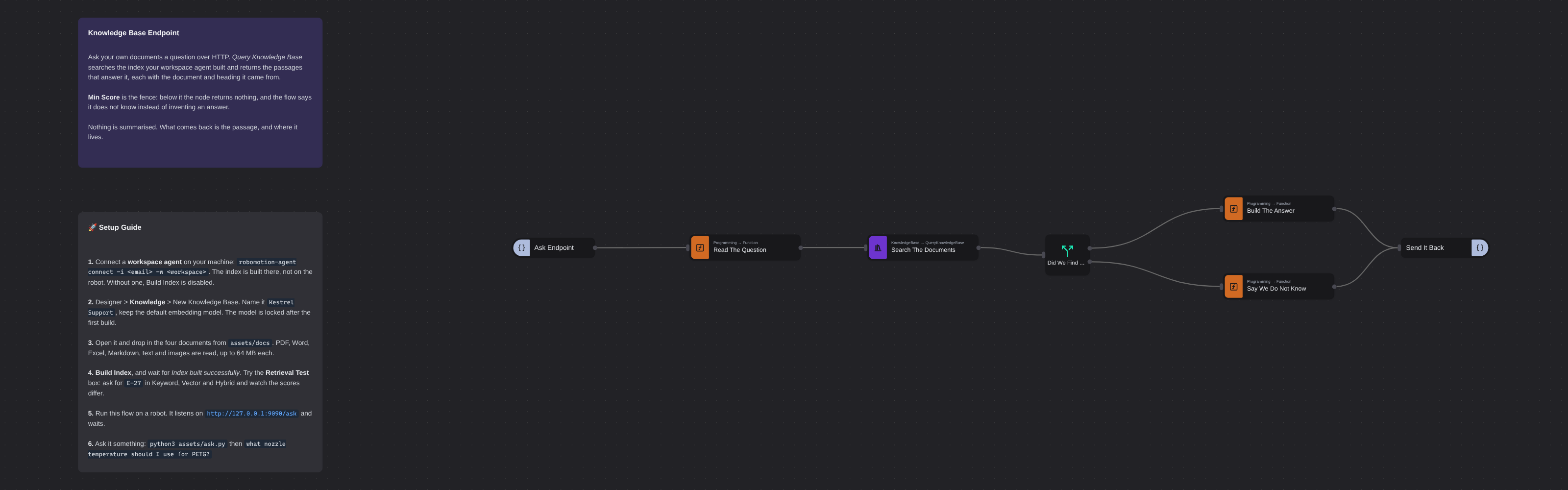
Seven nodes, and one of them is the interesting one.
Read The Question lifts question off the request body. Search The Documents is the Query Knowledge Base node, and everything it needs is on its panel: the base name (spelled exactly as the Knowledge page spells it — an id works too), the query, how many passages to bring back, the search mode, and a minimum score. A Switch asks whether anything survived, and the two answer-builders shape a body that Http Out returns.
Search Mode is the argument this template exists to make. Against the sample corpus, the error code E-27 scores like this:
| Mode | Top 3 |
|---|---|
| Keyword | 100 (E-27) · 1 · 0 |
| Vector | 68 (E-27) · 66 · 65 |
| Hybrid | 100 (E-27) · 49 · 49 |
Keyword nails an exact string and scores everything else at nothing. Vector has no idea the string is special, and ranks three unrelated printer faults within three points of each other. Hybrid puts the exact match on top and keeps meaning behind it. That is why hybrid is the default.
Min Score is a real fence, not a decoration. Query Knowledge Base returns nothing at all below it. Against these documents a genuine question tops out at 97–100 and an unrelated one at about 50, so 0.6 cleanly separates them — and the "I could not find that" branch is reachable rather than theoretical. Ask this flow how do I book annual leave? and it says it does not know.
The four documents in assets/docs were written for this template and exist nowhere else, which is the point: no model can have been trained on any of it, so a right answer has to have come out of your index. One is a PDF, so its citations carry page numbers; the other three are Markdown, so theirs carry heading paths.
Setup Guide
-
Connect a workspace agent on your machine:
robomotion-agent connect -i <email> -w <workspace>. This is a different connection from the robot that runs flows, and it is the one that builds the index. Without it, Build Index is disabled and the Retrieval Test box refuses to type — the only thing on screen that says so is a banner. One machine can hold both connections. -
Create the base. Designer > Knowledge > New Knowledge Base. Name it
Kestrel Support, describe it, and keep the default embedding model. The model is locked after the first build; changing it later forces a full rebuild. -
Upload the documents. Open the base and drop in the four files from
assets/docs. They will all say Pending: uploading only stores a file, nothing has been read yet. -
Build the index and wait for Index built successfully. Four documents become 23 chunks. Then try the Retrieval Test box: ask for
E-27in Keyword, Vector and Hybrid and watch the table above happen in front of you. -
Install the package if you have not: Packages >
Robomotion.KnowledgeBase0.1.7. -
Run the flow on a robot. It does not do anything yet: it listens on
http://127.0.0.1:9090/askand waits. -
Ask it something:
python3 assets/ask.py
you > what nozzle temperature should I use for PETG?
Standard library only, so there is nothing to install. Try
E-27next, and then something the documents do not cover.
Customization
Point it at your own documents by changing the Knowledge Base property to your base's name and uploading your own files. Nothing else in the flow knows what the documents are about.
Tune the fence. Min Score is the single most useful property here. Raise it and the flow refuses more often but is never wrong about where an answer came from; lower it and marginal passages get through. Set it to 0 and the "do not know" branch becomes unreachable.
Bring back more context with Top K. This flow answers from the top passage alone; the node returns all of them on msg.chunks, and a prompt-ready block with citations on msg.context. Feed that to an LLM node and you have generation on top of retrieval, with the sources already attached.
Scope a search with Filter Tag, which restricts it to documents carrying that tag — how you keep a superseded handbook in the base without letting it answer.
Change the endpoint on Ask Endpoint: method, path, IP and port are all properties. Bind to 0.0.0.0 to accept calls from other machines.
Give an agent the whole base instead of one node by wiring the package's Toolkit node to an agent's tools port, and let it write its own queries.
Documents are added in the Designer, not from a flow: the package deliberately does not export an AddDocument node. Upload and rebuild there, and this flow picks up the new index on its next query.
Requirements
Robomotion.KnowledgeBase0.1.7 — Query Knowledge Base, Rerank, and the Agents Toolkit- A workspace agent connected on the machine that will build the index
- A Knowledge Base with a built index, named on the Search The Documents node
- Robomotion AI Credits for the query embedding, or your own provider key on the node
More AI templates
See all 11 →- Book Shipments in Plain EnglishBooks a morning's shipments on a carrier website that has no API, from six numbered steps written in plain English. The Browser Act node follows the steps page by page: it reads what is on the screen, and Jev, TypeSafe's decision model on OpenRouter, picks every next move, including which service each customer's note asks for. No step names a button or a field. Jev never writes text, so its output tokens cost nothing, and below a confidence of 0.55 the robot touches nothing and hands the order to a person. Every booking is proven in code before it counts: a new tracking number, on a page that names that order.
- Website Pitch BuilderFinds a shop that has no website and builds it one. Google Maps is searched through the scrape.do API, the listings are filtered down to businesses with a phone, enough reviews to prove they have customers, and no real site of their own - a Facebook page or a Wix subdomain counts as no site - and the best one is scored out. Its opening hours, ten best reviews and four public domain photographs are gathered, and a DeepSeek Agent writes a single self-contained page from that brief and nothing else. A real browser then photographs the page, and the screenshot and a CSV row are mailed to you. Google Maps has no email column, so the packet comes to you with the shop's phone number in it, and a person makes the call.
- Clinic Support AssistantA customer support assistant for a website, served to the page as one MCP tool. A visitor and a signed-in patient are answered by two different Hermes Agents, and the difference is not a prompt or a flag, it is two wires: the visitor's agent is wired to the practice documents and to nothing else, so nothing on that side of the canvas can reach a patient record whatever the model is asked. The signed-in tools take no arguments at all. They read the record number the website established from a session cookie, so the model cannot name a patient, and every turn is written to a dialog log the practice can read in the morning.
- Conversational Order AssistantA conversational chat assistant that takes a return in whatever order the customer explains it. An LLM Agent asks for whatever is missing, and an ordinary automation wired to its tools port looks the order up mid conversation and hands the answer back.
- Guided Returns DeskA guided chat assistant that opens a product return, one question at a time. Uses Chat Assistant widget nodes for the questions, checks the order number while the customer is still in the conversation, and loops back to the question when it does not recognise one instead of throwing an exception.
- Tax Portal MCP ServerServes an ordinary RPA automation to an AI assistant as MCP tools, so a model can ask a question of a system it could never sign into. One Listen HTTP node makes the flow a stateless MCP server; three Tool In nodes declare the contracts a model reads, with no arguments, one required argument and one optional. Behind them a sign in subflow answers a government portal's tax number, password and one-time code from the vault, and two more subflows read VAT returns, penalties and electronic invoices off the page. The caller is given a bearer token and nothing else, and Tool Out's Is Error flag lets the flow refuse a company it holds no mandate for instead of returning an empty answer the model will fill in for itself.