Self-Learning Invoice Agent
The flow
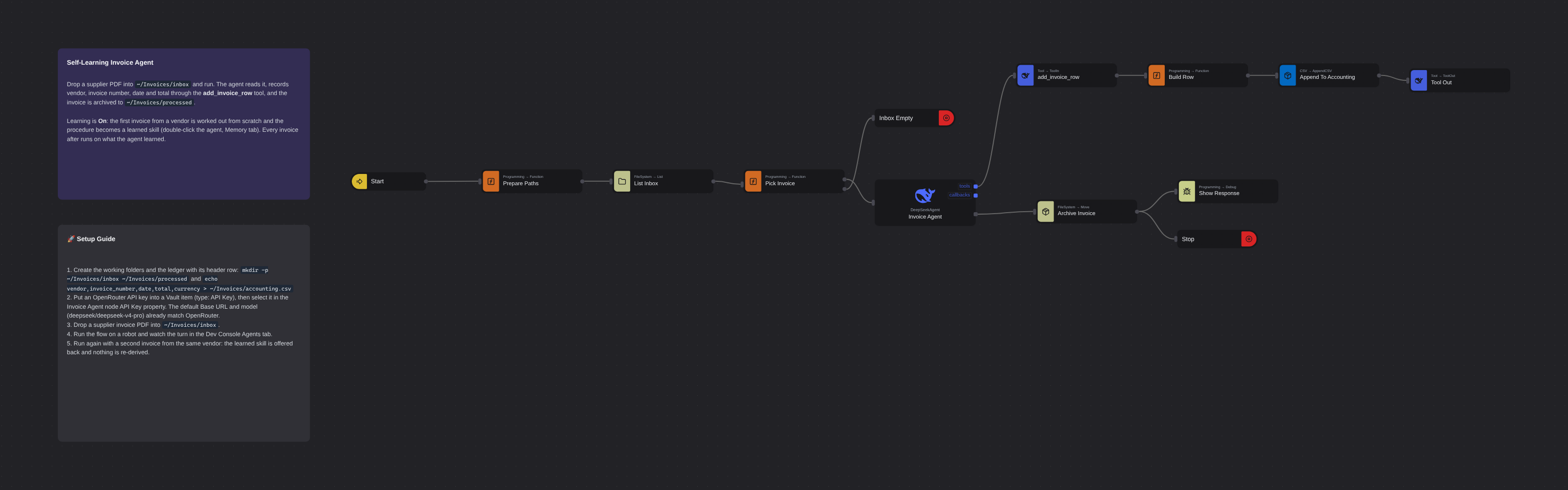
Overview
An invoice-processing DeepSeek Agent that teaches itself vendors. The first invoice from a supplier is worked out from scratch and the procedure is written down as a learned skill in the agent's memory; every invoice after runs on what it learned. Extracted fields are recorded to a CSV ledger through a Tool In / Tool Out pair, and memory syncs to the workspace so a whole fleet can run what one robot learned.
Self-Learning Invoice Agent
Self-Learning Invoice Agent is an invoice-processing flow built around the DeepSeek Agent node's learning feature. The agent reads a supplier invoice PDF, extracts the vendor, invoice number, invoice date and grand total, and records them to a CSV ledger through an add_invoice_row tool built from ordinary flow nodes. The first invoice from a vendor is worked out from scratch; the agent then writes the whole procedure down as a learned skill in its memory, and every invoice after from that vendor runs on what it learned.
This is AI and RPA working together: the agent decides what to record, and the flow between Tool In and Tool Out records it.
What Self-Learning Invoice Agent can do
- Pick up the next invoice PDF from
~/Invoices/inboxon every run - Extract vendor, invoice number, invoice date and grand total from the document
- Record exactly one ledger row per invoice via the
add_invoice_rowtool into~/Invoices/accounting.csv - Learn each vendor's layout once: which line holds the real total, which of the dates is the invoice date, how numbers are formatted
- Reuse the learned skill on every later invoice from that vendor, with no re-derivation
- Archive processed invoices to
~/Invoices/processed - Sync its memory to the workspace as a git repository, so what one robot learns is available to every robot running this flow
Behind the scenes
The flow lists ~/Invoices/inbox, picks the first PDF, and hands it to the DeepSeek Agent node together with a request naming the exact file. The agent reads the document (its persona, in the Context tab, tips it to pdftotext -layout), decides the field values, and calls add_invoice_row. That tool is plain flow: Tool In receives the call's parameters, a Function node shapes them into a one-row table, Append CSV writes the ledger, and Tool Out hands the result back to the agent. The agent's reply leaves on its response port, the invoice is moved to ~/Invoices/processed, and the run ends.
Because the node's Learning property is On, a turn that worked a new layout out ends with the agent recording the procedure via its learn tool. Everything about the agent lives behind a double-click on the node: the learned skill, the memory's commit history, version tags, and a Growth view that replays how the memory grew. A learned skill can be promoted to reviewed, pinned to a digest, and tagged as a version; a robot whose Memory Version names that tag replays exactly the reviewed state and records nothing new.
Setup Guide
- Create the working folders and the ledger (the ledger needs its header row to exist):
mkdir -p ~/Invoices/inbox ~/Invoices/processedecho "vendor,invoice_number,date,total,currency" > ~/Invoices/accounting.csv - Configure the API key: put an OpenRouter API key into a Vault item (type: API Key) and select it in the Invoice Agent node's API Key property. The node's default Base URL and model (
deepseek/deepseek-v4-pro) already match OpenRouter. - Drop an invoice PDF into
~/Invoices/inbox. - Run the flow on a robot and watch the turn stream in the Dev Console's Agents tab.
- Run it again with a second invoice from the same vendor: the skill is offered back to the agent and nothing is re-derived.
- Inspect the memory: double-click the Invoice Agent node and open the Memory tab to read the skill the agent wrote, its commit history, and the Growth view.
Customization
The agent's persona lives in the flow's AGENT.md asset (visible in the agent editor's Context tab): adjust the fields to extract, the exactness rules, or the learning instruction there. The tool's contract is the Tool In node's description and parameter schema; extend the schema and the Build Row function together to record more columns. Swap Append CSV for a Google Sheets or database node to land rows somewhere other than a local file. In the node's properties, Learning and Memory Sync control whether the agent may learn and where its memory lives; set Learning to Replay with a pinned Memory Version on fleet robots that should run exactly what was reviewed.
More ai templates
See all 11 →- Book Shipments in Plain EnglishBooks a morning's shipments on a carrier website that has no API, from six numbered steps written in plain English. The Browser Act node follows the steps page by page: it reads what is on the screen, and Jev, TypeSafe's decision model on OpenRouter, picks every next move, including which service each customer's note asks for. No step names a button or a field. Jev never writes text, so its output tokens cost nothing, and below a confidence of 0.55 the robot touches nothing and hands the order to a person. Every booking is proven in code before it counts: a new tracking number, on a page that names that order.
- Website Pitch BuilderFinds a shop that has no website and builds it one. Google Maps is searched through the scrape.do API, the listings are filtered down to businesses with a phone, enough reviews to prove they have customers, and no real site of their own - a Facebook page or a Wix subdomain counts as no site - and the best one is scored out. Its opening hours, ten best reviews and four public domain photographs are gathered, and a DeepSeek Agent writes a single self-contained page from that brief and nothing else. A real browser then photographs the page, and the screenshot and a CSV row are mailed to you. Google Maps has no email column, so the packet comes to you with the shop's phone number in it, and a person makes the call.
- Clinic Support AssistantA customer support assistant for a website, served to the page as one MCP tool. A visitor and a signed-in patient are answered by two different Hermes Agents, and the difference is not a prompt or a flag, it is two wires: the visitor's agent is wired to the practice documents and to nothing else, so nothing on that side of the canvas can reach a patient record whatever the model is asked. The signed-in tools take no arguments at all. They read the record number the website established from a session cookie, so the model cannot name a patient, and every turn is written to a dialog log the practice can read in the morning.
- Conversational Order AssistantA conversational chat assistant that takes a return in whatever order the customer explains it. An LLM Agent asks for whatever is missing, and an ordinary automation wired to its tools port looks the order up mid conversation and hands the answer back.
- Guided Returns DeskA guided chat assistant that opens a product return, one question at a time. Uses Chat Assistant widget nodes for the questions, checks the order number while the customer is still in the conversation, and loops back to the question when it does not recognise one instead of throwing an exception.
- Knowledge Base EndpointAsk your own documents a question over HTTP. A Robomotion Knowledge Base is indexed by a workspace agent on your machine and searched locally by the robot; one Query Knowledge Base node returns the passages that answer a question, each with the document and heading it came from. Http In and Http Out turn the flow into a service anything can call, and a Min Score fence means it answers "I could not find that" instead of inventing something. Ships four sample documents and a thirty-line Python client.