RAG with DeepSeek
The flow
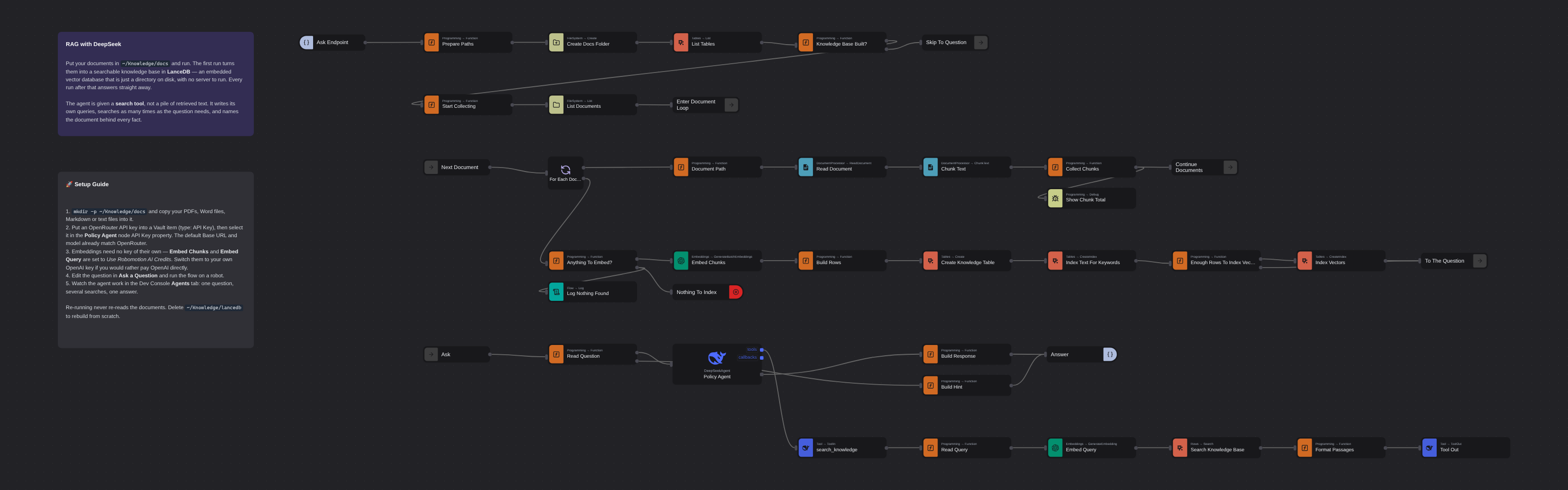
Overview
Retrieval-augmented generation over your own documents, with the retrieval handed to the agent instead of done for it. Documents are read, chunked, embedded and stored in LanceDB - an embedded vector database that is just a directory on disk. A DeepSeek Agent then answers questions through a search_knowledge tool built from ordinary flow nodes, writing its own queries and searching as many times as a question needs, with the source document named against every fact.
RAG with DeepSeek
RAG with DeepSeek answers questions about your own documents — the ones no model was trained on. The flow is a service rather than a script: it listens on an HTTP endpoint, so you talk to it from a terminal, a chat window or another automation. Documents in ~/Knowledge/docs are read, split into chunks, embedded and written to a LanceDB table on disk. A DeepSeek Agent then answers questions against them through a search_knowledge tool built from ordinary flow nodes.
The part worth studying is what the agent is given. Most RAG pipelines search once with the user's question, paste the results into the prompt, and ask the model to summarise. This flow hands the agent the search tool itself and lets it decide what to look for. A question that spans several documents becomes several searches, each one phrased by the agent, and every fact in the answer carries the document it came from.
That difference is measurable. Against the sample corpus in assets/docs, a single search on the raw question returns three of the six facts the answer needs — including the €180 hotel cap, but not that Berlin is a tier-1 city, so it cannot tell you which cap applies. Letting the agent write its own queries returns all six.
Run on a robot, the agent issued five, seven and nine searches across three runs of the same question — the count is not fixed, and that is the point. Its answer named the document behind every figure, said explicitly which parts the documents do not cover, and caught something nobody asked it for: that claiming the client dinner under EXP-114 forfeits that day's per diem — a rule that only exists by reading the travel policy and the expense policy together.
What RAG with DeepSeek can do
- Turn a folder of PDFs, Word files, Markdown or text into a searchable knowledge base
- Store it in LanceDB — an embedded vector database that is a directory on disk, with no server to run
- Skip the whole ingest on later runs: the table is already there
- Let the agent write its own search queries and search as many times as a question needs
- Search by meaning and by keyword at once, so an exact term like a policy number survives alongside the semantics
- Name the source document behind every fact, and say when the documents do not cover something
- Run the embedding side with no API key at all, on Robomotion AI Credits
Behind the scenes
The flow lists the tables in the LanceDB database first. If policies is already there it jumps straight to the question; if not, it builds it.
The ingest loop reads each document with Read Document, splits it with Chunk Text at 500 characters with 100 of overlap, and collects the chunks with the filename kept against each one. When every document has been read, all the chunks are embedded in a single batch call and written to LanceDB as one table by Create Table, with the embedding stored in a vector column.
Then two indexes, and the difference between them matters. The full-text index on text is not optional: keyword and hybrid search return nothing at all without it. The vector index is optional, and the flow checks before building it — LanceDB's IVF_PQ index trains a codebook from the data and needs at least 256 rows to do it. Below that the flow skips it deliberately, and LanceDB scans the column instead, which at that size is the faster answer anyway. The sample corpus lands at 82 chunks as PDFs (67 as Markdown), so the index is skipped and the flow says so rather than failing.
The question goes to the agent, and the agent's search_knowledge tool is plain flow: Tool In receives the query the agent wrote, Generate Embedding turns it into a vector, Search runs a hybrid vector-plus-keyword query against LanceDB, a Function node shapes the passages with their source filenames, and Tool Out hands them back. The agent calls it as many times as it wants before answering. Its reply leaves on the response port.
The tool's description is the whole of what the agent knows about it. It says to search once per idea rather than once per question, that short topical phrases beat whole sentences, and that nothing in the knowledge base is in its training data — so it must not answer from memory.
Setup Guide
-
Put your documents in place:
mkdir -p ~/Knowledge/docsand copy your files in. PDF, DOCX, PPTX, Markdown, HTML and plain text are all read. To try it with the bundled corpus, copyassets/docs/*.mdthere. -
Configure the API key: put an OpenRouter API key into a Vault item (type: API Key) and select it in the Policy Agent node's API Key property. The node's default Base URL and model already match OpenRouter.
-
Embeddings need no key. Embed Chunks and Embed Query are set to Use Robomotion AI Credits. If you would rather pay OpenAI directly, clear that option and select your own OpenAI key on both nodes.
-
Run the flow on a robot. It does not do anything yet: it listens on
http://127.0.0.1:3000/askand waits for a question. -
Ask it something with the client that ships in
assets/ask.py:python3 assets/ask.py you > how much can I claim for a client dinner?Standard library only, so there is nothing to install. The first question builds the knowledge base and takes a minute; every question after it comes back in seconds. Watch the turn in the Dev Console's Agents tab while you wait.
Re-running never re-reads the documents. Delete ~/Knowledge/lancedb to rebuild the knowledge base from scratch, or add documents and delete the directory to pick them up.
Customization
Point it at your own documents by changing msg.docs_dir in Prepare Paths; the database directory and table name are set in the same node.
Tune the chunking in Chunk Text. Smaller chunks retrieve more precisely and cost more calls; larger ones carry more context per hit but blur what a search actually matched. 500 with 100 of overlap is a reasonable default for policy prose.
Change the search behaviour in Search Knowledge Base: Search Type switches between vector, full-text and hybrid, Limit sets how many passages come back per call, and Filter takes a SQL predicate over the table's own columns — source = 'Travel-Policy.md' scopes a search to one document.
Add metadata by extending the row objects in Build Rows — a department, an effective date, a document version. Anything you add becomes a column you can filter on at search time, which is how you keep superseded documents out of an answer without deleting them.
Swap the embedding model on both embedding nodes; they must match, since a query vector is only comparable to vectors made by the same model. If you change it, delete the database so the table is rebuilt.
Give the agent the whole database instead of one tool by wiring the LanceDB Toolkit node to the agent's tools port. It exposes eleven tools — search, filtered reads, counts, inserts, indexing — with an operating contract shipped as its skill. Use it when you want the agent to explore the data rather than answer from one kind of lookup.
Requirements
Robomotion.LanceDB0.1.0 — the embedded vector databaseRobomotion.DeepSeekAgent0.7.5 — the agent, its tool ports and memoryRobomotion.DocumentProcessor1.0.14 — document reading and chunking. 1.0.13 could not read any file on Linux or macOS; if you are pinned to it, upgrade.Robomotion.OpenAI3.3.2 — embeddings- An OpenRouter API key in a Vault item, for the agent
- Robomotion AI Credits for embeddings, or your own OpenAI key
More AI templates
See all 11 →- Book Shipments in Plain EnglishBooks a morning's shipments on a carrier website that has no API, from six numbered steps written in plain English. The Browser Act node follows the steps page by page: it reads what is on the screen, and Jev, TypeSafe's decision model on OpenRouter, picks every next move, including which service each customer's note asks for. No step names a button or a field. Jev never writes text, so its output tokens cost nothing, and below a confidence of 0.55 the robot touches nothing and hands the order to a person. Every booking is proven in code before it counts: a new tracking number, on a page that names that order.
- Website Pitch BuilderFinds a shop that has no website and builds it one. Google Maps is searched through the scrape.do API, the listings are filtered down to businesses with a phone, enough reviews to prove they have customers, and no real site of their own - a Facebook page or a Wix subdomain counts as no site - and the best one is scored out. Its opening hours, ten best reviews and four public domain photographs are gathered, and a DeepSeek Agent writes a single self-contained page from that brief and nothing else. A real browser then photographs the page, and the screenshot and a CSV row are mailed to you. Google Maps has no email column, so the packet comes to you with the shop's phone number in it, and a person makes the call.
- Clinic Support AssistantA customer support assistant for a website, served to the page as one MCP tool. A visitor and a signed-in patient are answered by two different Hermes Agents, and the difference is not a prompt or a flag, it is two wires: the visitor's agent is wired to the practice documents and to nothing else, so nothing on that side of the canvas can reach a patient record whatever the model is asked. The signed-in tools take no arguments at all. They read the record number the website established from a session cookie, so the model cannot name a patient, and every turn is written to a dialog log the practice can read in the morning.
- Conversational Order AssistantA conversational chat assistant that takes a return in whatever order the customer explains it. An LLM Agent asks for whatever is missing, and an ordinary automation wired to its tools port looks the order up mid conversation and hands the answer back.
- Guided Returns DeskA guided chat assistant that opens a product return, one question at a time. Uses Chat Assistant widget nodes for the questions, checks the order number while the customer is still in the conversation, and loops back to the question when it does not recognise one instead of throwing an exception.
- Knowledge Base EndpointAsk your own documents a question over HTTP. A Robomotion Knowledge Base is indexed by a workspace agent on your machine and searched locally by the robot; one Query Knowledge Base node returns the passages that answer a question, each with the document and heading it came from. Http In and Http Out turn the flow into a service anything can call, and a Min Score fence means it answers "I could not find that" instead of inventing something. Ships four sample documents and a thirty-line Python client.