Refund Queue
The flow
Overview
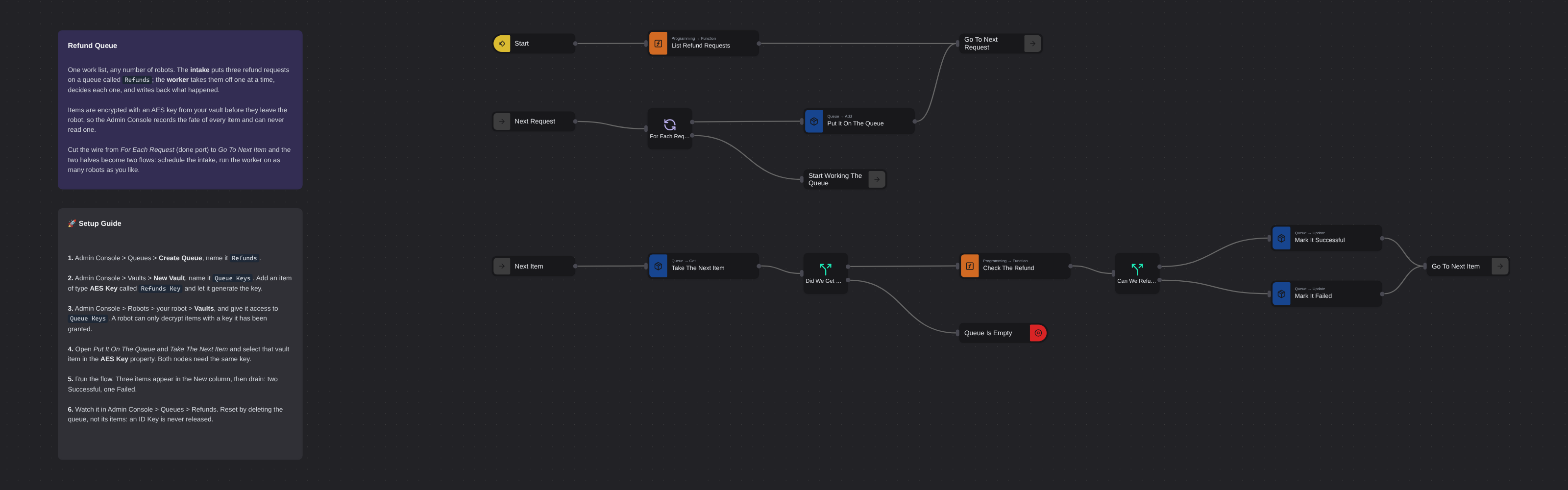
A work queue with both halves built for real: an intake that puts refund requests on a workspace queue one at a time, and a worker loop that takes them off, decides each one, and records Successful or Failed against it. Items are encrypted with an AES key from your vault before they leave the robot, so the Admin Console keeps the history of every item without ever being able to read one. Cut a single wire and the two halves become an intake you can schedule and a worker you can run on any number of robots.
Refund Queue
Some work does not arrive as one job. It arrives as a hundred small ones, all day, from somewhere else. A queue is where that work waits, and this template is both halves of one: an intake that puts refund requests on a workspace queue, and a worker that takes them off one at a time, decides each one, and records what happened.
The two halves are joined here by a single wire, so you can run the whole thing and watch it work. They are not meant to stay joined. Cut the wire from For Each Request's done port to Start Working The Queue and you have an intake you can put on a schedule and a worker you can run on ten robots at once — none of which will ever be handed the same request, because Get Next Item marks an item In Progress as it hands it over.
What makes a queue different from a list in a message is that it belongs to the workspace, not to a flow. Any flow, on any robot, can find it by name. That name is the whole contract: there is no schema, no size and no retention policy to configure.
What Refund Queue can do
- Fill a workspace queue from any flow, and drain it from any other
- Refuse a duplicate: ID Key names the field that makes an item unique, so the same ticket never lands twice
- Hand each item to exactly one robot, marked In Progress, for as long as it takes
- Record Successful or Failed against every item, with a note, so the Admin Console keeps the history
- Retry what failed: a failed item keeps the attempts it has left
- Encrypt every item with an AES key from your vault, so the platform stores what it cannot read
Behind the scenes
The intake is a loop because Add Item takes one object, not an array. List Refund Requests stands in for wherever your work really comes from — a mailbox, a form, a database — and For Each Request walks it, adding one at a time with a priority and a maximum try count. When the list runs out, For Each leaves by its done port, and that is the wire into the worker.
The worker is the same shape: Label → body → Go To. Take The Next Item asks the queue for one item and marks it In Progress in the same call. A Switch asks whether there was anything to take at all, and a Stop ends the run when the queue is empty — every filmed or scheduled flow needs one, because a flow that simply runs out of messages stays running on the robot and the next run is accepted and never executed.
Then the work happens. Check The Refund is the stand-in for it: a refund with no order number cannot be paid. Either way the queue is told. Update Item State takes the item ID and a status, and the note it carries is what the console shows in the Progress column.
Encryption is the part worth understanding. The AES key is generated in your browser and lives in your vault; the platform never sees it. Add Item encrypts the item with it before the item leaves the robot, and Get Next Item decrypts on the way back. A robot can only do either if it has been granted access to that vault — which is a deliberate step, one robot at a time.
Setup Guide
- Create the queue. Admin Console > Queues > Create Queue, name it
Refunds. A name and a description, and nothing else to decide. - Create the vault and the key. Admin Console > Vaults > New Vault, name it
Queue Keys. Add an item of type AES Key calledRefunds Keyand let it generate the key for you. - Give the robot the key. Admin Console > Robots > your robot > Vaults, and grant access to
Queue Keys. Without this the robot cannot decrypt what it takes off the queue. - Point the nodes at it. Open Put It On The Queue and Take The Next Item and select that vault item in the AES Key property. Both nodes need the same key.
- Run it on a robot. Three items appear in the New column of Admin Console > Queues > Refunds, then drain: two Successful, one Failed.
- Look at the console. Every item has a status, a try count and the note the flow wrote. What it never has is the item's contents.
To run it again, delete the queue and recreate it. Deleting an item does not release its ID Key, so re-adding RF-2041 to the same queue is refused even after the first one is gone.
Customization
Replace the intake. List Refund Requests is the only made-up part. Put a Gmail node, a form submission, an Excel sheet or an HTTP endpoint in its place; anything that produces an array of objects works, because For Each does the rest.
Split it in two. Delete the wire from For Each Request (done port) to Start Working The Queue and save two flows: the intake on a schedule, the worker on as many robots as you want to give it. The queue name is all they share.
Set the retry policy on Put It On The Queue. Max Try is how many attempts an item gets before the queue stops offering it; Priority decides what comes off first when items are waiting.
Change what makes an item unique with ID Key. It names a field on the item, and the queue refuses a second item with the same value. Leave it empty and duplicates are allowed.
Do the real work in Check The Refund. Everything around it — take, decide, record, repeat — stays exactly as it is whatever the work turns out to be.
Requirements
- Core nodes only; no packages to install
- A workspace queue named
Refunds - A vault with an AES Key item, and a robot granted access to that vault
More Concurrency templates
See all 4 →- Bulk Shipment Tracking SweepChecks 200 shipment tracking numbers on a public carrier tracker using eight parallel workers pulling from a shared in-memory queue. Reads the tracking list straight from the carrier's bulk page, scrapes status, latest event and ETA for each shipment, and writes a full status CSV plus an exceptions-only CSV covering customs holds, failed deliveries and delays. No login required.
- Clinic Eligibility Morning RunVerifies insurance for every appointment on a clinic's eligibility worklist, running the payer checks on nine parallel browsers instead of one at a time. Signs in, reads the worklist, fans out into workers that each claim an appointment from a shared queue, click its eligibility check and read the coverage answer. Writes a full status CSV plus a coverage-problems CSV listing the lapsed and not-covered patients the front desk has to chase.
- Fork Branch With Memory QueueDemonstrates parallel browser automation using Fork Branch and Memory Queue. Creates multiple concurrent browser instances that dequeue items from a shared queue, navigate to e-commerce websites, and take screenshots simultaneously.