Bulk Shipment Tracking Sweep
Overview
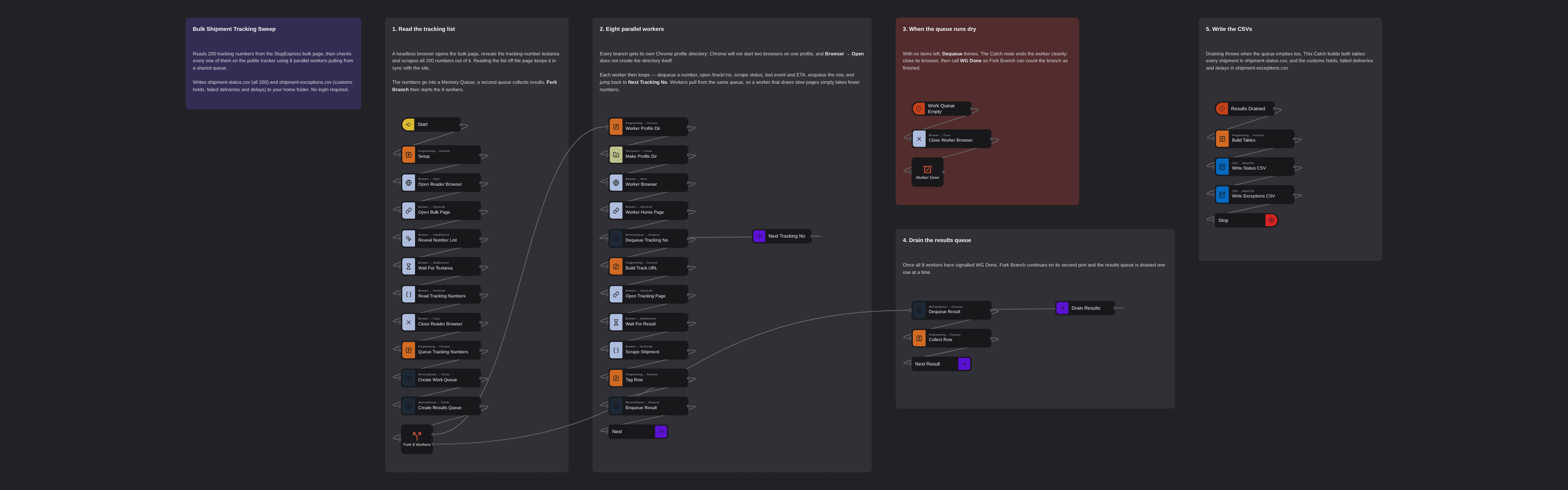
Checks 200 shipment tracking numbers on a public carrier tracker using eight parallel workers pulling from a shared in-memory queue. Reads the tracking list straight from the carrier's bulk page, scrapes status, latest event and ETA for each shipment, and writes a full status CSV plus an exceptions-only CSV covering customs holds, failed deliveries and delays. No login required.
Bulk Shipment Tracking Sweep
Checking a spreadsheet of tracking numbers one at a time is the sort of job that quietly eats a logistics team's morning. This flow does 200 of them at once: it reads the tracking list straight off the carrier's bulk page, then fans out into eight parallel workers that pull from a shared in-memory queue until every shipment has been checked.
It runs against the SlugExpress public tracker, a fictional training environment. No login and no signup are required, so the flow can be run as-is.
How it works
1. Read the tracking list
A headless browser opens the carrier's bulk-tracking page, reveals the tracking-number list, and scrapes all 200 numbers out of it. The list is read from the page rather than shipped as a CSV, so it never drifts out of sync with the site's data.
2. Queue the work
The 200 numbers go into a Memory Queue — a first-in, first-out structure held in the robot's memory. Every worker pulls from this same queue, which load-balances the work automatically: a worker that draws a slow page simply takes fewer numbers than one that draws fast pages.
3. Fan out into eight parallel workers
A Fork Branch creates eight independent sequences that run at the same time. Each worker:
- opens its own headless browser
- dequeues the next tracking number
- opens
/track/<tracking_no>in the same tab (images and CSS are blocked, for speed) - scrapes the status, the most recent tracking event, its location, and the ETA
- pushes the result onto a second queue and loops for the next number
Eight workers is a deliberate choice. Spinning up 200 concurrent branches is slower than a small worker pool — the per-branch overhead dominates, and 200 browsers will thrash the host. A queue plus a handful of workers gets the same wall-clock win without the cost.
4. Finish cleanly
When the queue runs dry, the Dequeue node throws. An exception handler catches it, closes that
worker's browser, and signals WG Done. Once all eight branches have reported in, the Fork Branch
continues through its lower port, drains the results queue, and writes the output.
Output
Two CSV files in your home folder:
| File | Contents |
|---|---|
shipment-status.csv | All 200 shipments: tracking_no, status, last_event, last_event_location, eta, is_exception |
shipment-exceptions.csv | Only the problem shipments (customs holds, failed deliveries, delays), sorted by status, with a final ELAPSED_SECONDS row recording the sweep's wall-clock time |
What this flow demonstrates
- Parallel execution with
Core.Flow.ForkBranchandCore.WaitGroup.Done - FIFO work distribution with
Robomotion.MemoryQueue - Graceful branch shutdown by catching the empty-queue exception
- Scraping a client-rendered page with
Core.Browser.RunScript
The same shape fits any large, independent, parallelizable workload: price checks, uptime probes, document lookups, bulk enrichment.
More concurrency templates
See all 4 →- Refund QueueA work queue with both halves built for real: an intake that puts refund requests on a workspace queue one at a time, and a worker loop that takes them off, decides each one, and records Successful or Failed against it. Items are encrypted with an AES key from your vault before they leave the robot, so the Admin Console keeps the history of every item without ever being able to read one. Cut a single wire and the two halves become an intake you can schedule and a worker you can run on any number of robots.
- Clinic Eligibility Morning RunVerifies insurance for every appointment on a clinic's eligibility worklist, running the payer checks on nine parallel browsers instead of one at a time. Signs in, reads the worklist, fans out into workers that each claim an appointment from a shared queue, click its eligibility check and read the coverage answer. Writes a full status CSV plus a coverage-problems CSV listing the lapsed and not-covered patients the front desk has to chase.
- Fork Branch With Memory QueueDemonstrates parallel browser automation using Fork Branch and Memory Queue. Creates multiple concurrent browser instances that dequeue items from a shared queue, navigate to e-commerce websites, and take screenshots simultaneously.