Clinic Eligibility Morning Run
Overview
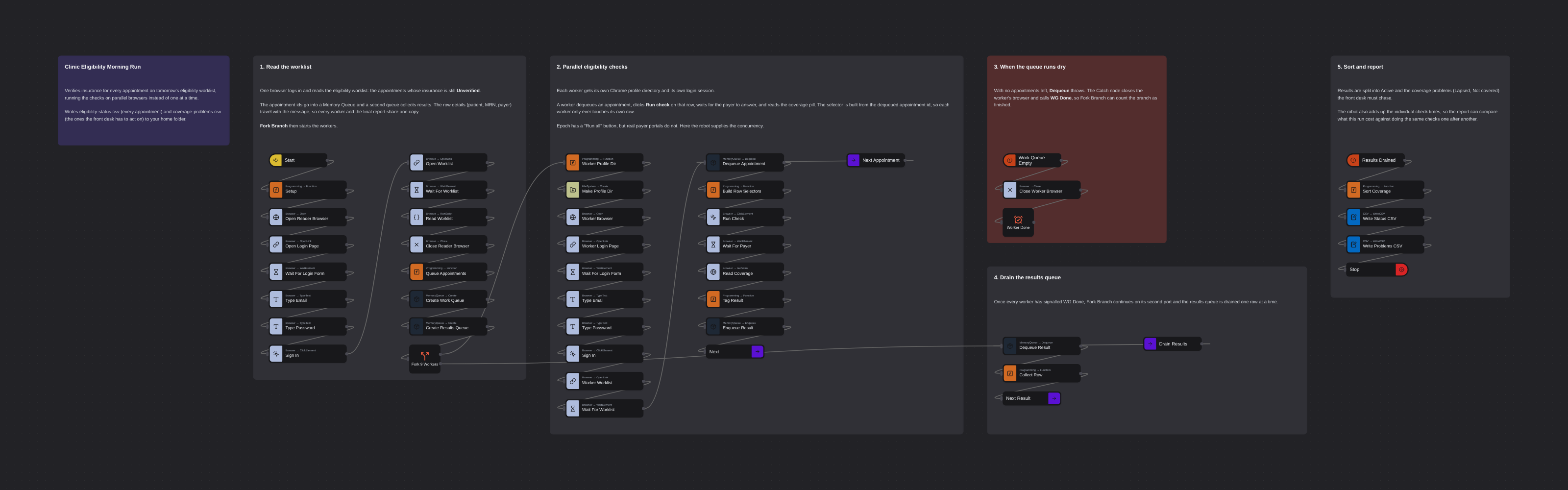
Verifies insurance for every appointment on a clinic's eligibility worklist, running the payer checks on nine parallel browsers instead of one at a time. Signs in, reads the worklist, fans out into workers that each claim an appointment from a shared queue, click its eligibility check and read the coverage answer. Writes a full status CSV plus a coverage-problems CSV listing the lapsed and not-covered patients the front desk has to chase.
Clinic Eligibility Morning Run
Before a clinic opens, somebody has to ask each patient's insurer whether tomorrow's patients are actually covered. The payer takes its time answering, so the job is mostly waiting — nine checks, one after another, staring at a spinner.
This flow does the waiting in parallel. It signs in, reads the eligibility worklist, then fans out into nine browsers that each claim an appointment from a shared queue, run its check, and read the answer back. What the coverage answer is comes from the payer; what the robot adds is that all nine questions are asked at once.
It runs against Epoch, a fictional clinic system used for training. The data is entirely synthetic — no real patient information is involved.
What it produces
Two CSVs in your home folder:
eligibility-status.csv— every appointment on the worklist, with the coverage answer and how long that check took.coverage-problems.csv— only the patients the front desk has to chase, each with the action to take.
On the seeded worklist the nine checks resolve to 6 Active, 2 Lapsed, and 1 Not covered.
How it works
1. Read the worklist
One browser signs in and opens the eligibility worklist: the appointments whose insurance is still Unverified. The appointment ids go into a Memory Queue and a second queue collects results.
The row details — patient, MRN, payer — are read once here and travel with the message. Fork Branch copies the message into every worker, so all nine workers and the final report share one copy of that data rather than re-scraping it.
2. Fan out into nine parallel workers
Each worker gets its own Chrome profile directory and its own login session, then loops: dequeue an appointment, click Run check on that row, wait for the payer, read the coverage pill, enqueue the result, and go back for the next one. Workers pull from the same queue, so a worker that draws a slow check simply takes fewer appointments.
Two details are worth knowing if you adapt this:
Core.Browser.Opendoes not createoptUserDataDir. Chrome refuses to start two browsers on one profile, so each worker needs its own directory — and something has to create it first. That is what theMake Profile Dirnode is for. Without it, every worker dies at launch.Core.Browser.RunScript'sfuncis a static string. It cannot be told which appointment the worker just dequeued.inSelectoris a variable field, so the row is targeted through the selector instead: the flow builds an XPath from the dequeued id and hands it toClick Element,Wait ElementandGet Value. This is the trick that makes per-row parallel work possible.
The session is kept in localStorage, so navigating to the worklist after signing in keeps the
worker logged in. The chaos flag is not stored — it is parsed from the query string on every page
load, which is why it stays on the worklist URL.
3. When the queue runs dry
With no appointments left, Dequeue throws. A Catch node ends each worker cleanly: close its
browser, then call WG Done so Fork Branch can count the branch as finished.
4. Drain and report
Once all nine workers have signalled done, Fork Branch continues on its second port and the results queue is drained into a table. The rows are sorted by appointment id so two runs of the same seed produce identical CSVs.
The point of the demo
The flow adds up the individual check times and prints them next to the wall clock, so the comparison is measured rather than asserted. A representative run:
Checked 9 appointments: 6 Active, 3 need attention
  FLAG APT-1007 Olivia Santos -> Lapsed
  FLAG APT-1008 Yusuf Yildiz -> Lapsed
  FLAG APT-1009 Ines Schulz -> Not covered
Wall clock 36s; the same checks run one after another would have taken 137s
Nine payer checks, 137 seconds of waiting, done in 36 — on one robot. Running nine checks at once does not cost nine robot licences.
Running it
The flow is ready to run as-is. It signs in with the published training credentials for the demo
site (diego.ramirez@harborview.example), which are not secret.
The worklist URL carries ?chaos=eligibility-slow, a demo-site flag that makes each payer check
take 10–25 seconds instead of 3–8. That is what makes the concurrency visible. Remove the flag and
the flow behaves identically, just faster.
Epoch's own worklist has a Run all button that fires the checks in the browser. Real payer portals do not — so this flow deliberately drives the per-row checks itself, which is the pattern that transfers to a portal that has no such button.
More concurrency templates
See all 4 →- Refund QueueA work queue with both halves built for real: an intake that puts refund requests on a workspace queue one at a time, and a worker loop that takes them off, decides each one, and records Successful or Failed against it. Items are encrypted with an AES key from your vault before they leave the robot, so the Admin Console keeps the history of every item without ever being able to read one. Cut a single wire and the two halves become an intake you can schedule and a worker you can run on any number of robots.
- Bulk Shipment Tracking SweepChecks 200 shipment tracking numbers on a public carrier tracker using eight parallel workers pulling from a shared in-memory queue. Reads the tracking list straight from the carrier's bulk page, scrapes status, latest event and ETA for each shipment, and writes a full status CSV plus an exceptions-only CSV covering customs holds, failed deliveries and delays. No login required.
- Fork Branch With Memory QueueDemonstrates parallel browser automation using Fork Branch and Memory Queue. Creates multiple concurrent browser instances that dequeue items from a shared queue, navigate to e-commerce websites, and take screenshots simultaneously.