Webhook Screenshot Service
The flow
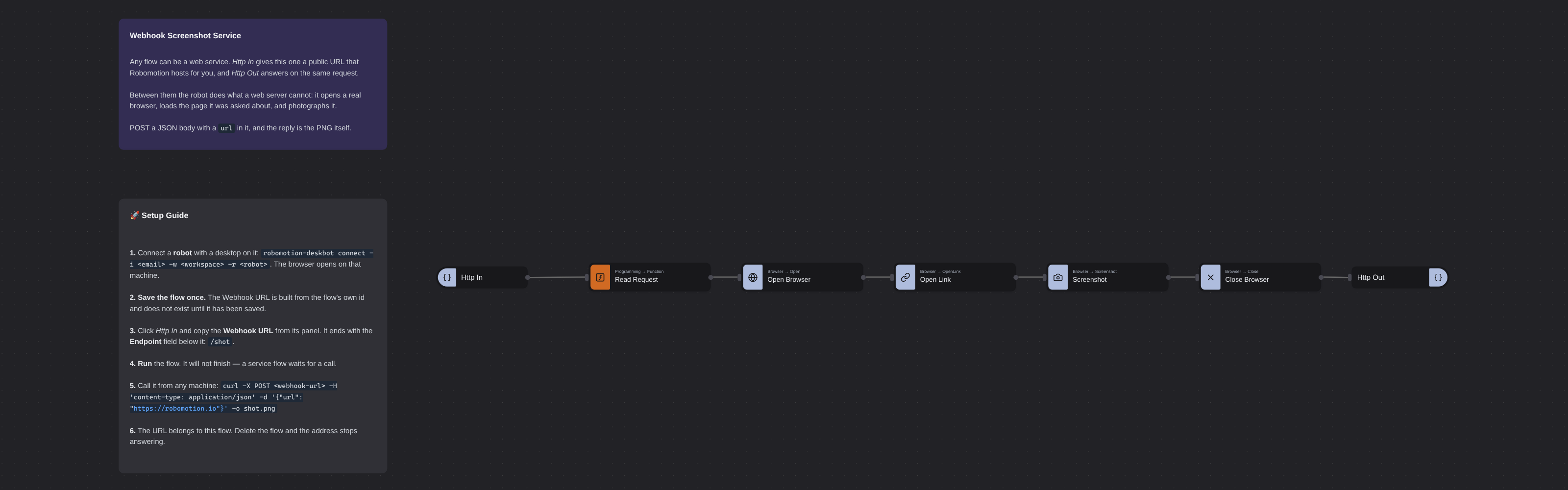
Overview
A flow that waits to be called. Http In gives it a public URL that Robomotion hosts for you, with no port to open and no tunnel to run, and Http Out answers on the same held-open request. Between the two, the robot does what a web service cannot do for itself: it opens a real browser, loads the page it was asked about, waits three seconds for it to settle, and photographs it. The reply is the PNG, attached to the response, so curl -o shot.png is a complete client and nothing about the caller needs to know what Robomotion is.
Webhook Screenshot Service
Every other flow in this repository starts itself. A button, a schedule, a folder being watched — something inside Robomotion decides when the work happens. This one starts when somebody outside asks it to, and that is the whole difference between an automation and a service.
Http In gives the flow a public URL. Robomotion hosts it for you: there is no port to open on your router, no tunnel process to keep alive, and no certificate to renew. Http Out answers on the same request Http In is still holding open — no wire runs between the two nodes, and none is needed, because they are the two ends of one call.
What sits between them is the part a web service cannot do for itself. The robot opens a real Chrome, loads the page it was asked about, waits three seconds for it to settle, and photographs it. The reply is that PNG, attached to the response, so curl -o shot.png is a complete client and nothing about the caller needs to know Robomotion exists.
What Webhook Screenshot Service can do
- Answer an HTTP request from anywhere, with no infrastructure of your own
- Put a real browser behind a URL — anything you can automate becomes an endpoint
- Return a file as the response body, not just JSON
- Read whatever the caller sent: body, headers, cookies, query parameters and path parameters are all outputs on Http In
- Serve the same flow on a local IP and port at the same time, which is convenient while you are building it
Behind the scenes
Seven nodes, in a straight line.
Http In has exactly two properties that matter: Method and Endpoint. The public Webhook URL shown on its panel is built out of the flow's own id and that endpoint, so the panel updates as you type the path — and it does not exist at all until the flow has been saved once.
Read Request is three lines of JavaScript. It lifts url off the request body and picks a filename under $TempDir$, a global the robot resolves on whichever machine it is running on, so the same flow works on Windows and Linux without being edited.
Screenshot carries the one property worth arguing about: Delay Before, set to three seconds. It is not padding. A page that is still fading in photographs half-drawn, and three seconds is the difference between a screenshot and a picture of a loading state. Its Save File Path comes from the message; its Path output reports where the file actually landed.
Close Browser runs before the answer, because a browser left open is a browser still running on the robot after the caller has hung up.
Http Out sets Attachment Path to that path, which makes the file itself the body of the reply.
The URL belongs to the flow. It contains the flow's id, so it survives redeploys and robot restarts — and it dies when you delete the flow. Nothing else revokes it.
A service flow does not finish. Press Run and it sits there, which is correct: it is waiting to be called. Stop it and the address stops answering.
One caveat worth knowing before you build on it. Response headers you set on msg.headers do reach the caller, but Content-Type does not survive the hosted webhook proxy — a local listener answers image/png and the same call through webhooks.robomotion.io answers application/json. The bytes are identical either way, so curl -o and an <img> tag both work; a client that switches on the content type does not.
Setup Guide
-
Connect a robot with a desktop on it.
robomotion-deskbot connect -i <email> -w <workspace> -r <robot>. The browser opens on that machine, so a headless server needs a display before this flow can run there. -
Save the flow once. The Webhook URL is derived from the flow id and simply is not there until it has been saved.
-
Copy the URL. Click Http In and read the Webhook URL field at the top of the panel. It ends with the Endpoint below it —
/shot— and it changes as you edit that field. -
Run it. The flow will not finish. That is the point.
-
Call it from anywhere:
curl -X POST <webhook-url> \
  -H 'content-type: application/json' \
  -d '{"url": "https://robomotion.io"}' \
  -o shot.png
Any machine, any language, no Robomotion installed.
Customization
Change what it does by replacing the middle. The two Http nodes are the service; the five between them are just work. Swap the browser for a PDF renderer, a database query, or a desktop application, and the URL keeps behaving the same way.
Change the shape of the request on Http In. Method and Endpoint are properties, and a path can carry parameters — /shot/:site arrives on the Path Params output. A GET with ?url= lands on Query Params instead, and needs no body at all.
Answer with JSON instead of a file by dropping Attachment Path and setting Body on Http Out — for example to the public URL of a screenshot you uploaded somewhere, rather than the bytes.
Bind a local listener too with IP (Local) and Port (Local) on Http In. The public URL is always exposed; the local one is useful while you are developing and can be ignored afterwards.
Guard it. The URL is public and unguessable, which is not the same as authenticated. If it matters, check a shared secret in a header early in the flow and answer 401 from a second Http Out.
Requirements
- A robot with a desktop session, since a real Chrome opens on it
- No packages: every node here is a Core node
- Outbound network access from the robot to whatever page it is asked to photograph
More Networking templates
See all 4 →- API Calls with Http RequestThree HTTP calls, one node. A plain read of a public exchange rate service, the same call behind a password, and a call that carries a file. They differ only in their properties, which is the point: authentication is a property and not a different node, and neither is a multipart body. Basic Authentication takes a vault item and nothing else, so no password is written into the flow, and an at-sign in front of a path is what makes the node open that file and send it as a form part, exactly the way curl does it.
- REST APICreates a simple REST API server with GET and POST endpoints using the Net Http nodes. The default robot runs on http://localhost:9090.
- Send GET RequestSends an HTTP GET request to a sample service and displays the response in a message box. Defaults to querying https://ifconfig.me for your public IP address.