Send GET Request
Overview
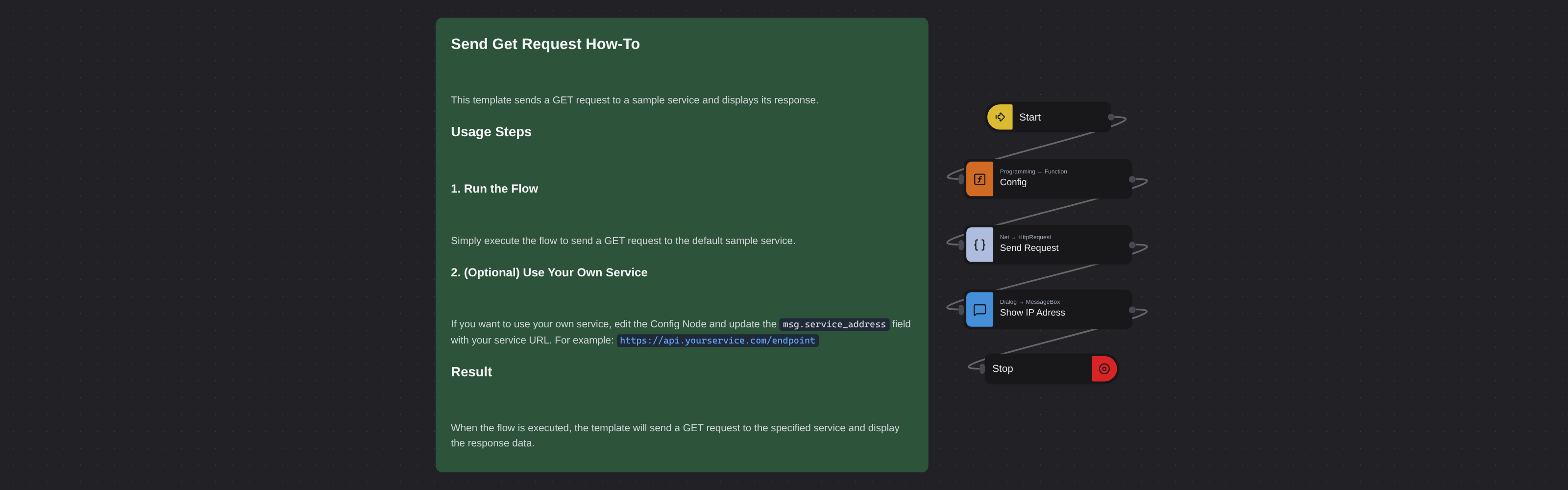
Sends an HTTP GET request to a sample service and displays the response in a message box. Defaults to querying https://ifconfig.me for your public IP address.
Send GET Request
Send GET Request fires an HTTP GET request to any URL and displays the response in a message box. Powered by Robomotion's HTTP nodes, it provides the simplest way to fetch data from a web service and inspect the result. By default it calls https://ifconfig.me to show your public IP address.
This template is a practical starting point for any automation that needs to consume REST APIs, check service responses, or retrieve data from the web.
What Send GET Request can do
- Send an HTTP GET request to any URL
- Display the response body in a dialog box
- Work with any endpoint that returns text or JSON
- Serve as a building block for API consuming workflows
Behind the scenes
The flow sends a GET request to the URL you configure and reads the response body. The response content is passed to a message box for display. You can point it at any public or internal endpoint that returns text or JSON data.
Configuration
Open the Config node and set:
| Variable | Description | Example |
|---|---|---|
msg.service_address | URL to send the GET request to | "https://ifconfig.me" |
More networking templates
See all 4 →- API Calls with Http RequestThree HTTP calls, one node. A plain read of a public exchange rate service, the same call behind a password, and a call that carries a file. They differ only in their properties, which is the point: authentication is a property and not a different node, and neither is a multipart body. Basic Authentication takes a vault item and nothing else, so no password is written into the flow, and an at-sign in front of a path is what makes the node open that file and send it as a form part, exactly the way curl does it.
- Webhook Screenshot ServiceA flow that waits to be called. Http In gives it a public URL that Robomotion hosts for you, with no port to open and no tunnel to run, and Http Out answers on the same held-open request. Between the two, the robot does what a web service cannot do for itself: it opens a real browser, loads the page it was asked about, waits three seconds for it to settle, and photographs it. The reply is the PNG, attached to the response, so curl -o shot.png is a complete client and nothing about the caller needs to know what Robomotion is.
- REST APICreates a simple REST API server with GET and POST endpoints using the Net Http nodes. The default robot runs on http://localhost:9090.