API Calls with Http Request
The flow
Overview
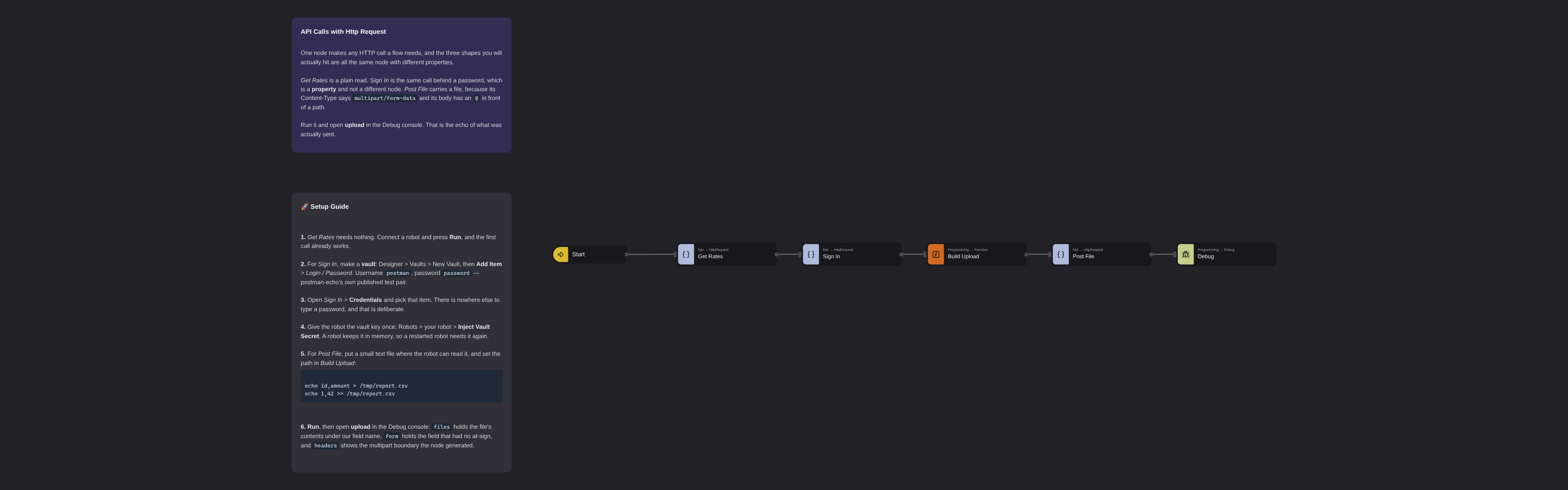
Three HTTP calls, one node. A plain read of a public exchange rate service, the same call behind a password, and a call that carries a file. They differ only in their properties, which is the point: authentication is a property and not a different node, and neither is a multipart body. Basic Authentication takes a vault item and nothing else, so no password is written into the flow, and an at-sign in front of a path is what makes the node open that file and send it as a form part, exactly the way curl does it.
API Calls with Http Request
Almost every system worth automating has an API, and a flow can call one directly. Http Request is the node that does it, and this template is the three calls you will actually hit, side by side, so you can see what changes between them.
What changes is properties. Not nodes. Authentication is a property. A multipart body is a property. The same node makes a public read, a call behind a password, and an upload — and reading the three panels next to each other is the fastest way to stop guessing which node you need.
Nothing here requires an account anywhere. All three services are public, and two of them exist specifically to be called by people learning this.
What API Calls with Http Request can do
- Make a GET, POST, PUT, DELETE or PATCH request to any URL
- Parse a JSON reply into an object you can address as
msg.rates.EUR, without a line of code - Sign in with Basic Authentication using a vault item, so no password is written into the flow
- Send a file as
multipart/form-datawith an at-sign in front of its path, exactly the waycurl -Fdoes it - Add any custom header, and read back the status, headers and cookies the server returned
Behind the scenes
Six nodes: Inject, three calls, one Function, and a Debug at the end holding all three answers on one message.
Get Rates — a plain read
Method and URL, and nothing else. Two details are worth knowing before you write your first one:
- A new Http Request node comes set to POST. A read has to change it. This trips up more first flows than anything else on the panel.
- The URL is the whole address, query string included. There is no separate parameters table to fill in.
Response names the field the reply lands on — msg.rates here. The body is parsed into an object only when the reply carries an application/json content type or none at all; anything else arrives as a string, which is why an API that answers text/plain hands you something you have to parse yourself.
Sign In — the same call, behind a password
Authentication is a dropdown, and switching it to Basic Authentication reveals exactly one new field: Credentials. There is no username box and no password box anywhere on the node.
That is deliberate. Credentials points at an item in a vault, and the robot fetches it at run time. The password is not in the flow, it is not in the export, and it does not travel with a copy of the flow to anybody you share it with. A vault key is injected into a robot once, and lives in that robot's memory — restart the robot and it needs injecting again.
Post File — a call that carries a file
Three things make an upload, and all three are on the panel:
| Property | Value | Why |
|---|---|---|
| Custom Headers | Content-Type: multipart/form-data | The switch. This is what makes the node build a multipart body instead of sending JSON |
| Request | body | The message field the body is read from. It defaults to msg.req |
| The body itself | { file: '@/tmp/report.csv', note: '...' } | An @ in front of a path means open this file and send it as a form file part |
Everything in that object without an at-sign goes as an ordinary form field. The node generates the multipart boundary itself and rewrites the header with it, so the bare multipart/form-data you typed is not what actually goes on the wire — and it must be bare, because the match is on the whole trimmed value.
The at-sign is not a Robomotion invention. It is curl -F name=@file, and it behaves the same way.
Run the flow and open upload in the Debug console: files holds the file's contents under the key you chose, form holds the field that had no at-sign beside it, and headers shows the boundary the node generated. That echo is the point of the third call — it is the request, read back to you.
Setup Guide
-
Run it as it arrives. Get Rates needs no key, no account and no setup. Connect a robot, press Run, and open rates in the Debug console.
-
Make a vault for the second call: Designer > Vaults > New Vault, then Add Item > Login / Password. Username
postman, passwordpassword— postman-echo's own published test pair, which is why they can be written down here. -
Point the node at it. Open Sign In > Credentials and pick that item.
-
Inject the vault key into the robot once: Robots > your robot > Inject Vault Secret. Without it the robot cannot open the item and the call fails with an authentication error that looks like a wrong password.
-
Put a file where the robot can read it, and set its path in Build Upload:
echo id,amount > /tmp/report.csv
echo 1,42 >> /tmp/report.csv
On Windows, use a Windows path —
@C:\\reports\\report.csv. The robot opens the file, so it has to exist on the robot's machine and not on yours. -
Run, and read
uploadin the Debug console.
Customization
Point it at your own API. Change the URL and the method, and add whatever the service asks for in Custom Headers — an Authorization: Bearer … line is just another row.
Keep a token out of the flow the same way the password is kept out: put it in a vault and read it in a Function from the credential, rather than typing it into a header.
Send JSON instead of a file by leaving the Content-Type at application/json and writing an object to the field named in Request. The node serializes it for you.
Handle failure. Status Code is an output: wire a Switch after the call and branch on it, instead of assuming a 200. Continue On Error on the node's Common block lets the flow keep going when a service is down.
Slow services need Timeout, which is 30 seconds by default and lives at the bottom of the Options block.
Requirements
- A connected robot with outbound internet access
- A vault with a Login / Password item, for the Sign In call, and its key injected into that robot
- A small file on the robot's machine, for the Post File call
- No packages: every node here is a Core node
More Networking templates
See all 4 →- Webhook Screenshot ServiceA flow that waits to be called. Http In gives it a public URL that Robomotion hosts for you, with no port to open and no tunnel to run, and Http Out answers on the same held-open request. Between the two, the robot does what a web service cannot do for itself: it opens a real browser, loads the page it was asked about, waits three seconds for it to settle, and photographs it. The reply is the PNG, attached to the response, so curl -o shot.png is a complete client and nothing about the caller needs to know what Robomotion is.
- REST APICreates a simple REST API server with GET and POST endpoints using the Net Http nodes. The default robot runs on http://localhost:9090.
- Send GET RequestSends an HTTP GET request to a sample service and displays the response in a message box. Defaults to querying https://ifconfig.me for your public IP address.