Leave Request Policing
Overview
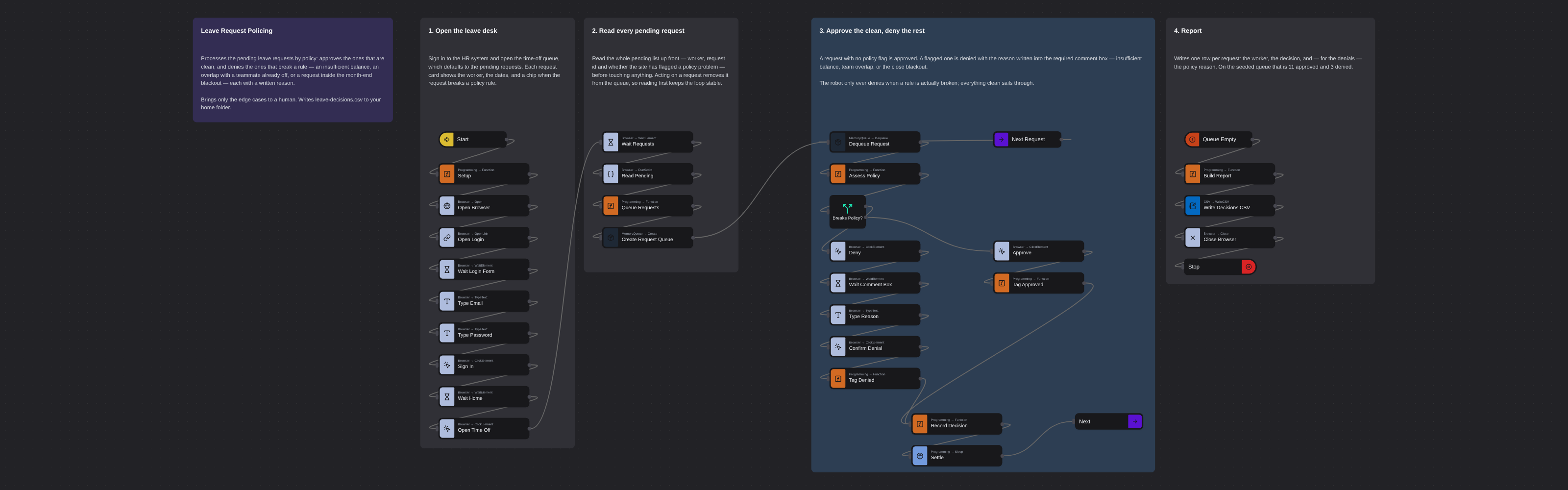
Processes the pending leave requests in an HR system by policy: approves the ones that are clean and denies the ones that break a rule - an insufficient balance, an overlap with a teammate already off, or a request inside the month-end blackout - writing the reason into the required comment box. Brings only the edge cases to a human. Writes a decision CSV.
Leave Request Policing
Approving leave is mostly rubber-stamping — until it isn't. Most requests are fine; a few break a rule the approver is supposed to catch. The tedious part is checking every one against policy so the handful of real problems don't slip through, and writing down why when you say no.
This flow does the checking. It reads the pending requests, approves the ones that are clean, and denies the ones that break a policy rule — each with a written reason — so the only thing that reaches a human is the genuine edge case.
It runs against Workmonth, a fictional HR system used for training. All data is synthetic.
What it produces
leave-decisions.csv in your home folder — one row per request: the worker, the decision, and, for
each denial, the policy reason. On the seeded queue that is 11 approved and 3 denied.
How it works
1. Open the leave desk
Sign in and open the time-off queue, which defaults to the pending requests. Each request card shows the worker, the dates, and a chip when the request breaks a policy rule.
2. Read every pending request
The robot reads the whole pending list up front — worker, request id, and whether the site has flagged a policy problem — before it touches anything. Approving or denying a request removes it from the pending queue, so reading first keeps the loop stable while the list changes underneath it.
3. Approve the clean, deny the rest
A request with no policy flag is approved. A flagged one is denied, with the reason written into the comment box the system requires — an insufficient annual-leave balance, an overlap with leave already approved in the same team, or a date inside the month-end close blackout.
The robot only ever denies when a rule is actually broken. It does not second-guess clean requests, and it never denies without a stated reason.
4. Report
The decision CSV is the record: what was approved, what was denied, and why — the three edge cases a manager actually needs to look at, separated from the eleven that did not need anyone.
Running it
Ready to run as-is. It signs in with the published training credentials
(priya.sharma@globex.example), which are not secret. Real system credentials belong in the
Robomotion Vault, never in a flow.
More flow control templates
See all 7 →- Denial Worklist TriageWorks a clinic's denied insurance claims, choosing a different action for each denial code: fix and resubmit the ones missing a field the chart already has, write off what the payer will never cover, void duplicates of already-paid claims, and escalate the ones that need a human to call the payer. Waits for the resubmitted claims to be re-adjudicated, then reads each claim's real status back off the table and writes denial-actions.csv.
- Use Conditionals to Check if File ExistsChecks whether a given file is present on disk and routes the flow accordingly. A textbook conditional branching example.
- Use Labels to Check if File ExistsUses Label and GoTo to structure a loop that rechecks file existence — a non-sequential flow pattern useful for polling.
- Use Subflows to Check if File ExistsEncapsulates a "does this file exist?" check inside a reusable subflow so the main flow stays linear and readable.
- Use the AND Operator in ConditionalsShows how to branch a flow only when two conditions are both true using a Switch node with a combined predicate.
- Use the OR Operator in ConditionalsCombines two conditions with a logical OR and branches the flow based on the result. Complements the AND-operator variant.