Denial Worklist Triage
Overview
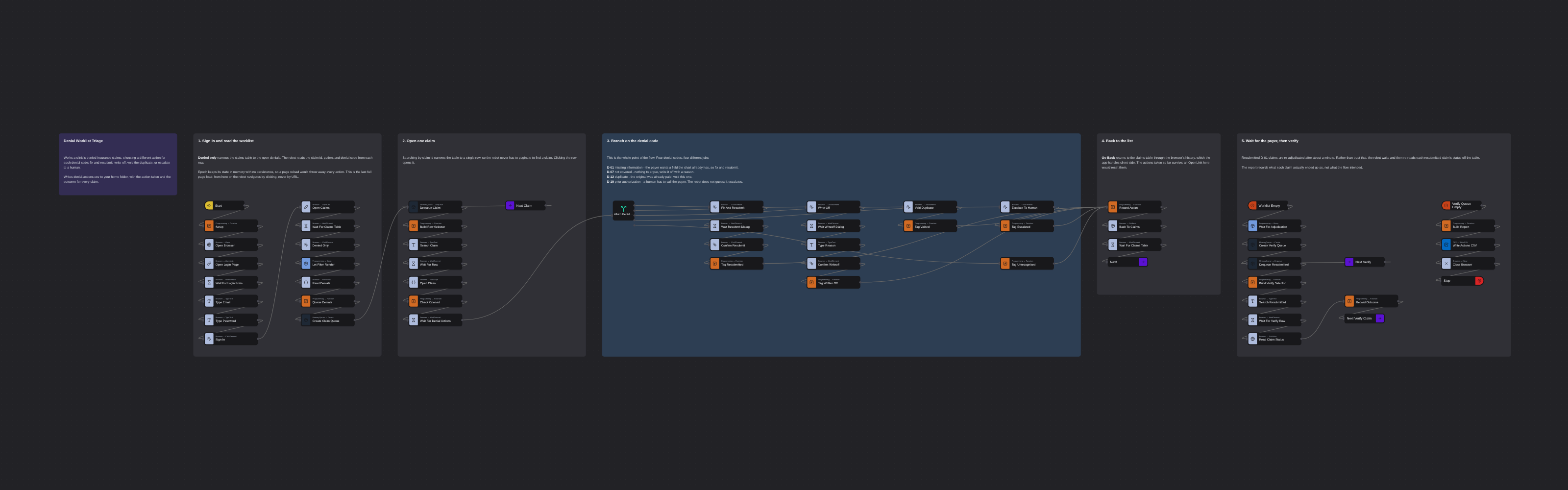
Works a clinic's denied insurance claims, choosing a different action for each denial code: fix and resubmit the ones missing a field the chart already has, write off what the payer will never cover, void duplicates of already-paid claims, and escalate the ones that need a human to call the payer. Waits for the resubmitted claims to be re-adjudicated, then reads each claim's real status back off the table and writes denial-actions.csv.
Denial Worklist Triage
A denied insurance claim is not one problem, it is four. Sometimes the payer wants a field the patient's chart already contains. Sometimes the service was never covered and there is nothing to argue about. Sometimes it is a duplicate of a claim that was already paid. And sometimes it needs a human to phone the payer for prior authorisation.
A robot that treats all four the same is useless. This flow reads the denial code on each claim and does a different job for each one — including deciding, for one of them, that it should not act at all.
It runs against Epoch, a fictional clinic system used for training. The data is entirely synthetic — no real patient information is involved.
What it does, per denial code
| Code | Meaning | What the robot does |
|---|---|---|
| D-01 | Missing information | The missing member field is already in Demographics. Fix and resubmit. |
| D-07 | Not covered | Write off, with the reason on the record. |
| D-12 | Duplicate claim | The original was already paid. Void this one. |
| D-19 | Prior authorisation | Escalate to a human. The robot does not guess. |
On the seeded worklist that is 5 × D-01, 3 × D-07, 2 × D-12 and 2 × D-19. The five resubmitted claims come back Paid, which is the visible win.
The result lands in denial-actions.csv in your home folder, one row per claim, with the action
taken and the outcome.
How it works
A Switch node routes each claim to one of four action chains, which converge again afterwards.
The last condition is a plain true fallback: an unrecognised code is recorded and left alone,
rather than routing nowhere and stalling the loop.
The verification step is worth noting. Resubmitted claims re-adjudicate about a minute later, so rather than assume they turned into payments the flow waits and then re-reads each resubmitted claim's status from the claims table. The report records what each claim actually became.
Three things that will bite you
These were all found by running the flow against the real site, not by reading its source.
Epoch keeps its state in memory, with no persistence. A page reload throws away every action
the robot has taken. So the flow loads a URL exactly once, at the start; after that it navigates by
clicking rows and by Go Back, which React Router handles client-side. Swap either for an
Open Link and the run quietly resets itself.
Every action raises a toast — a fixed, centred overlay that sits over the claims table for five
seconds. A real mouse click that lands on a toast is swallowed: the click node reports success and
nothing happens. Worse, the resubmitted D-01 claims re-adjudicate about a minute later and toast
again, asynchronously, in the middle of a later claim. This is what made the flow fail on claim 11
of 12 while claims 1–10 passed. Epoch has a toast-kill chaos flag, so the flow turns the toasts
off for the session; on a real portal you would wait for the overlay to clear or click through the
DOM.
The row click goes through the DOM, not the mouse. Searching by claim id narrows the table to one row, so a small script can click it and — usefully — return which claim it opened. The next node checks that against the claim the robot meant to open, so a mis-narrowed search fails loudly instead of silently working the wrong claim.
Running it
Ready to run as-is. It signs in with the published training credentials for the demo site
(diego.ramirez@harborview.example), which are not secret.
A full run takes about two minutes, most of which is the flow waiting for the payer to re-adjudicate the resubmitted claims.
More flow control templates
See all 7 →- Leave Request PolicingProcesses the pending leave requests in an HR system by policy: approves the ones that are clean and denies the ones that break a rule - an insufficient balance, an overlap with a teammate already off, or a request inside the month-end blackout - writing the reason into the required comment box. Brings only the edge cases to a human. Writes a decision CSV.
- Use Conditionals to Check if File ExistsChecks whether a given file is present on disk and routes the flow accordingly. A textbook conditional branching example.
- Use Labels to Check if File ExistsUses Label and GoTo to structure a loop that rechecks file existence — a non-sequential flow pattern useful for polling.
- Use Subflows to Check if File ExistsEncapsulates a "does this file exist?" check inside a reusable subflow so the main flow stays linear and readable.
- Use the AND Operator in ConditionalsShows how to branch a flow only when two conditions are both true using a Switch node with a combined predicate.
- Use the OR Operator in ConditionalsCombines two conditions with a logical OR and branches the flow based on the result. Complements the AND-operator variant.