All templates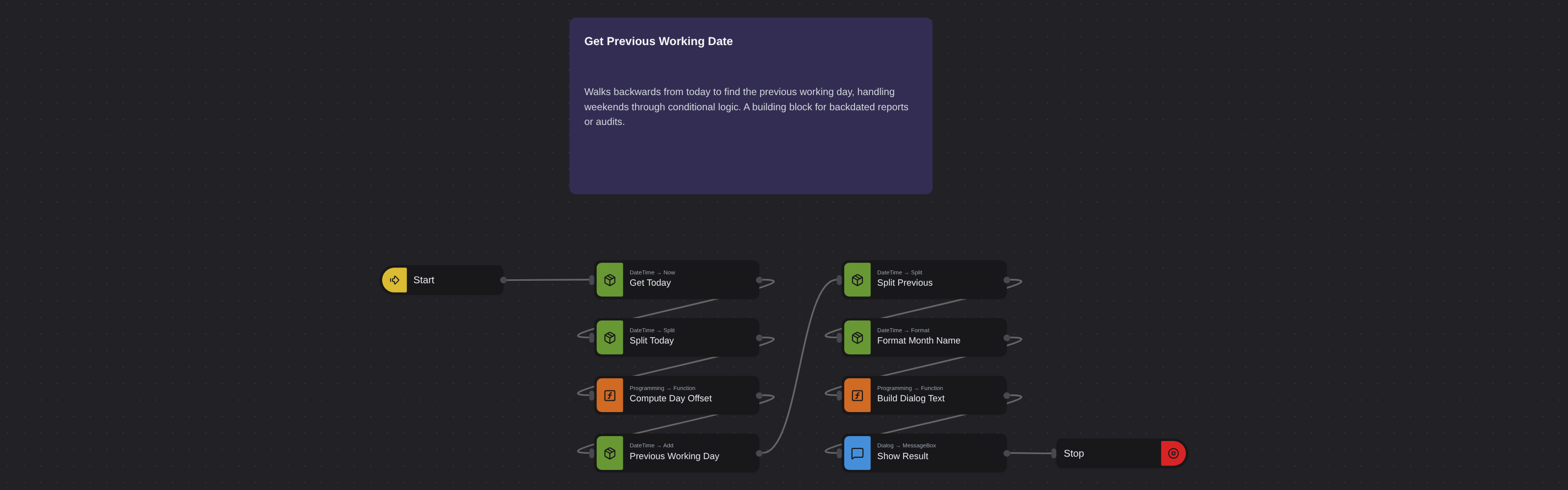
Date & TimeAdvanced
Get Previous Working Date
Robomotion•Updated 11 months ago
Overview
Walks backwards from today to find the previous working day, handling weekends through conditional logic. A building block for backdated reports or audits.
Get Previous Working Date
Apart from performing simple calculations with dates, some scenarios may require more complex logic to get the desired results. Using datetime and conditional nodes, you can make calculations based on specific conditions, such as calculating the previous working day.
What Get Previous Working Date can do
Robomotion.DateTime.NowwithoptLayout: 'RFC3339'andoptTimezoneOffset: 'Local'→msg.today.Robomotion.DateTime.Splitonmsg.today→msg.today_parts(exposes.weekday).Compute Day Offset(Core.Programming.Function) — setsmsg.day_offsetto-2on Sunday,-3on Monday, otherwise-1.Robomotion.DateTime.AddwithoptDurationUnit: 'Days'andinDuration: msg.day_offset→msg.previous_working_day.Robomotion.DateTime.Splitonmsg.previous_working_day→msg.previous_parts;Robomotion.DateTime.FormatwithoptCustomOutLayout: 'January'→msg.month_name.Build Dialog Text(Core.Programming.Function) assemblesmsg.dialog_textasDay / Month / Year, thenCore.Dialog.MessageBoxshows the result beforeCore.Flow.Stop.
Behind the scenes
- The weekday branches collapse into a single Function node (
Compute Day Offset) that returns the numeric offset, so oneRobomotion.DateTime.Addhandles all three cases instead of three parallel branches. Robomotion.DateTime.Splitexposes.day,.year, and.weekdayas structured fields, avoiding any string parsing of the RFC3339 value.- The custom format layout
January(Go-style reference date) yields the full month name, matching theMMMMpattern from the source tutorial.
More date & time templates
See all 6 →- Convert Datetime to TextConverts a datetime value into a formatted text string using the Robomotion DateTime package. Demonstrates standard and custom output layouts for logging, filenames, and reports.
- Convert Text to DatetimeParses a text string like "2025-05-01 09:30:00" into a true datetime value the flow can work with. Shows how to declare an input layout so downstream nodes can format or compare the date.
- Days of Your LifeCalculates how many days you have been alive by subtracting your birthday from today. Uses DateTime Now, Subtract, and a Function node to produce a clean day count.
- Get Current TimeReads the local date and time and formats it as a long time string (HH:mm:ss). Displays the result in an information dialog so you can verify the system clock at a glance.
- Get First Working Day of the Next MonthComputes the first business day of next month, skipping weekends. Useful for scheduling invoices, reports, or reminders that must fire on a working day.