All templates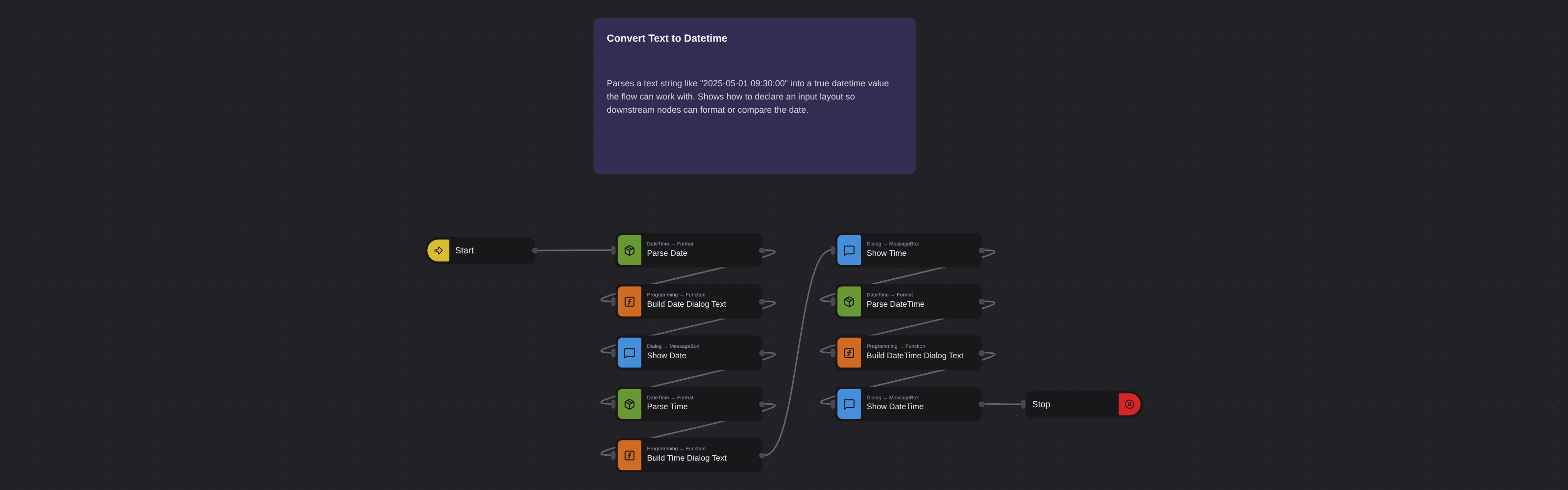
Date & TimeBeginner
Convert Text to Datetime
Robomotion•Updated 11 months ago
Overview
Parses a text string like "2025-05-01 09:30:00" into a true datetime value the flow can work with. Shows how to declare an input layout so downstream nodes can format or compare the date.
Convert Text to Datetime
Although flows can extract data from documents, the retrieved values are usually stored as text. If a text represents a date or time value, Robomotion enables users to convert it to a datetime variable and use this variable for further date and time calculations.
What Convert Text to Datetime can do
- Parse date (
Robomotion.DateTime.Format) —inTime: 20220101, custom input layout20060102, outputRFC3339→msg.text_as_date_time. - Build text (
Core.Programming.Function) →msg.dialog_text = "The text '20220101' has been converted to the following datetime variable: " + msg.text_as_date_time, thenCore.Dialog.MessageBoxtitledResult(info). - Parse time (
Robomotion.DateTime.Format) —inTime: 23:45:00, custom input layout15:04:05, outputRFC3339→msg.text_as_date_time, followed by the same build-text +Resultdialog pattern. - Parse datetime (
Robomotion.DateTime.Format) —inTime: January 01, 2022 23:45:00, custom input layoutJanuary 02, 2006 15:04:05, outputRFC3339→msg.text_as_date_time, followed by the finalResultdialog beforeCore.Flow.Stop.
Behind the scenes
Robomotion.DateTime.Formatuses Go-style reference-time layouts (2006,01,02,15,04,05) rather thanyyyy/MM/ddtokens — the literal sample values in the input layout are what define each field.msg.text_as_date_timeis deliberately reused across all three conversions — each dialog shows the value produced by the most recentParsestep.
More date & time templates
See all 6 →- Convert Datetime to TextConverts a datetime value into a formatted text string using the Robomotion DateTime package. Demonstrates standard and custom output layouts for logging, filenames, and reports.
- Days of Your LifeCalculates how many days you have been alive by subtracting your birthday from today. Uses DateTime Now, Subtract, and a Function node to produce a clean day count.
- Get Current TimeReads the local date and time and formats it as a long time string (HH:mm:ss). Displays the result in an information dialog so you can verify the system clock at a glance.
- Get First Working Day of the Next MonthComputes the first business day of next month, skipping weekends. Useful for scheduling invoices, reports, or reminders that must fire on a working day.
- Get Previous Working DateWalks backwards from today to find the previous working day, handling weekends through conditional logic. A building block for backdated reports or audits.