All templates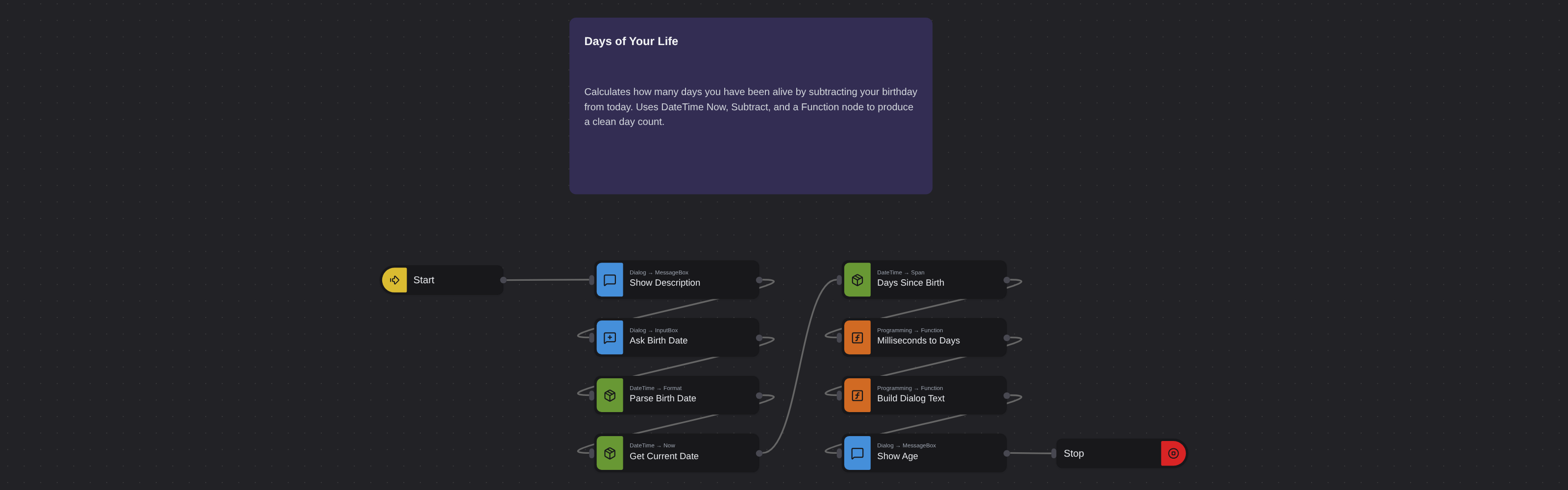
Date & TimeIntermediate
Days of Your Life
Robomotion•Updated 11 months ago
Overview
Calculates how many days you have been alive by subtracting your birthday from today. Uses DateTime Now, Subtract, and a Function node to produce a clean day count.
Days of Your Life
Handling datetime values can be challenging, as time-related data require absolute accuracy. Robomotion allows you to perform reliable calculations with datetime values and display results in various units.
What Days of Your Life can do
- Message Dialog (
Core.Dialog.MessageBox,optType: info) titledDescriptionexplains the flow to the user. - Input Dialog (
Core.Dialog.InputBox) titledPlease select your birthday..., promptSelect your birth date (YYYY-MM-DD):, default1990-01-01→msg.birth_date_text. - Parse birth date (
Robomotion.DateTime.Format, custom in-layout2006-01-02, out-layoutRFC3339) →msg.birth_date. - Get current date (
Robomotion.DateTime.Now,RFC3339,Local) →msg.current_date. - Days since birth (
Robomotion.DateTime.Span,RFC3339) frommsg.birth_datetomsg.current_date→msg.span_ms. - Milliseconds to days (
Core.Programming.Function) —Math.floor(msg.span_ms / 86400000)→msg.days_alive. - Build dialog text (
Core.Programming.Function) — composesToday is day #<days_alive>intomsg.dialog_text. - Message Dialog (
Core.Dialog.MessageBox,optType: info) titledAttention!showsmsg.dialog_text, thenCore.Flow.Stop.
Behind the scenes
- The flow has no explicit cancel branch — if the user cancels the input dialog, downstream nodes simply fail fast.
- Day counting is done by dividing the millisecond span (
Robomotion.DateTime.Spanreturns ms) by86400000and flooring — this matches a whole-days-elapsed semantic and avoids DST / timezone drift. - The birth-date string is normalised through
Robomotion.DateTime.Format(custom2006-01-02layout toRFC3339) soSpangets a well-formed timestamp regardless of how the user typed it.
More date & time templates
See all 6 →- Convert Datetime to TextConverts a datetime value into a formatted text string using the Robomotion DateTime package. Demonstrates standard and custom output layouts for logging, filenames, and reports.
- Convert Text to DatetimeParses a text string like "2025-05-01 09:30:00" into a true datetime value the flow can work with. Shows how to declare an input layout so downstream nodes can format or compare the date.
- Get Current TimeReads the local date and time and formats it as a long time string (HH:mm:ss). Displays the result in an information dialog so you can verify the system clock at a glance.
- Get First Working Day of the Next MonthComputes the first business day of next month, skipping weekends. Useful for scheduling invoices, reports, or reminders that must fire on a working day.
- Get Previous Working DateWalks backwards from today to find the previous working day, handling weekends through conditional logic. A building block for backdated reports or audits.