Convert Excel Document to CSV File
Overview
Converts an Excel spreadsheet to a CSV file on your file system. Supports configurable separator characters and optional sheet selection via subflows for reading Excel data and writing CSV output.
Convert Excel to CSV
Convert Excel to CSV transforms your Excel spreadsheets into clean CSV files with a configurable delimiter. Powered by Robomotion's Excel and CSV subflows, it handles the conversion end to end so you can move data between systems without manual export steps.
Whether you need to prepare data for a database import, feed it into another tool, or simply work with a lighter file format, this template takes care of the formatting in one automated run.
What Convert Excel to CSV can do
- Read data from .xls and .xlsx Excel files
- Target a specific sheet by name or convert the default sheet
- Write the output as CSV with a delimiter of your choice
- Handle the full conversion pipeline without manual intervention
Behind the scenes
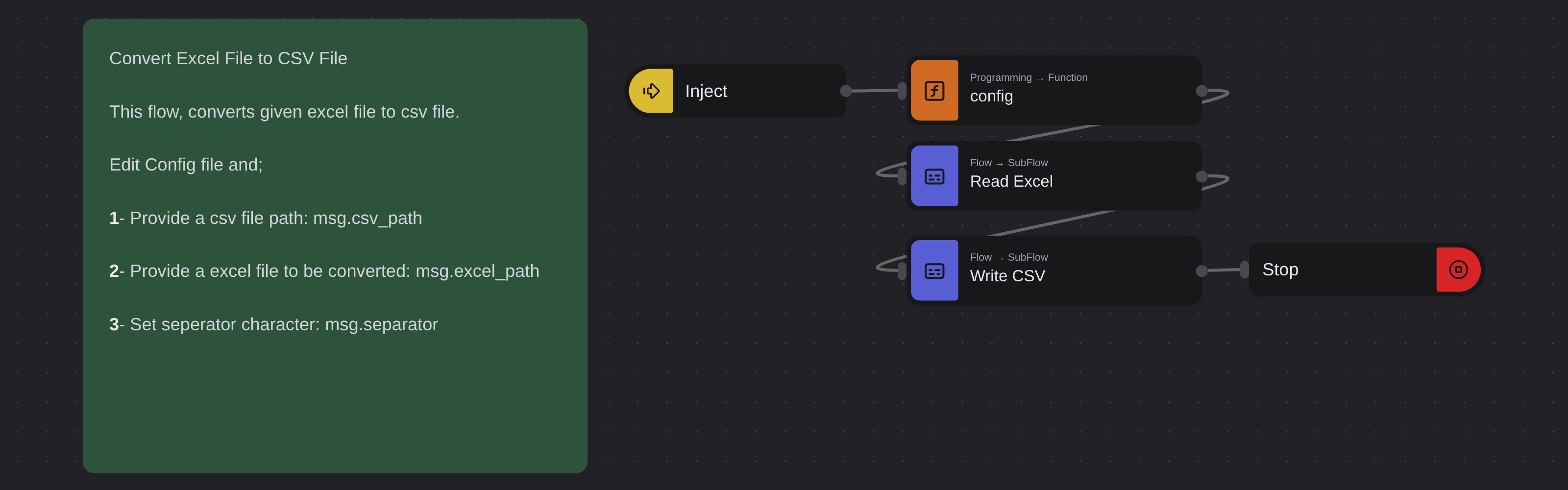
The flow reads your Excel file using a Read Excel subflow, optionally targeting a named sheet. It then passes the data to a Write CSV subflow that formats the rows with your chosen separator character and saves the result to the output path you specify. Both subflows handle the low level file parsing so the main flow stays clean and simple.
Configuration
Open the Config node and set:
| Variable | Description | Example |
|---|---|---|
msg.excel_path | Path to the input Excel file | "/home/user/data.xlsx" |
msg.csv_path | Path for the output CSV file | "/home/user/data.csv" |
msg.separator | Delimiter character (, or ;) | ";" |
msg.sheet_name | Sheet name to convert (empty = default sheet) | "" |
More productivity templates
See all 4 →- Internship Application IntakeCollect work from people who are not in your workspace. A published Robomotion form is a public web page with its own link: whoever answers it needs no account and installs nothing, and every submission becomes one item on a workspace queue. Submissions are encrypted in the visitor's own browser with the public half of an RSA key pair from your vault, so the platform stores the history of every application and can never read one. Three nodes take the next application off the queue, decrypt it with the private half, and show every field the applicant filled in.
- TranslatorTranslates text from one language to another using Google Translate. Text can be provided directly or read from a file, and the result can be displayed in a dialog or saved to a text file.
- Web Element To PDFConverts any web element to a PDF file by injecting the html2pdf.js library into the page and rendering the selected element based on its XPath selector.