All templates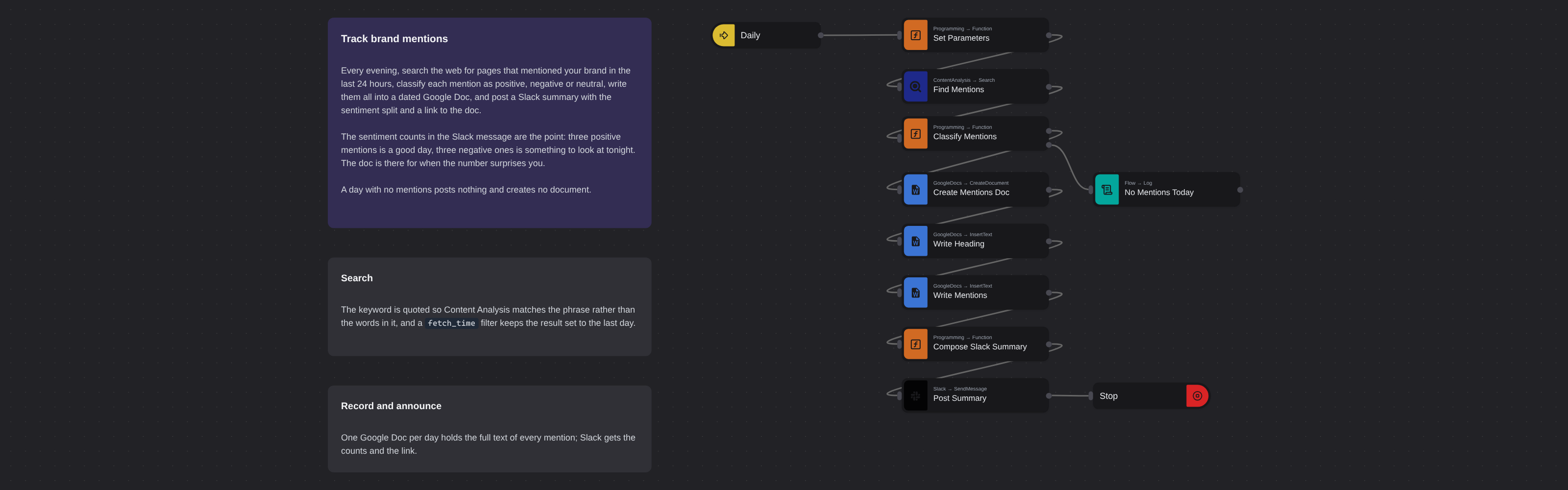
SEOIntermediate
Track Brand Mentions
Robomotion•Updated 2 months ago
Overview
Every evening, searches the web for pages that mentioned your brand in the last 24 hours, classifies each mention as positive, negative or neutral, writes them into a dated Google Doc, and posts a Slack summary with the sentiment split and a link to the doc.
Track Brand Mentions
Every evening, searches the web for pages that mentioned your brand in the last 24 hours, classifies each mention as positive, negative or neutral, writes them into a dated Google Doc, and posts a Slack summary with the sentiment split and a link to the doc.
How it works
- Daily — an Inject trigger repeating every 86,400 seconds.
- Set Parameters — the keyword is wrapped in quotes so Content Analysis matches the exact phrase; without them a two-word brand matches pages containing either word. A
fetch_timefilter keeps the result set to the last day. - Find Mentions —
DataForSEO.ContentAnalysis.Search, up to 1000 results, newest first. - Classify Mentions — whichever connotation (positive / negative / neutral) scores highest wins the mention. A quiet day takes the second output and stops here.
- Create Mentions Doc → Write Heading → Write Mentions → Compose Slack Summary → Post Summary.
The sentiment counts in the Slack message are the point: three positive mentions is a good day, three negative ones is something to look at tonight. The doc is there for when the number surprises you.
Setup
- DataForSEO credential — API login and password from https://app.dataforseo.com/api-access.
- Google credential — Service Account or OAuth2 able to create documents.
- Slack credential — a bot token with
chat:write. - The brand keyword in Set Parameters.
Ported from
- Track Brand Mentions with DataForSEO — DataForSEO template
More seo templates
See all 53 →- ActiveCampaign Lead Business DataEvery 15 minutes, takes the leads ActiveCampaign has touched most recently, turns each website into a bare domain, looks the company up in the Google Business listings database, and writes the name, description, categories, address, rating and price level back onto the ActiveCampaign record.
- ActiveCampaign Lead Traffic StatsEvery 15 minutes, takes the leads ActiveCampaign has touched most recently, turns each website into a bare domain, estimates how much organic search traffic that domain gets, and writes the numbers back onto the ActiveCampaign record.
- Add Backlinks to Google SheetsPulls the live backlinks pointing at a domain every 15 minutes and appends them to a Google Sheet, one row per link, with the source page, anchor text, follow status, ranks and first/last seen dates.
- AI Mode References to SheetsTracks which websites Google's AI Mode cites when it answers a question. Every 7 days it queries the AI Mode SERP for a keyword, flattens the references of every answer block, de-duplicates them by URL and appends them to a Google Sheet.
- AI Overview Citations to SheetsTracks which websites Google's AI Overview cites for a keyword. Every 7 days it pulls the Google SERP with the AI Overview block loaded, collects every source the answer references, de-duplicates them by URL and appends them to a Google Sheet.
- AI Overview Keyword Wins by EmailEach week, finds the keywords where your domains are newly cited inside Google's AI Overview, saves the full picture to Google Sheets, and emails the new placements.