All templates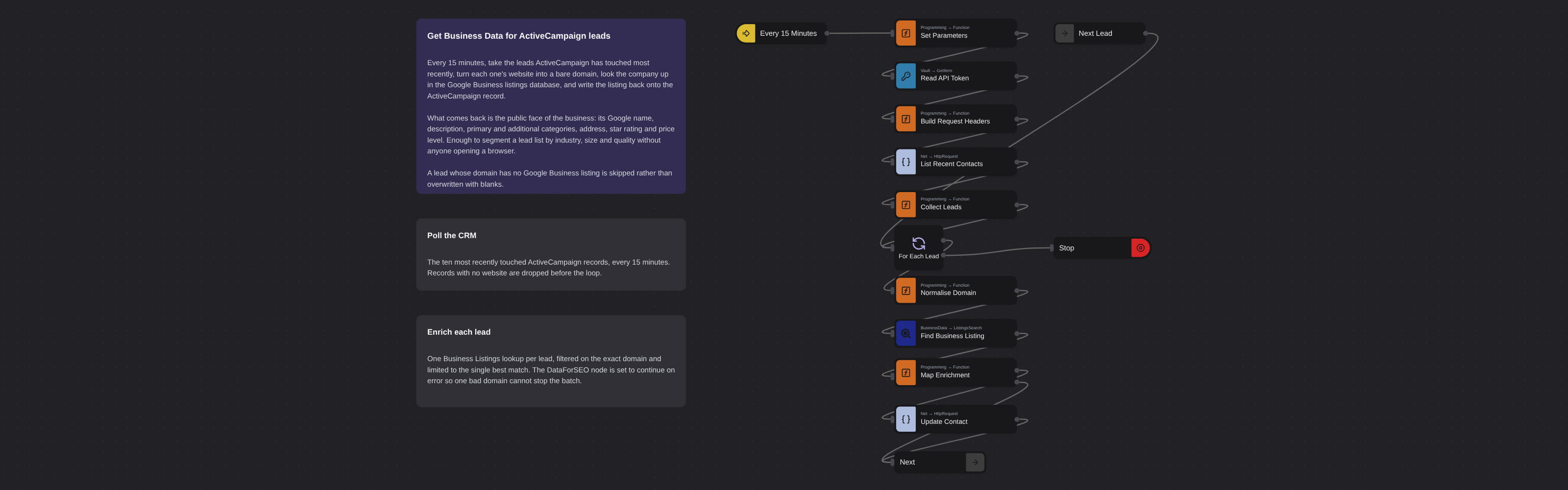
SEOIntermediate
ActiveCampaign Lead Business Data
Robomotion•Updated 2 months ago
Overview
Every 15 minutes, takes the leads ActiveCampaign has touched most recently, turns each website into a bare domain, looks the company up in the Google Business listings database, and writes the name, description, categories, address, rating and price level back onto the ActiveCampaign record.
ActiveCampaign Lead Business Data
Every 15 minutes, takes the leads ActiveCampaign has touched most recently, turns each website into a bare domain, looks the company up in the Google Business listings database, and writes the name, description, categories, address, rating and price level back onto the ActiveCampaign record.
How it works
- Every 15 Minutes — an Inject trigger repeating every 900 seconds. Set Parameters holds
all the configuration: the location and language for the lookup, and
field_map, which says where each enrichment value lands on the ActiveCampaign side. - Read API Token —
Core.Vault.GetItempulls the API token, and Build Request Headers turns it into the header object the HTTP nodes send. - List Recent Contacts — reads the ten most recently touched records via a GET against
/api/3/contactson the ActiveCampaign v3 API. Collect Leads reduces whatever came back to a flat list of{ id, website }and drops records with no website. - Find Business Listing —
DataForSEO.BusinessData.ListingsSearch, filtered ondomain = <lead domain>and limited to the single best match. Before the call, Normalise Domain strips the scheme, anywww.prefix and everything from the first slash on, because DataForSEO matches on a bare domain:https://www.acme.com/pricingbecomesacme.com. - Map Enrichment — a two-output Function. Port 0 has something to write; port 1 means nothing was found for that domain, so the update is skipped and the loop moves on rather than overwriting good data with blanks.
- Update Contact — writes back through an HTTP PUT to
/api/3/contacts/{id}with afieldValuesarray.
The DataForSEO node runs with continueOnError, so one unresolvable domain cannot stop the batch.
Setup
- DataForSEO credential — API login and password from https://app.dataforseo.com/api-access.
- ActiveCampaign credential — a vault item holding the API token.
field_map— the values shipped here are the field names shipped as defaults. Replace them with your own: the enrichment keys aretitle,description,category,additional_categories,address,rating,price_level.
Cost
One Business Listings call per lead with a website.
Ported from
- Get Business Data for ActiveCampaign leads with DataForSEO — DataForSEO template
More seo templates
See all 53 →- ActiveCampaign Lead Traffic StatsEvery 15 minutes, takes the leads ActiveCampaign has touched most recently, turns each website into a bare domain, estimates how much organic search traffic that domain gets, and writes the numbers back onto the ActiveCampaign record.
- Add Backlinks to Google SheetsPulls the live backlinks pointing at a domain every 15 minutes and appends them to a Google Sheet, one row per link, with the source page, anchor text, follow status, ranks and first/last seen dates.
- AI Mode References to SheetsTracks which websites Google's AI Mode cites when it answers a question. Every 7 days it queries the AI Mode SERP for a keyword, flattens the references of every answer block, de-duplicates them by URL and appends them to a Google Sheet.
- AI Overview Citations to SheetsTracks which websites Google's AI Overview cites for a keyword. Every 7 days it pulls the Google SERP with the AI Overview block loaded, collects every source the answer references, de-duplicates them by URL and appends them to a Google Sheet.
- AI Overview Keyword Wins by EmailEach week, finds the keywords where your domains are newly cited inside Google's AI Overview, saves the full picture to Google Sheets, and emails the new placements.
- App Review Alerts to SlackEvery morning, pulls the newest reviews for your app from both Google Play and the App Store, keeps only the ones written since the last run, and posts a digest per store to Slack.