Read From Clipboard
Overview
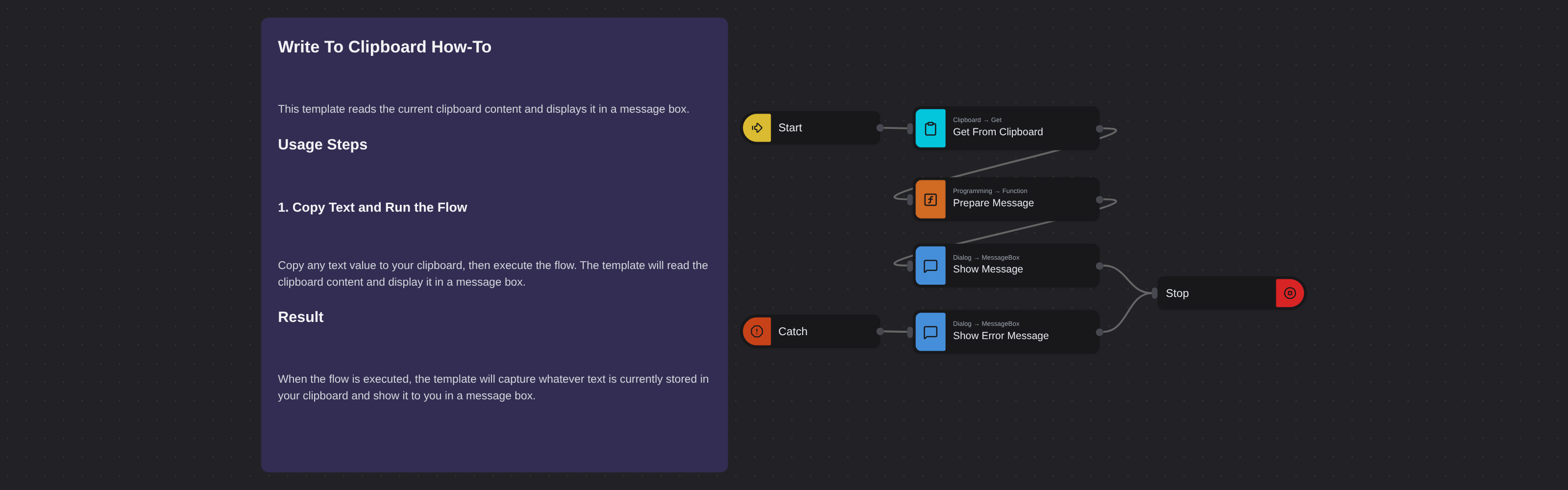
Reads the current clipboard content and displays it in a message box. Includes error handling for non-text clipboard content.
Read From Clipboard
Read From Clipboard grabs the current text content from your system clipboard and displays it in a message box. Powered by Robomotion's clipboard and dialog nodes, it provides a simple way to inspect or process clipboard content inside an automation flow.
This template is a useful building block for workflows that need to read clipboard data, such as processing copied text, validating pasted content, or chaining clipboard operations together.
What Read From Clipboard can do
- Read the current text content from the system clipboard
- Display the clipboard text in a dialog box
- Handle non-text clipboard content gracefully with a friendly error message
- Serve as a starting point for clipboard based automation workflows
Behind the scenes
The flow reads the text content of your system clipboard and passes it to a message box for display. If the clipboard does not contain text, for example if you copied an image, the error is caught and a dialog asks you to copy some text first. No configuration is needed, just copy some text and run the flow.