All templates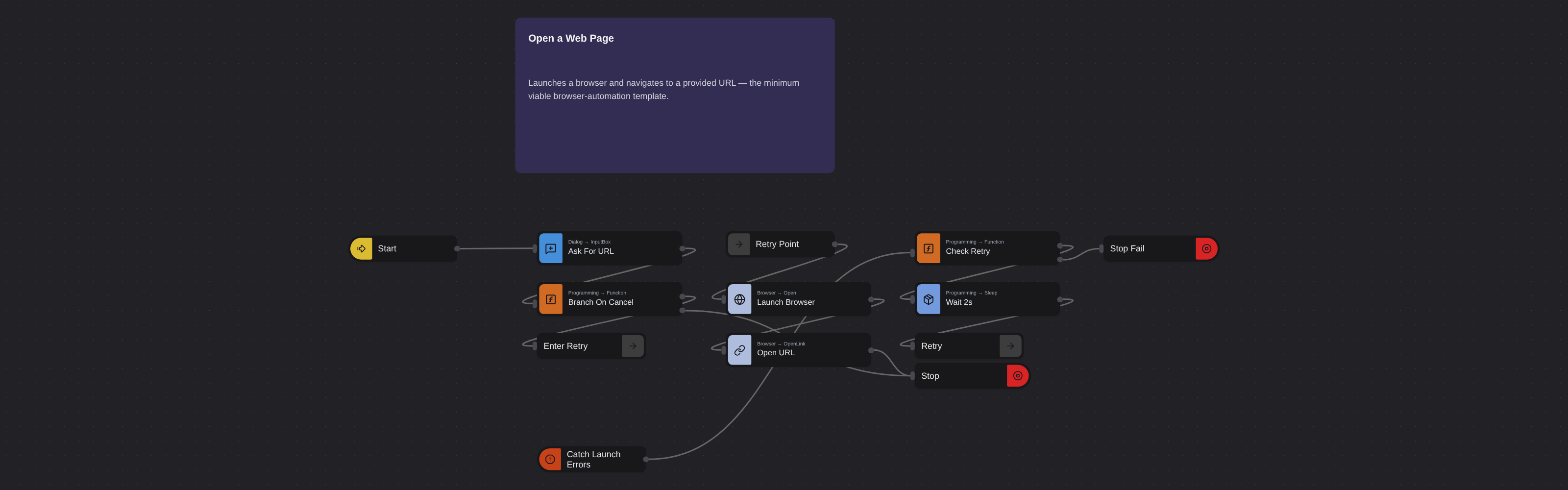
Web AutomationBeginner
Open a Web Page
Robomotion•Updated 11 months ago
Overview
Launches a browser and navigates to a provided URL — the minimum viable browser-automation template.
Open a Web Page
Before performing any other web tasks, you have to launch a browser window and load the appropriate web page. Robomotion allows you to launch instances of all popular browsers and load web pages on them.
What Open a Web Page can do
- Input Dialog titled
Website address, messagePlease provide the website address to launch.., defaultrobomotion.io→msg.url_input. - Normalise input (
Core.Programming.Function,outputs: 2) — cancel short-circuits toCore.Flow.Stop; otherwise trim, prependhttps://if missing, store asmsg.url, initialisemsg.retry_count = 0. - Launch browser (
Core.Browser.Open,chrome, maximised) →msg.browser_id, then open the URL (Core.Browser.OpenLink, timeout 60) →msg.page_id. Core.Trigger.Catcharound the launch/open pair — incrementsmsg.retry_count, sleeps 2s, andCore.Flow.GoToback to the retry label; after one retry it stops withfailed.
Behind the scenes
- No trailing close — the browser stays on screen so the user sees the loaded page.
- The default
robomotion.iohas no scheme; the normalisation Function prependshttps://beforeCore.Browser.OpenLinkruns, so users can type bare hostnames.
More web automation templates
See all 20 →- Any browser: Edge and FirefoxA browser flow built from Web Automation nodes that signs in to Acme ERP Web and searches the customers, run on a robot in Edge and then in Firefox, with only the Browser Type changed.
- Headless ChromeThe Web Inspector lesson's flow, run first headed so you can watch it, then headless with Record Session, so the robot keeps a video of the run nobody saw.
- Payment Run with Hold ReportRuns the weekly vendor payment run in a SAP-style ERP and then accounts for every bill it refused to pay. Signs in with credentials read from the Robomotion Vault, proposes the bills due within seven days, confirms the run so a journal entry is posted per document, and verifies the posted summary against the proposal before going on. Then it opens the bills list, filters to the blocked bills, and reports each one with the reason it is on hold - a pending goods receipt, a quantity or price mismatch against the purchase order, or a missing PO reference. Writes a two-section CSV covering what was paid and what was held back, with the value held back totalled.
- Shipment Status ReportSigns in to a carrier portal and sweeps every page of the shipments list into one report, then narrows that sweep to the shipments that need a person. Reads the login from the Robomotion Vault, walks the pager with a Label and a GoTo until the Next control is disabled, and writes two CSVs: the full book, and an exceptions file covering customs holds, failed deliveries and delays, oldest booking first, with the billed value stuck in each one. Closes with a Log line carrying the counts and the total.
- Bank ReconciliationTakes the payments and receipts the ERP could not reconcile and confirms each one against the real bank statement. It pulls the ERP's flagged paid-bill exceptions and open invoices awaiting cash, then signs in to the bank, searches the operating account by reference and reads what actually settled - quantifying the four ways money and ledger drift apart: a missing payment, a transposed amount, a double payment and unapplied cash. Writes a reconciliation CSV. The story is evidence: the ledger raises the question, the bank statement answers it, and every discrepancy comes out with a number attached.
- Logistics Exception CenterBuilds one worklist of every active delivery exception from the carrier, then dedupes it against the systems that may already be handling it - the mailbox that was notified, and the help desk where a ticket may already exist. Joining the three on the tracking number tells the robot which exceptions were mailed, which already have a ticket, and which nobody has picked up yet. Writes a consolidated exception CSV. The story is consolidation: three systems each hold part of the picture, and the robot joins them so a stuck shipment is neither missed nor double-worked.