Toxic Backlink Disavow File
Overview
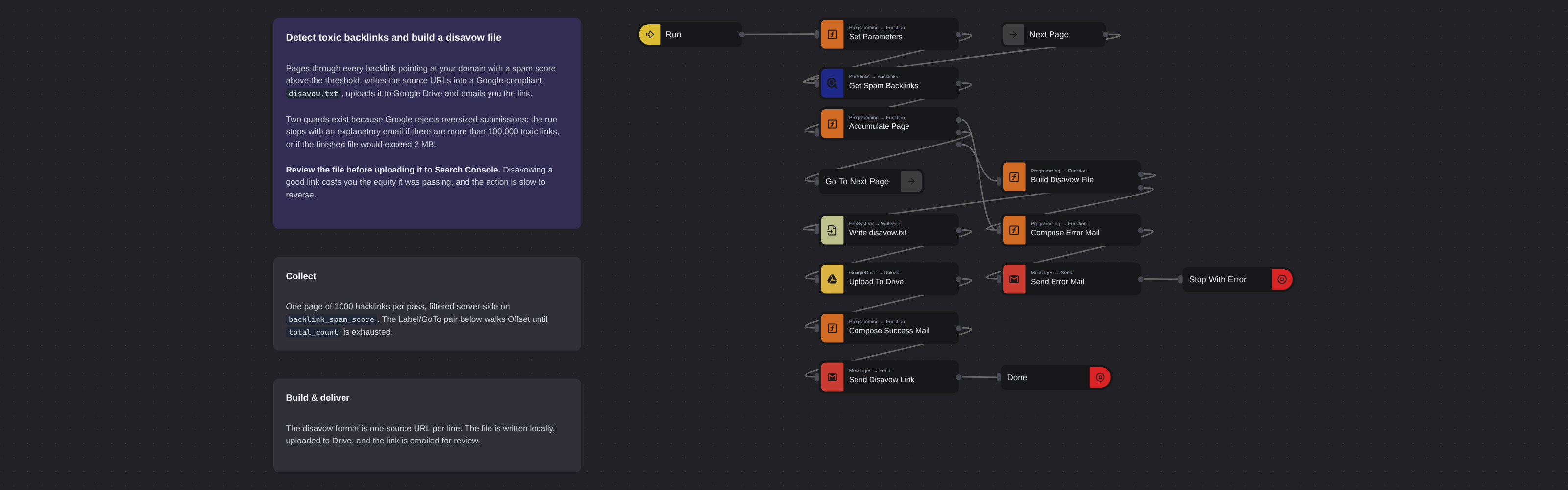
Pages through every backlink pointing at your domain with a spam score above the threshold, writes the source URLs into a Google-compliant disavow.txt, uploads it to Google Drive and emails you the link.
Toxic Backlink Disavow File
Pages through every backlink pointing at your domain with a spam score above the threshold, writes the source URLs into a Google-compliant disavow.txt, uploads it to Google Drive and emails you the link.
How it works
- Run — an Inject trigger; run it on demand, or give it a repeat interval.
- Set Parameters — target domain, notification address, Drive folder, and the spam threshold (50 by default, which is DataForSEO's own toxic line).
- Get Spam Backlinks → Accumulate Page → Go To Next Page — a
Label/GoToloop that walksoptOffset1000 at a time untiltotal_countis exhausted, collectingurl_fromas it goes. - Build Disavow File — joins the URLs one per line and measures the UTF-8 byte length.
- Write disavow.txt → Upload To Drive → Send Disavow Link.
The two guards
Google rejects oversized disavow submissions, so the flow refuses to produce a file it knows will bounce and emails you the reason instead:
- more than 100,000 toxic links, or
- a finished file over 2 MB.
Both paths land on the same Compose Error Mail → Send Error Mail branch and stop the flow with a failed status.
Setup
- DataForSEO credential — API login and password from https://app.dataforseo.com/api-access.
- Google Drive credential — OAuth2 or Service Account, plus the destination folder ID (
rootfor My Drive). - Gmail credential — OAuth2 for the account that sends the notification.
Before you upload
Review the file. Disavowing a good link costs you the equity it was passing, and the action is slow to reverse.
Implementation note
The byte count is done by hand rather than with Buffer.byteLength — the Function node runs in a pure JS sandbox with no Node built-ins, so Buffer is unavailable.
Ported from
- Detect toxic backlinks and build a disavow file with DataForSEO, Google Drive, and Gmail — DataForSEO template
More seo templates
See all 53 →- ActiveCampaign Lead Business DataEvery 15 minutes, takes the leads ActiveCampaign has touched most recently, turns each website into a bare domain, looks the company up in the Google Business listings database, and writes the name, description, categories, address, rating and price level back onto the ActiveCampaign record.
- ActiveCampaign Lead Traffic StatsEvery 15 minutes, takes the leads ActiveCampaign has touched most recently, turns each website into a bare domain, estimates how much organic search traffic that domain gets, and writes the numbers back onto the ActiveCampaign record.
- Add Backlinks to Google SheetsPulls the live backlinks pointing at a domain every 15 minutes and appends them to a Google Sheet, one row per link, with the source page, anchor text, follow status, ranks and first/last seen dates.
- AI Mode References to SheetsTracks which websites Google's AI Mode cites when it answers a question. Every 7 days it queries the AI Mode SERP for a keyword, flattens the references of every answer block, de-duplicates them by URL and appends them to a Google Sheet.
- AI Overview Citations to SheetsTracks which websites Google's AI Overview cites for a keyword. Every 7 days it pulls the Google SERP with the AI Overview block loaded, collects every source the answer references, de-duplicates them by URL and appends them to a Google Sheet.
- AI Overview Keyword Wins by EmailEach week, finds the keywords where your domains are newly cited inside Google's AI Overview, saves the full picture to Google Sheets, and emails the new placements.