SQLite Quick Start
Overview
Demonstrates how to use the SQLite package for database operations including creating a database, inserting rows, creating tables, and querying data.
SQLite Quick Start
SQLite Quick Start walks you through the core database operations, from creating a database to inserting and querying data, all within a single flow. Powered by Robomotion's SQLite package, it provides a hands on introduction to working with local databases in your automations.
Whether you are building a data collection pipeline, caching API results locally, or need persistent storage for your robot, this template covers the essential operations you will use in every database driven workflow.
What SQLite Quick Start can do
- Create a new SQLite database file from scratch
- Insert a single row into a table
- Batch insert multiple rows from a data table
- Run SELECT queries to retrieve and display stored data
Behind the scenes
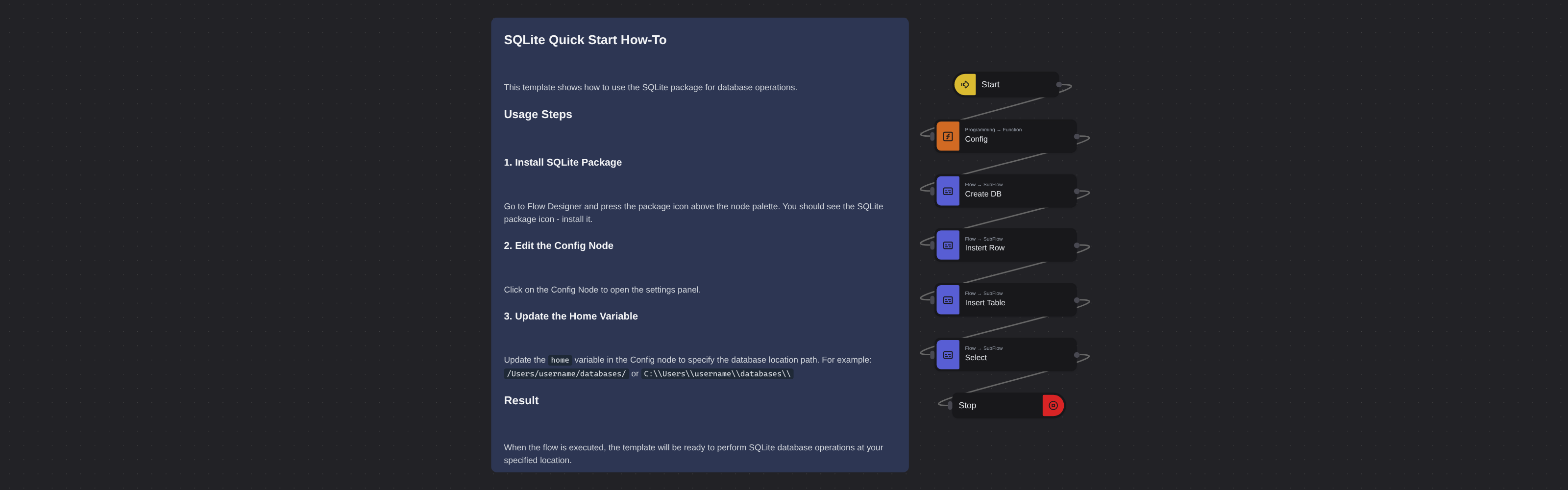
The flow runs four subflows in sequence. Create DB initializes a new SQLite file at the path you configure. Insert Row adds a single record to demonstrate basic insert operations. Insert Table batch inserts multiple rows to show how to work with tabular data. Finally, Select queries the data back to verify everything was stored correctly. All operations target a local .db file built from the path you set in the config.
Configuration
Open the Config node and update the home variable to the directory where the database file should be created:
var home = "/home/user/databases/";
The flow automatically builds msg.dbFile and msg.dbConnStr from this path.
Prerequisites
- Install the Robomotion.SQLite package from the package manager in Flow Designer