Screen Capture
Overview
Captures a screenshot of a web page by opening the specified URL in a browser and saving the screenshot to a given file path.
Screen Capture
Screen Capture takes a screenshot of any web page and saves it to a file on your machine. Powered by Robomotion's browser automation nodes, it opens a browser, renders the page, and captures the result automatically without any manual interaction.
Whether you need to archive a webpage, generate visual reports, or capture page state as part of a larger monitoring workflow, this template handles the full process from navigation to file save.
What Screen Capture can do
- Open a browser and navigate to any URL
- Render the page fully before capturing
- Take a screenshot of the rendered page
- Save the image to a specific file path on your machine
Behind the scenes
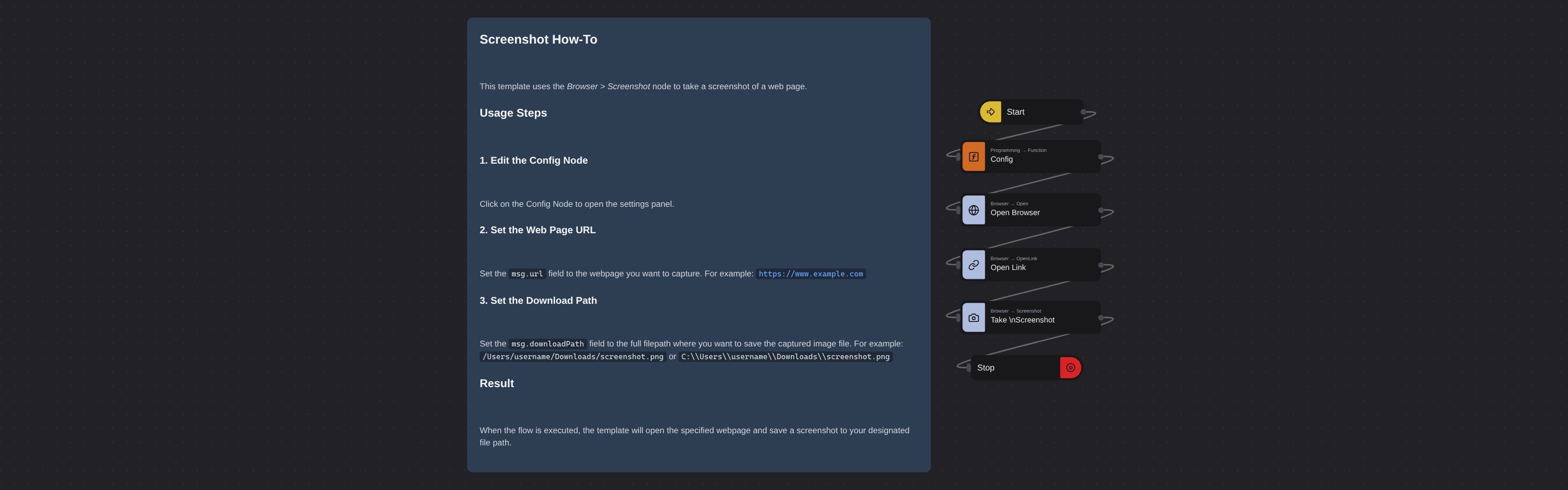
The flow opens a browser instance, navigates to the URL you configure, waits for the page to render, captures a screenshot of the visible viewport, and saves it to the file path you specify. The browser closes automatically once the screenshot is saved.
Configuration
Open the Config node and set:
| Variable | Description | Example |
|---|---|---|
msg.url | Page URL to capture | "https://www.robomotion.io/" |
msg.downloadPath | Where to save the screenshot | "/home/user/screenshot.png" |
More web scraping templates
See all 124 →- Amazon Product Search ScraperSearches Amazon from its search box and exports the products it finds (title, product link, price, rating, image) into a CSV, going through the result pages with Next.
- LinkedIn Company URL FinderFinds the LinkedIn company pages for a company name with LinkedIn's own company search: each result's page URL, name, industry and location, into a CSV.
- LinkedIn Job ScraperReads a LinkedIn job: its title, company, location and the About the job text, into a CSV.
- LinkedIn Post Commenter and Liker ScraperCollects the people who commented on a LinkedIn post and the people who reacted to it into one CSV: name, profile link, headline, and whether each one commented and/or reacted.
- LinkedIn Post Commenters ExportExports the people who commented on a LinkedIn post (name, profile link, headline, comment) into a CSV, scrolling for more.
- LinkedIn Post Likers ExportExports the people who reacted to a LinkedIn post (name, profile link, headline) into a CSV, from the post's reactions list.