YouTube Video Info
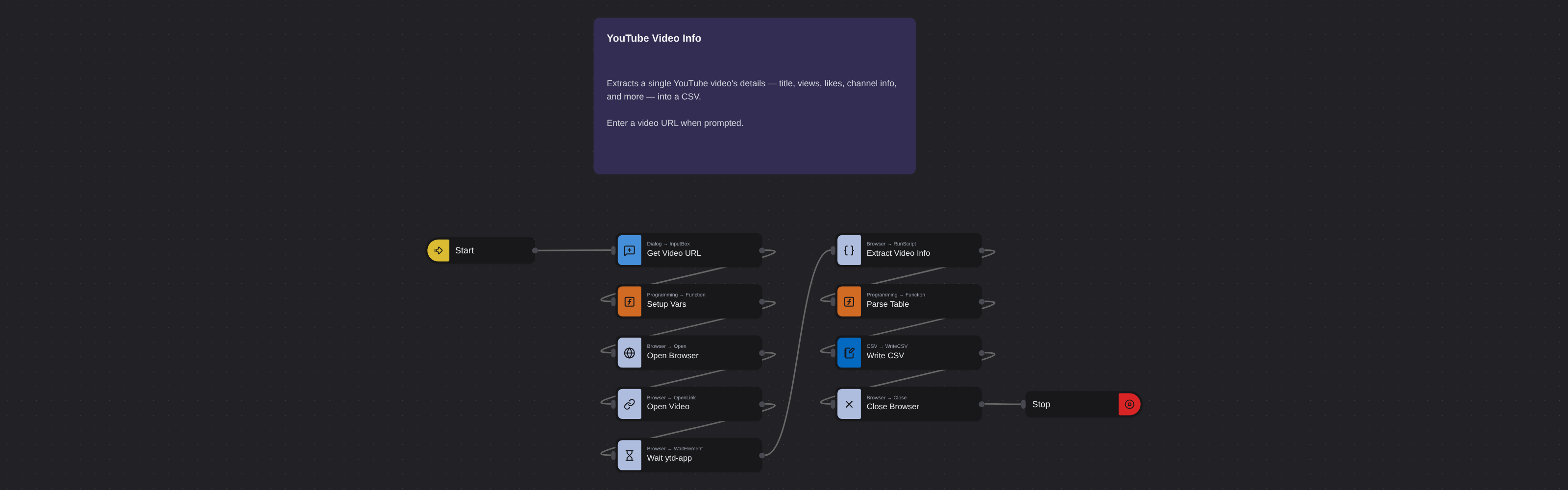
Overview
YouTube video scraper extracting titles, views, likes, channel info, descriptions, tags, and metadata.
YouTube Video Info
Every YouTube video page is a rich data source far beyond what the search results listing shows. On the video page itself you find the full video title, channel name and subscriber count, channel URL, total view count, like count, upload date, full video description (often hundreds of words including links and timestamps), video tags, and the total number of comments. This deep metadata drives competitive analysis in ways that search result summaries cannot.
What it extracts
- Video Title — How to Build a Growth Strategy in 2024
- Channel URL — youtube.com/@brandbuild
- Subscriber Count — 450,000
- View Count — 2,850,000
- Like Count — 125,400
What you can do with it
- Deep content reverse-engineering: Move beyond surface-level search listings. Extract the full description, tags, and metadata of top-performing videos in your niche to understand exactly how they're optimized - and replicate the approach.
- Influencer performance verification: Before signing a creator for a campaign, extract their video data to verify view counts, engagement rates, and posting consistency. Get accurate numbers, not estimates.
- YouTube SEO tag and keyword analysis: Tags on YouTube videos signal topic relevance to the algorithm. Extract tags from top-ranking videos in your category to inform your own video optimization strategy.
- Content performance benchmarking: Extract video-level metrics for your own videos and direct competitors. Build a structured performance comparison that shows where your content leads, matches, or lags the competition.
How it works
Enter the requested input when prompted. The flow opens the target page, extracts the fields listed above, and saves them as a CSV in your home folder.
Frequently asked questions
How is this different from the YouTube search results scraper?
The YouTube search results scraper extracts listing summaries for many videos at once from a search page. This robot extracts complete metadata from a single video page - including the full description, tags, channel URL, subscriber count, and precise engagement counts that search listings don't show.
Can I extract data from private or unlisted videos?
No. This robot only works on public YouTube videos. Private and unlisted videos require authentication and are not accessible.
Are video tags always visible on the YouTube page?
YouTube no longer displays tags publicly in the standard page view, but they remain embedded in the page source. Browse AI's robot accesses the source to extract tag data.
More web scraping templates
See all 124 →- Amazon Product Search ScraperSearches Amazon from its search box and exports the products it finds (title, product link, price, rating, image) into a CSV, going through the result pages with Next.
- LinkedIn Company URL FinderFinds the LinkedIn company pages for a company name with LinkedIn's own company search: each result's page URL, name, industry and location, into a CSV.
- LinkedIn Job ScraperReads a LinkedIn job: its title, company, location and the About the job text, into a CSV.
- LinkedIn Post Commenter and Liker ScraperCollects the people who commented on a LinkedIn post and the people who reacted to it into one CSV: name, profile link, headline, and whether each one commented and/or reacted.
- LinkedIn Post Commenters ExportExports the people who commented on a LinkedIn post (name, profile link, headline, comment) into a CSV, scrolling for more.
- LinkedIn Post Likers ExportExports the people who reacted to a LinkedIn post (name, profile link, headline) into a CSV, from the post's reactions list.