Redfin Property Listings
Overview
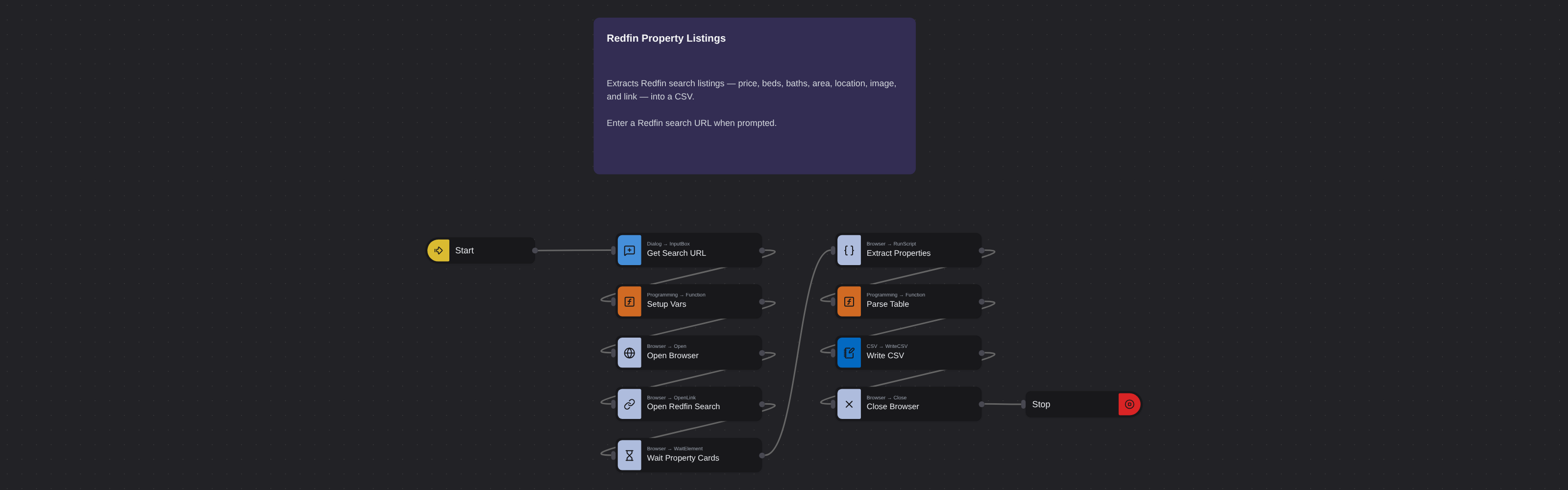
Redfin scraper that extracts property listings, prices, beds, baths, square footage, images and links from search results.
Redfin Property Listings
Redfin publishes some of the most detailed real estate search results available to the public. Each listing on a Redfin search page shows the property address, asking price, number of bedrooms and bathrooms, total square footage, a property image, and a direct link to the full listing. For anyone monitoring real estate markets professionally - investors, agents, appraisers, researchers - this combination of fields tells a rich story about neighborhood supply, demand, and pricing trends.
What it extracts
- Position — Listing position on the search results page.
- Price — Current asking price of the property.
- Beds — Number of bedrooms.
- Baths — Number of bathrooms (full and half).
- Area (Sq. Ft.) — Total interior living area in square feet.
- Location — Full street address of the property.
- Image — Property listing photograph.
- Link — Direct URL to the property listing on Redfin.
What you can do with it
- Neighborhood pricing intelligence: Extract all active listings in a zip code or radius. Compare price-per-sqft across streets and subdivisions to understand precisely where value sits and how pricing varies block by block.
- Market velocity tracking: Days on market is one of the most telling real estate metrics. Extract listings regularly to monitor how quickly inventory is turning - a falling average signals increasing demand before prices visibly react.
- Inventory monitoring for buyers and agents: Know exactly how many properties meet your criteria at any moment. Extract filtered search results to build a live count of qualifying inventory across target neighborhoods.
- Investment deal screening: Real estate investors need to process large property lists quickly. Extract Redfin search results to screen dozens of listings by price, size, and market days without opening every individual listing page.
How it works
Enter the requested input when prompted. The flow opens the target page, extracts the fields listed above, and saves them as a CSV in your home folder.
Frequently asked questions
Does this extract sold listings as well as active ones?
Yes. Redfin lets you filter search results by listing status. Filter for Sold properties, copy that URL, and the robot extracts sold listing data including sale prices - useful for building comps.
Can I extract listings from multiple zip codes at once?
Redfin's map-based search lets you draw custom boundaries. Draw a search area covering multiple zip codes, copy the resulting URL, and the robot extracts all listings within that boundary in a single run.
How often should I re-run the extraction to track market changes?
For active markets, weekly extractions capture meaningful shifts in inventory and pricing. For slower markets, monthly runs are usually sufficient to monitor trends.
More web scraping templates
See all 124 →- Amazon Product Search ScraperSearches Amazon from its search box and exports the products it finds (title, product link, price, rating, image) into a CSV, going through the result pages with Next.
- LinkedIn Company URL FinderFinds the LinkedIn company pages for a company name with LinkedIn's own company search: each result's page URL, name, industry and location, into a CSV.
- LinkedIn Job ScraperReads a LinkedIn job: its title, company, location and the About the job text, into a CSV.
- LinkedIn Post Commenter and Liker ScraperCollects the people who commented on a LinkedIn post and the people who reacted to it into one CSV: name, profile link, headline, and whether each one commented and/or reacted.
- LinkedIn Post Commenters ExportExports the people who commented on a LinkedIn post (name, profile link, headline, comment) into a CSV, scrolling for more.
- LinkedIn Post Likers ExportExports the people who reacted to a LinkedIn post (name, profile link, headline) into a CSV, from the post's reactions list.