SEEK Job Details
Overview
Seek.com scraper extracts job titles, company names, descriptions, and posting details from Seek job postings.
SEEK Job Details
Seek.com is the dominant job board across Australia and New Zealand, processing the vast majority of advertised positions in the APAC English-language market. For HR professionals, recruiters, and job seekers operating in the Australian and New Zealand markets, Seek is the reference point for job advertising. Individual Seek job posting pages carry a rich set of structured fields: job title, employer name, the complete job description, company logo and cover images, company profile links, and detailed posting information including when the role was listed.
What it extracts
- Job Title — Advertised position title.
- Company Name — Hiring company or recruiter agency name.
- Description — Complete text of the posting including requirements and responsibilities.
- Job Information — Posted time and additional job details.
- Posted time — Date the role was listed on Seek.
- Logo — Company logo image.
- Cover — Job posting cover image.
- Company Link — Direct link to the company's Seek profile or website.
What you can do with it
- Australian market salary intelligence: Seek postings frequently include advertised salary ranges specific to the Australian and New Zealand markets, which differ substantially from US or UK benchmarks. Extract to build APAC-specific compensation datasets.
- Work type classification analysis: Seek's structured work type field (full time, part time, casual, contract) is more consistently coded than on most international job boards. Extract across categories to understand the employment structure of your industry in Australia.
- Location-level hiring data: Seek locations include suburb-level precision for metro areas. Extract posting locations to understand where hiring is concentrated by city and suburb for workforce planning and office location decisions.
- Recruitment industry benchmarking: Australian recruitment agencies use Seek extensively. Comparing advertised packages across employers in the same sector allows talent teams to position their own offers more competitively within the local market.
How it works
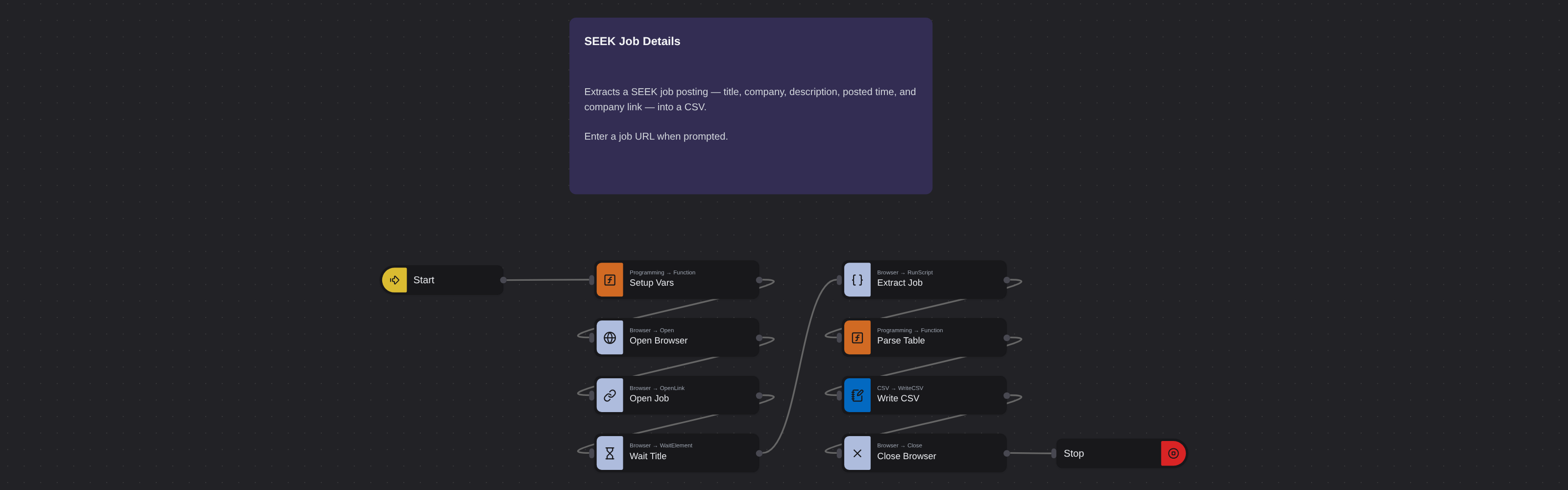
Just run the flow. It loads the source, extracts the fields listed above, and saves them as a CSV in your home folder.
Frequently asked questions
Does Seek list jobs only in Australia?
Seek.com.au covers Australia and New Zealand. The robot extracts from seek.com.au listings. Seek also operates in separate regional versions for Southeast Asia, which have different URLs and formats.
How often are Seek postings updated?
Seek postings are live until the employer fills the role or the listing expires, typically 30 days. New postings appear constantly. Schedule regular extractions to capture the current state of your target market.
What information does the robot extract from each posting?
The robot extracts job title, company name, complete job description, job information, posting time, company logo, cover image, and company profile link from each Seek job posting.
More Web Scraping templates
See all 124 →- Amazon Product Search ScraperSearches Amazon from its search box and exports the products it finds (title, product link, price, rating, image) into a CSV, going through the result pages with Next.
- LinkedIn Company URL FinderFinds the LinkedIn company pages for a company name with LinkedIn's own company search: each result's page URL, name, industry and location, into a CSV.
- LinkedIn Job ScraperReads a LinkedIn job: its title, company, location and the About the job text, into a CSV.
- LinkedIn Post Commenter and Liker ScraperCollects the people who commented on a LinkedIn post and the people who reacted to it into one CSV: name, profile link, headline, and whether each one commented and/or reacted.
- LinkedIn Post Commenters ExportExports the people who commented on a LinkedIn post (name, profile link, headline, comment) into a CSV, scrolling for more.
- LinkedIn Post Likers ExportExports the people who reacted to a LinkedIn post (name, profile link, headline) into a CSV, from the post's reactions list.