Password Generator
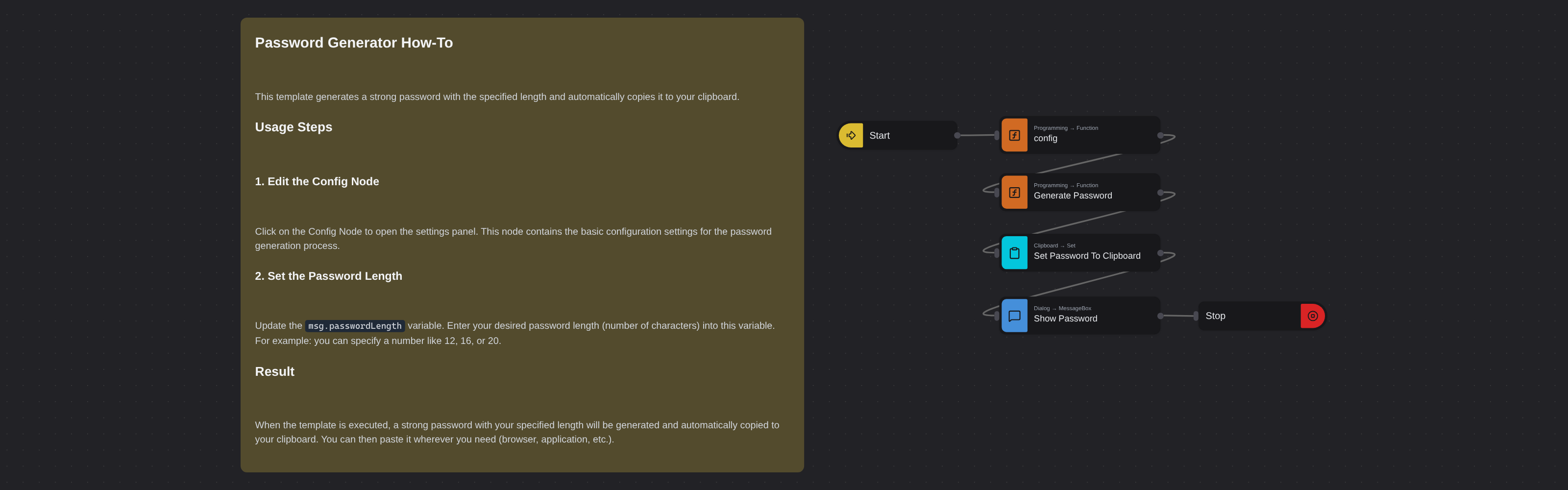
Overview
Generates a strong random password with a specified length using alphanumeric characters, then automatically copies it to the clipboard and displays it in a message box.
Password Generator
Password Generator creates a random alphanumeric password at the length you choose and copies it straight to your clipboard. Powered by Robomotion's programming and clipboard nodes, it gives you a secure password in one click without relying on external tools or websites.
Whether you need a quick password for a new account or a strong credential for a service, this template generates it instantly and puts it right where you need it.
What Password Generator can do
- Generate a random password using uppercase letters, lowercase letters, and digits
- Let you choose the exact password length
- Copy the result directly to your system clipboard
- Display the generated password in a dialog for visual confirmation
Behind the scenes
The flow reads the desired password length from the config, generates a random string of that length using a mix of uppercase, lowercase, and numeric characters, copies the result to the system clipboard automatically, and displays it in a message box so you can see what was generated.
Configuration
Open the Config node and set:
| Variable | Description | Example |
|---|---|---|
msg.passwordLength | Number of characters | 16 |