Invoice Inbox to Ledger
Overview
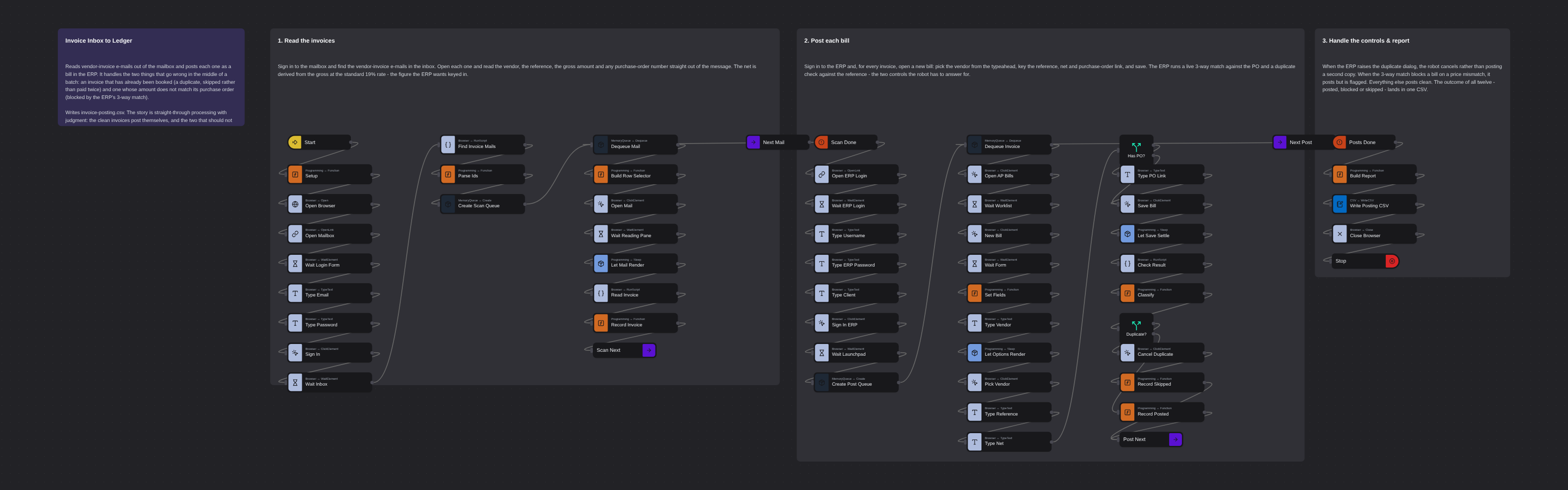
Reads vendor-invoice e-mails out of the mailbox and posts each one as a bill in the ERP. It reads the vendor, reference, gross and purchase-order number from each message, derives the net, and keys a new bill - handling the two controls that fire mid-batch: a duplicate reference (cancelled rather than paid twice) and a failed 3-way match against the purchase order (posted but blocked). Writes a posting report. The story is straight-through processing with judgment: the clean invoices post themselves, and the two that should not go through are caught and reported.
Invoice Inbox to Ledger
Vendor invoices arrive as e-mail and have to end up as bills in the ERP. The re-keying is dull, but the batch is never quite clean: somewhere in the twelve is an invoice that was already booked, and one whose amount does not match the purchase order it was raised against. A robot that posts all twelve blindly pays a duplicate and lets a price mismatch through. The valuable one posts the clean ones and stops on the two that should not go through.
This flow reads the invoice e-mails, posts each as a bill, and answers the two controls the ERP raises: a duplicate-reference dialog and a live 3-way match against the purchase order.
It spans two fictional training systems — Lookout Mail for the inbox and RAP One for the ledger — whose data is entirely synthetic.
What it produces
invoice-posting.csv in your home folder: every invoice with its outcome — posted, blocked or
skipped — and the ERP document number. On the seeded inbox that is 12 invoices → 10 posted, 1
blocked, 1 skipped:
- Skipped —
INIT-2026-118is already booked; the ERP raises the duplicate dialog and the robot cancels rather than posting a second copy. - Blocked —
NW-2026-9002fails the 3-way match (invoice net €4,200 against a €3,950 purchase order); it posts but is flagged, not payable. - The remaining ten post clean.
How it works
1. Read the invoices
Sign in to the mailbox and find the vendor-invoice e-mails. Open each and read the vendor, the reference, the gross amount and any purchase-order number straight out of the message. The net is derived from the gross at the standard 19% rate — the figure the ERP wants keyed in.
2. Post each bill
Sign in to the ERP and, for every invoice, open a new bill: pick the vendor from the typeahead, key the reference, net and purchase-order link, and save. The ERP runs a live 3-way match against the PO and a duplicate check against the reference — the two controls the robot has to answer for.
3. Handle the controls & report
When the ERP raises the duplicate dialog, the robot cancels. When the 3-way match blocks a bill on a price mismatch, it is flagged. Everything else posts clean, and the outcome of all twelve lands in one CSV — the exceptions at the top, ready to work.
Running it
Ready to run as-is. It signs in with the published training credentials
(hiroshi.tanaka@globex.example for the mailbox, HTANAKA for the ERP), which are not secret. Real
system credentials belong in the Robomotion Vault, never in a flow.
More web automation templates
See all 20 →- Any browser: Edge and FirefoxA browser flow built from Web Automation nodes that signs in to Acme ERP Web and searches the customers, run on a robot in Edge and then in Firefox, with only the Browser Type changed.
- Headless ChromeThe Web Inspector lesson's flow, run first headed so you can watch it, then headless with Record Session, so the robot keeps a video of the run nobody saw.
- Payment Run with Hold ReportRuns the weekly vendor payment run in a SAP-style ERP and then accounts for every bill it refused to pay. Signs in with credentials read from the Robomotion Vault, proposes the bills due within seven days, confirms the run so a journal entry is posted per document, and verifies the posted summary against the proposal before going on. Then it opens the bills list, filters to the blocked bills, and reports each one with the reason it is on hold - a pending goods receipt, a quantity or price mismatch against the purchase order, or a missing PO reference. Writes a two-section CSV covering what was paid and what was held back, with the value held back totalled.
- Shipment Status ReportSigns in to a carrier portal and sweeps every page of the shipments list into one report, then narrows that sweep to the shipments that need a person. Reads the login from the Robomotion Vault, walks the pager with a Label and a GoTo until the Next control is disabled, and writes two CSVs: the full book, and an exceptions file covering customs holds, failed deliveries and delays, oldest booking first, with the billed value stuck in each one. Closes with a Log line carrying the counts and the total.
- Bank ReconciliationTakes the payments and receipts the ERP could not reconcile and confirms each one against the real bank statement. It pulls the ERP's flagged paid-bill exceptions and open invoices awaiting cash, then signs in to the bank, searches the operating account by reference and reads what actually settled - quantifying the four ways money and ledger drift apart: a missing payment, a transposed amount, a double payment and unapplied cash. Writes a reconciliation CSV. The story is evidence: the ledger raises the question, the bank statement answers it, and every discrepancy comes out with a number attached.
- Logistics Exception CenterBuilds one worklist of every active delivery exception from the carrier, then dedupes it against the systems that may already be handling it - the mailbox that was notified, and the help desk where a ticket may already exist. Joining the three on the tracking number tells the robot which exceptions were mailed, which already have a ticket, and which nobody has picked up yet. Writes a consolidated exception CSV. The story is consolidation: three systems each hold part of the picture, and the robot joins them so a stuck shipment is neither missed nor double-worked.