Handle Errors
Overview
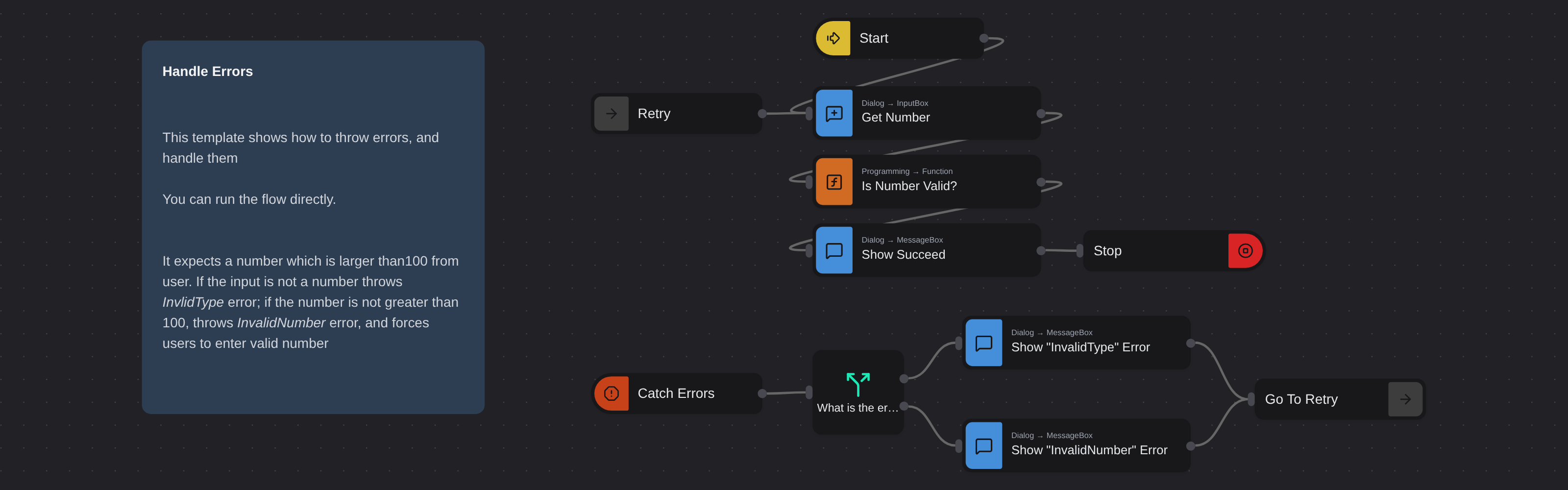
Shows how to throw and handle errors in a Robomotion flow. Prompts the user for a number greater than 100, validates the input, and demonstrates catching specific error types with appropriate feedback.
Handle Errors
Handle Errors teaches the throw and catch error handling pattern in Robomotion through a practical input validation example. Using custom error types, conditional routing, and a retry loop, it shows how to build flows that respond gracefully to invalid input instead of crashing.
This template is essential for anyone building production automations where user input or external data can be unpredictable and needs proper validation before processing.
What Handle Errors can do
- Validate user input against multiple criteria
- Throw custom named errors for different failure conditions
- Catch errors and route them by type to show specific messages
- Retry automatically by looping back to the input step
Behind the scenes
The flow prompts the user to enter a number greater than 100. A Function node validates the input and throws "InvalidType" if the value is not a number or "InvalidNumber" if it is not greater than 100. A Catch node picks up any thrown error, and a Switch node routes execution by error type to display the correct error message. A GoTo node then loops back to the input dialog for another attempt. When valid input is provided, a success dialog appears and the flow stops.