All templates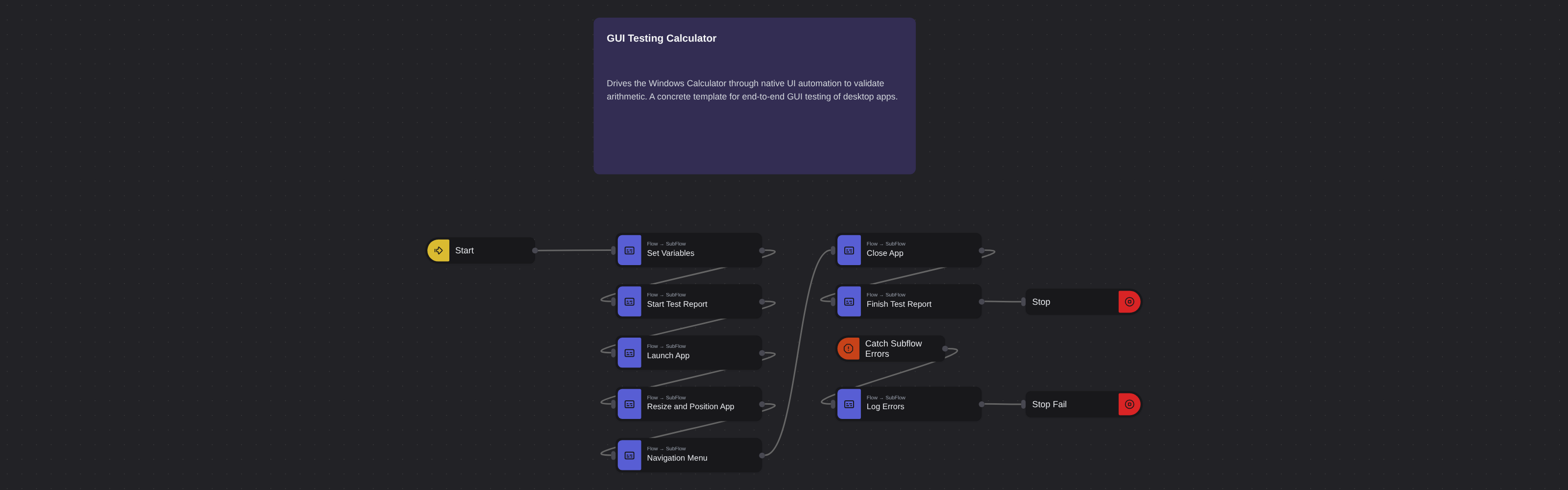
Desktop AutomationAdvanced
GUI Testing Calculator
Robomotion•Updated 11 months ago
Overview
Drives the Windows Calculator through native UI automation to validate arithmetic. A concrete template for end-to-end GUI testing of desktop apps.
GUI Testing Calculator
Manual GUI testing can be a challenging task for applications with complicated interfaces. Use Robomotion as a testing tool and create desktop flows that replicate testing steps every time they are needed.
What GUI Testing Calculator can do
- Pre-test —
Set Variables(Core.Flow.SubFlow): seeds the core identifiers and computes the CSV report file paths. - Pre-test —
Start Test Report(Core.Flow.SubFlow): writes the CSV header row to the temporary report file. - Test setup —
Launch App(Core.Flow.SubFlow): starts Calculator, waits for its window, captures its product version, thenResize and Position Appnormalises the window geometry. - Test pass —
Navigation Menu(Core.Flow.SubFlow): exercises the hamburger menu by switching betweenGraphing CalculatorandStandard Calculatormodes. - Teardown —
Close App(Core.Flow.SubFlow) thenFinish Test Report(Core.Flow.SubFlow) writes the final report row and closes the target application beforeCore.Flow.Stop. Core.Trigger.Catchwatches theLaunch App,Resize and Position App,Navigation Menu, andClose Appsubflows — on any subflow error it invokesLog Errors(Core.Flow.SubFlow) and stops withfailedand reasonA subflow raised an error.
Behind the scenes
- The flow is orchestrated entirely from
Core.Flow.SubFlownodes; each step is an isolated subflow that can be run or debugged independently. - The central
Core.Trigger.Catchfunnels errors from every test subflow into a singleLog Errorspath, so per-subflow Fail rows remain consistent in the CSV report. - The success path lets each subflow write its own
Passrow at the tail; the error path writes the correspondingFailrow — mirror this two-outcome shape when adding new test subflows. - CSV writes inside the
Log Errorsbranch should usecontinueOnError: trueso logging a failure cannot itself abort the flow.
More desktop automation templates
See all 17 →- Every customer from a CSVThe Windows Recorder's customer task run for every row of a CSV file, each typed value replaced by the row's field, with a Catch that logs a row the app will not take and goes on with the next.
- Putting it togetherOne flow over three systems. Headless Chrome reads today's web orders from Acme ERP Web, the finance system is asked about each customer over Remote Desktop, and the orders with nothing overdue are entered into Acme ERP for Windows, line by line, with a report at the end.
- Reading from a Java applicationA flow that signs in to Acme ERP (Java Edition), reads a customer's credit limit and the fasteners in the product table, works out how many boxes of each the limit covers, and writes the answer to a CSV file.
- Reading over Remote DesktopA flow that logs on to Acme ERP over Remote Desktop, reads the outstanding and overdue totals off the Invoices screen with OCR, each anchored to its label, and writes the overdue share to a CSV file.
- Slow sessionsA flow recorded on a good Remote Desktop session that logs on and updates a customer's email, phone and notes in Acme ERP, and still gets every value right on a slow session that loses keystrokes.
- Windows dialogs and gridsA flow that signs in to Acme ERP for Windows, waits for its orders grid, reads it with Get Table Data, exports the orders on hold through the Save As dialog, and closes the app answering its "Save changes?" question.