YouTube Video Transcript
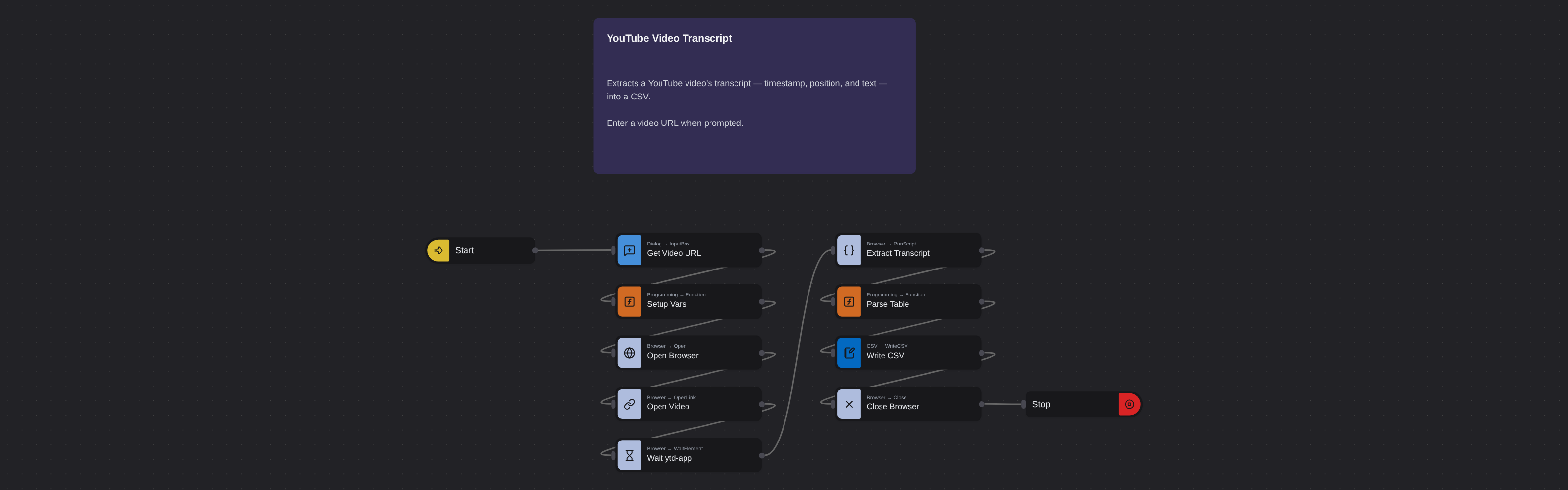
Overview
YouTube transcript extractor that pulls full video text and timestamps from any video.
YouTube Video Transcript
YouTube hosts over 800 million videos, and the vast majority of the information they contain is locked inside audio and video formats that aren't searchable, quotable, or easily repurposable as text. YouTube's auto-generated captions and creator-uploaded subtitles contain the full spoken content of most videos, effectively creating text versions of video content. For content marketers, these transcripts are raw material for blog posts, social media quotes, and SEO content.
What it extracts
- Title — The title of the YouTube video.
- Description — The video's description text from the YouTube page.
- Channel Name — The name of the channel that uploaded the video.
- Position — The sequence position of the transcript segment.
- Time — Timestamp marker for each transcript segment.
- Text — Complete spoken content of the video at that timestamp.
What you can do with it
- Content repurposing at scale: Turn any YouTube video into written content. Extract transcripts to create blog posts, articles, newsletters, and social media content from video source material.
- Searchable video archives: Video content is unsearchable by default. Extract transcripts to build text-searchable databases of video content for research and reference.
- Quote extraction accuracy: Need exact quotes from video interviews or presentations? Extract the transcript to get word-for-word text instead of paraphrasing from memory.
- Accessibility and translation: Transcripts are the foundation for subtitles, closed captions, and translated versions. Extract to create accessible content in multiple languages from any video.
How it works
Enter the requested input when prompted. The flow opens the target page, extracts the fields listed above, and saves them as a CSV in your home folder.
Frequently asked questions
Does this work with auto-generated captions?
Yes. The robot works with both auto-generated YouTube captions and manually uploaded subtitle files. Auto-generated captions may have occasional accuracy issues with technical terms or proper nouns.
Can I extract transcripts in languages other than English?
Yes. YouTube generates auto-captions in many languages, and many creators upload subtitles in multiple languages. The robot extracts whatever caption track is available.
What if a video doesn't have captions?
Some videos have captions disabled by the creator. In those cases, there's no transcript data available on YouTube for the robot to extract.
More web scraping templates
See all 124 →- Amazon Product Search ScraperSearches Amazon from its search box and exports the products it finds (title, product link, price, rating, image) into a CSV, going through the result pages with Next.
- LinkedIn Company URL FinderFinds the LinkedIn company pages for a company name with LinkedIn's own company search: each result's page URL, name, industry and location, into a CSV.
- LinkedIn Job ScraperReads a LinkedIn job: its title, company, location and the About the job text, into a CSV.
- LinkedIn Post Commenter and Liker ScraperCollects the people who commented on a LinkedIn post and the people who reacted to it into one CSV: name, profile link, headline, and whether each one commented and/or reacted.
- LinkedIn Post Commenters ExportExports the people who commented on a LinkedIn post (name, profile link, headline, comment) into a CSV, scrolling for more.
- LinkedIn Post Likers ExportExports the people who reacted to a LinkedIn post (name, profile link, headline) into a CSV, from the post's reactions list.