Webpage HTML & Screenshot
Overview
HTML scraper that extracts source code from any webpage instantly. No coding needed.
Webpage HTML & Screenshot
Sometimes you need more than the visible content of a webpage - you need the code underneath it. The HTML source reveals how a page is built: its tag structure, metadata, schema markup, script references, and styling approach. Developers use this for debugging and cross-browser testing.
What it extracts
- HTML — The complete rendered HTML source code of the page.
What you can do with it
- Full HTML source code from any page - the complete rendered markup including dynamically loaded elements, not just the initial server response.
- Visual page captures paired with code: see what the page looks like and how it is built in one extraction.
- Technical SEO inspection: examine meta tags, schema markup, canonical URLs, and script loading without opening developer tools on every page.
- Legal and compliance archiving: capture both the visual appearance and underlying code of web pages as time-stamped evidence for regulatory or legal records.
How it works
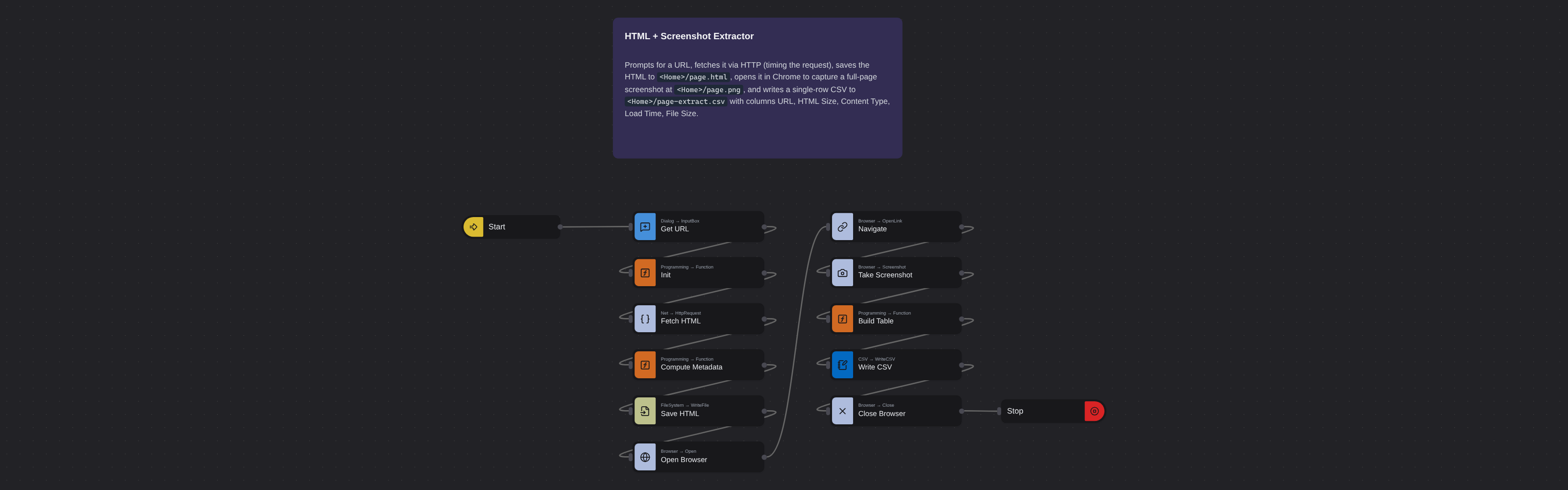
Enter the requested input when prompted. The flow opens the target page, extracts the fields listed above, and saves them as a CSV in your home folder.
Frequently asked questions
What is an HTML scraper?
An HTML scraper extracts the full source code of a webpage. This robot captures the complete rendered HTML, giving you the technical markup of any page.
Does it capture JavaScript-rendered content?
Yes. The robot uses a full browser to render the page. Content loaded via JavaScript frameworks (React, Vue, Angular, etc.) is included in the HTML source.
What format is the output?
The HTML source is captured as the complete rendered code that shows the full page structure and content.
Can I extract HTML from multiple pages at once?
Yes. Queue multiple URLs and the robot extracts the HTML source code for each page. All outputs are organized in your Browse AI dashboard.
Is this HTML scraper free?
Browse AI's free plan includes credits to run this robot at no cost. Create an account without a credit card and start extracting pages.
Is this the same as cURL or wget?
No. cURL and wget fetch the raw server response. This robot renders the page in a full browser first, so it captures the final rendered HTML including any JavaScript-generated content.
More web scraping templates
See all 124 →- Amazon Product Search ScraperSearches Amazon from its search box and exports the products it finds (title, product link, price, rating, image) into a CSV, going through the result pages with Next.
- LinkedIn Company URL FinderFinds the LinkedIn company pages for a company name with LinkedIn's own company search: each result's page URL, name, industry and location, into a CSV.
- LinkedIn Job ScraperReads a LinkedIn job: its title, company, location and the About the job text, into a CSV.
- LinkedIn Post Commenter and Liker ScraperCollects the people who commented on a LinkedIn post and the people who reacted to it into one CSV: name, profile link, headline, and whether each one commented and/or reacted.
- LinkedIn Post Commenters ExportExports the people who commented on a LinkedIn post (name, profile link, headline, comment) into a CSV, scrolling for more.
- LinkedIn Post Likers ExportExports the people who reacted to a LinkedIn post (name, profile link, headline) into a CSV, from the post's reactions list.