Webpage Text & Full-Page Screenshot
Overview
Extract text from any website and capture a full-page screenshot. No code needed.
Webpage Text & Full-Page Screenshot
There are dozens of reasons you might need the text from a webpage outside of a browser - content audits, competitive analysis, archival, legal compliance, migration planning. And in every case, the process is the same frustrating routine: select all, copy, paste, clean up formatting. This robot eliminates that.
What it extracts
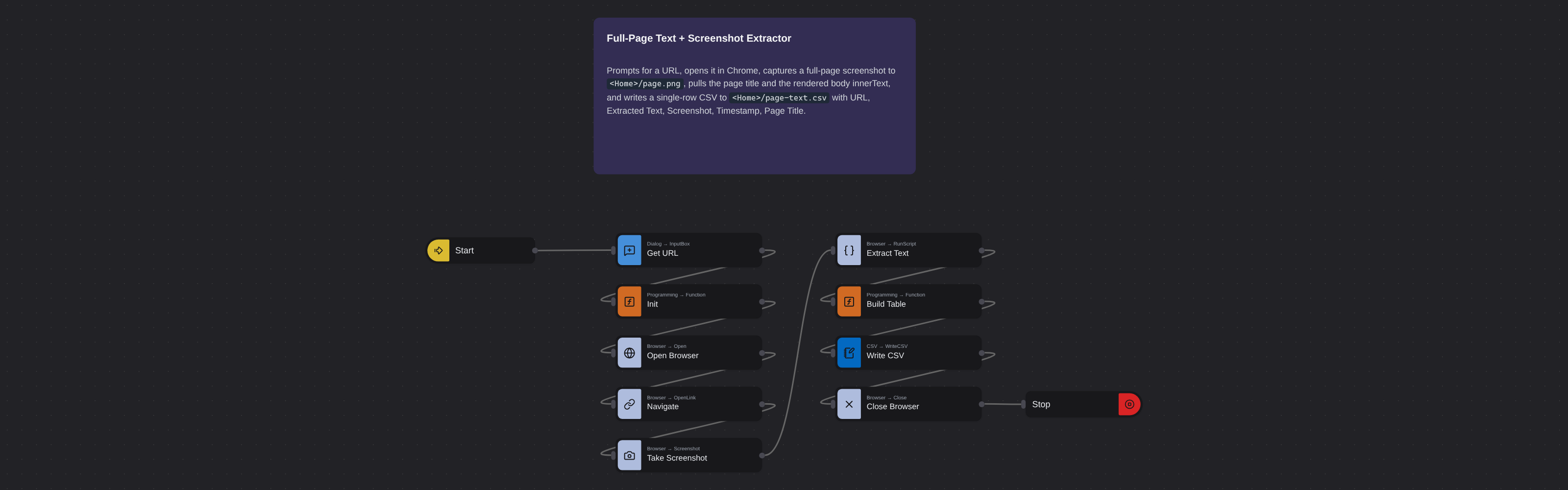
- URL — https://example.com/about
- Extracted Text — About Us - We are a leading provider of...
- Screenshot — Full-page PNG image captured at time of extraction
- Timestamp — 2026-02-25 14:30:00 UTC
- Page Title — About Us
What you can do with it
- Get clean, consistent text extraction - no stray HTML, no formatting artifacts, no missed sections.
- Capture a full-page screenshot alongside the text for visual documentation and compliance records.
- Extract from dozens or hundreds of URLs in bulk instead of visiting each page manually.
- Schedule recurring extraction to monitor content changes on important pages over time.
How it works
Enter the requested input when prompted. The flow opens the target page, extracts the fields listed above, and saves them as a CSV in your home folder.
Frequently asked questions
What is a website text extractor?
A tool that visits a URL, reads all visible text on the page, and returns it as clean, structured data. This robot also captures a full-page screenshot. No manual copying needed.
Is the free plan enough to try this?
Yes. Browse AI's free tier includes credits to test this robot on several pages. Try it on a few URLs and review the output before upgrading.
Can I extract text from pages that require login?
This robot works with publicly accessible pages. Content behind authentication walls requires a different approach.
What about JavaScript-rendered content?
The robot loads the page in a full browser environment, so JavaScript-rendered content is captured. However, content that only appears after user interaction (clicking buttons or scrolling) may not be included.
Can I extract text from PDFs?
This robot is designed for web pages. For PDF content extraction, you would need a different tool.
How does scheduling work?
Set the robot to run on any recurring schedule - daily, weekly, or custom. Use it to monitor content changes on important pages and get notified when text is added, removed, or updated.
More web scraping templates
See all 124 →- Amazon Product Search ScraperSearches Amazon from its search box and exports the products it finds (title, product link, price, rating, image) into a CSV, going through the result pages with Next.
- LinkedIn Company URL FinderFinds the LinkedIn company pages for a company name with LinkedIn's own company search: each result's page URL, name, industry and location, into a CSV.
- LinkedIn Job ScraperReads a LinkedIn job: its title, company, location and the About the job text, into a CSV.
- LinkedIn Post Commenter and Liker ScraperCollects the people who commented on a LinkedIn post and the people who reacted to it into one CSV: name, profile link, headline, and whether each one commented and/or reacted.
- LinkedIn Post Commenters ExportExports the people who commented on a LinkedIn post (name, profile link, headline, comment) into a CSV, scrolling for more.
- LinkedIn Post Likers ExportExports the people who reacted to a LinkedIn post (name, profile link, headline) into a CSV, from the post's reactions list.