Udemy Course Reviews
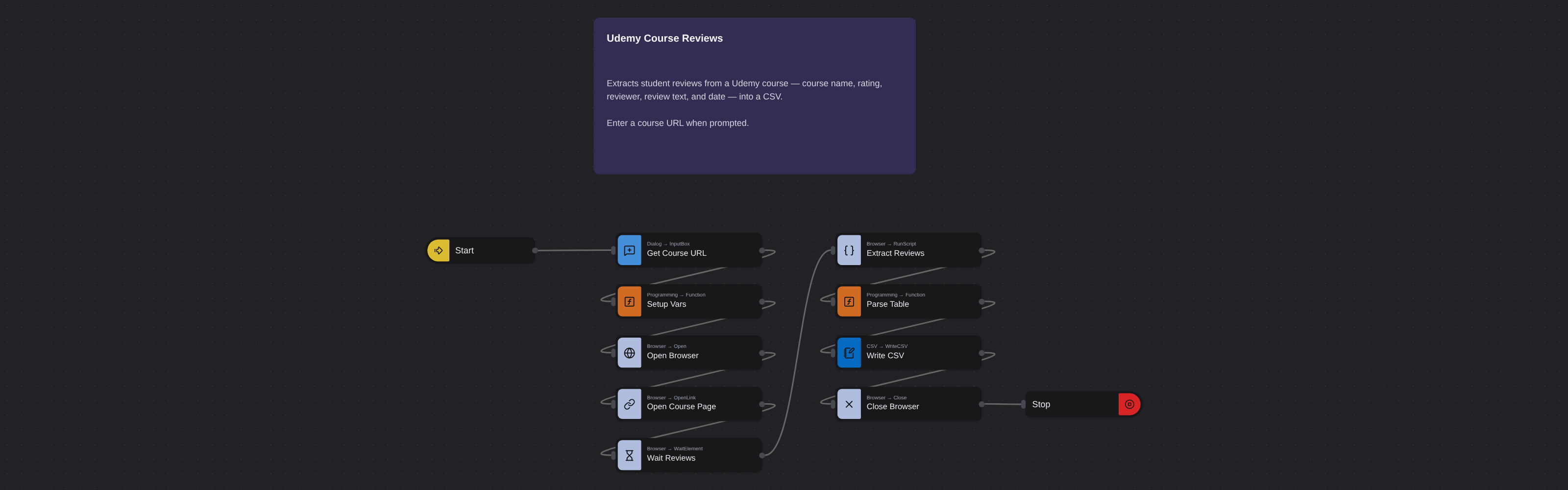
Overview
Udemy review scraper extracts student feedback - course names, ratings, text, and dates. No API needed.
Udemy Course Reviews
Student reviews are the most honest signal of course quality on Udemy. They reveal what learners found valuable, what confused them, and whether the course delivered on its promises. But Udemy does not let you export reviews, and scrolling through hundreds of comments manually to find patterns is impractical.
What it extracts
- Course Name — The title of the Udemy course where the review was posted.
- Position — The sequential position of the review on the course page.
- Rating — The star rating given by the reviewer (1–5 stars).
- Reviewer — The display name of the student who left the review.
- Reviews — The full text of the student's review.
- Posted at — When the review was posted.
What you can do with it
- Every student review from a course extracted with text, star rating, reviewer name, and date - ready for filtering and analysis.
- Learner satisfaction analysis: identify the most common praise and complaints across hundreds of reviews instead of reading them one by one.
- Course quality comparison: extract reviews from multiple competing courses and compare sentiment themes to find the best option.
- Curriculum improvement insights: mine negative reviews from your own course to find specific lectures or topics that need work.
How it works
Enter the requested input when prompted. The flow opens the target page, extracts the fields listed above, and saves them as a CSV in your home folder.
Frequently asked questions
What is a Udemy review scraper?
A Udemy review scraper extracts student reviews from course pages - course names, review positions, star ratings, reviewer names, review text, and dates - and exports them as structured data for sentiment analysis and comparison.
Can I extract reviews from any Udemy course?
Yes. This robot works on any publicly visible Udemy course page. Paste the URL and it extracts all available student reviews.
Do I need a Udemy account?
No. This robot extracts publicly visible review data from Udemy course pages without requiring you to log in or have API credentials.
How many reviews can it extract?
The robot captures all reviews displayed on the course page, paginating automatically through the review section. Courses with hundreds of reviews are handled without issue.
Is this Udemy review scraper free?
Browse AI's free plan includes credits to run this robot at no cost. Sign up without a credit card and start extracting Udemy reviews.
Can I analyze review sentiment?
The robot extracts the raw review text and star ratings. You can run your own sentiment analysis on the exported data using any text analysis tool or NLP pipeline.
More web scraping templates
See all 124 →- Amazon Product Search ScraperSearches Amazon from its search box and exports the products it finds (title, product link, price, rating, image) into a CSV, going through the result pages with Next.
- LinkedIn Company URL FinderFinds the LinkedIn company pages for a company name with LinkedIn's own company search: each result's page URL, name, industry and location, into a CSV.
- LinkedIn Job ScraperReads a LinkedIn job: its title, company, location and the About the job text, into a CSV.
- LinkedIn Post Commenter and Liker ScraperCollects the people who commented on a LinkedIn post and the people who reacted to it into one CSV: name, profile link, headline, and whether each one commented and/or reacted.
- LinkedIn Post Commenters ExportExports the people who commented on a LinkedIn post (name, profile link, headline, comment) into a CSV, scrolling for more.
- LinkedIn Post Likers ExportExports the people who reacted to a LinkedIn post (name, profile link, headline) into a CSV, from the post's reactions list.