YouTube Video Comments
Overview
YouTube comments scraper that extracts comment text, likes, authors, and timestamps from any video. No API key needed.
YouTube Video Comments
YouTube video comments are a goldmine of audience feedback - viewers share their honest reactions, ask questions, debate opinions, and leave feature requests right below the content. But YouTube's comment section has no bulk export, the Data API has strict quotas, and scrolling through thousands of comments manually is not feasible.
What it extracts
- Comment Text — The full text of the YouTube comment.
- Author — The display name of the commenter.
- Likes — The number of likes the comment has received.
- Reply Count — How many replies are nested under the comment.
- Timestamp — When the comment was posted.
- Author Channel URL — Link to the commenter's YouTube channel.
What you can do with it
- Bulk access to every comment on a video - text, likes, replies, and timestamps - exported as structured rows instead of endless scrolling.
- Audience sentiment analysis at scale: understand how viewers react to specific content, products mentioned, or topics discussed in videos.
- Creator feedback aggregation that turns scattered YouTube comments into organized data for identifying recurring themes, questions, and suggestions.
- Competitive video intelligence by analyzing the comment sections of competitor content to see what their audience cares about and complains about.
How it works
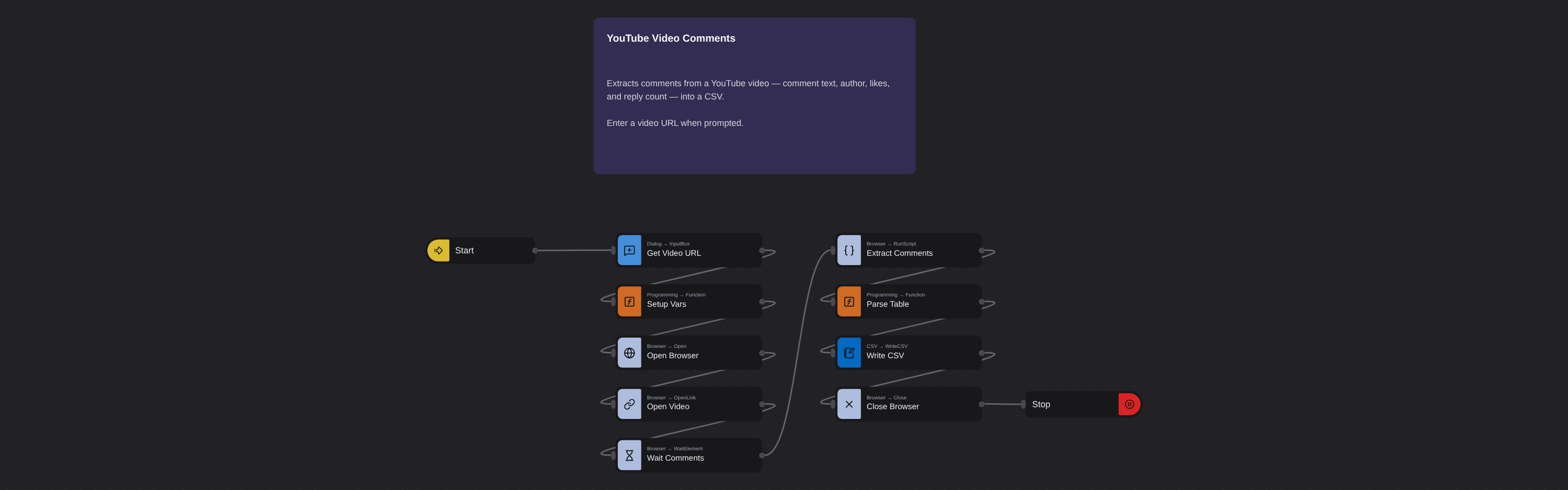
Enter the requested input when prompted. The flow opens the target page, extracts the fields listed above, and saves them as a CSV in your home folder.
Frequently asked questions
What is a YouTube comments scraper?
A YouTube comments scraper extracts all comments from a video page - the text, author names, like counts, reply counts, and timestamps - and organizes them into a structured format for analysis.
Do I need a YouTube API key?
No. This robot works without any YouTube Data API credentials. It loads the video page directly and scrolls through the comments section, bypassing API quota limits entirely.
Can I extract comments from any YouTube video?
Yes, as long as the video has comments enabled and is publicly accessible. Private videos and videos with disabled comments cannot be scraped.
How many comments can the robot extract?
The robot scrolls through and captures all comments displayed on the video page. Videos with thousands of comments may take longer but are handled automatically.
Is this YouTube comments scraper free?
Browse AI's free tier includes credits to run this robot at no cost. Sign up without a credit card and start extracting YouTube comments immediately.
Can I filter comments by likes or date?
After extraction, your data is in a spreadsheet. Sort by like count to find the most popular comments or by timestamp to see the newest reactions.
More web scraping templates
See all 124 →- Amazon Product Search ScraperSearches Amazon from its search box and exports the products it finds (title, product link, price, rating, image) into a CSV, going through the result pages with Next.
- LinkedIn Company URL FinderFinds the LinkedIn company pages for a company name with LinkedIn's own company search: each result's page URL, name, industry and location, into a CSV.
- LinkedIn Job ScraperReads a LinkedIn job: its title, company, location and the About the job text, into a CSV.
- LinkedIn Post Commenter and Liker ScraperCollects the people who commented on a LinkedIn post and the people who reacted to it into one CSV: name, profile link, headline, and whether each one commented and/or reacted.
- LinkedIn Post Commenters ExportExports the people who commented on a LinkedIn post (name, profile link, headline, comment) into a CSV, scrolling for more.
- LinkedIn Post Likers ExportExports the people who reacted to a LinkedIn post (name, profile link, headline) into a CSV, from the post's reactions list.