CoinMarketCap Coin Prices
Overview
Crypto scraper extracts CoinMarketCap rankings - prices, market caps, volume, icons and links. No code needed.
CoinMarketCap Coin Prices
CoinMarketCap's main rankings page lists thousands of cryptocurrencies sorted by market capitalization - it is the default starting point for anyone researching the crypto market. But the website only lets you browse, not export. If you need that data in a spreadsheet for portfolio analysis, market research, or automated trading signals, you are stuck with manual copying or expensive API subscriptions.
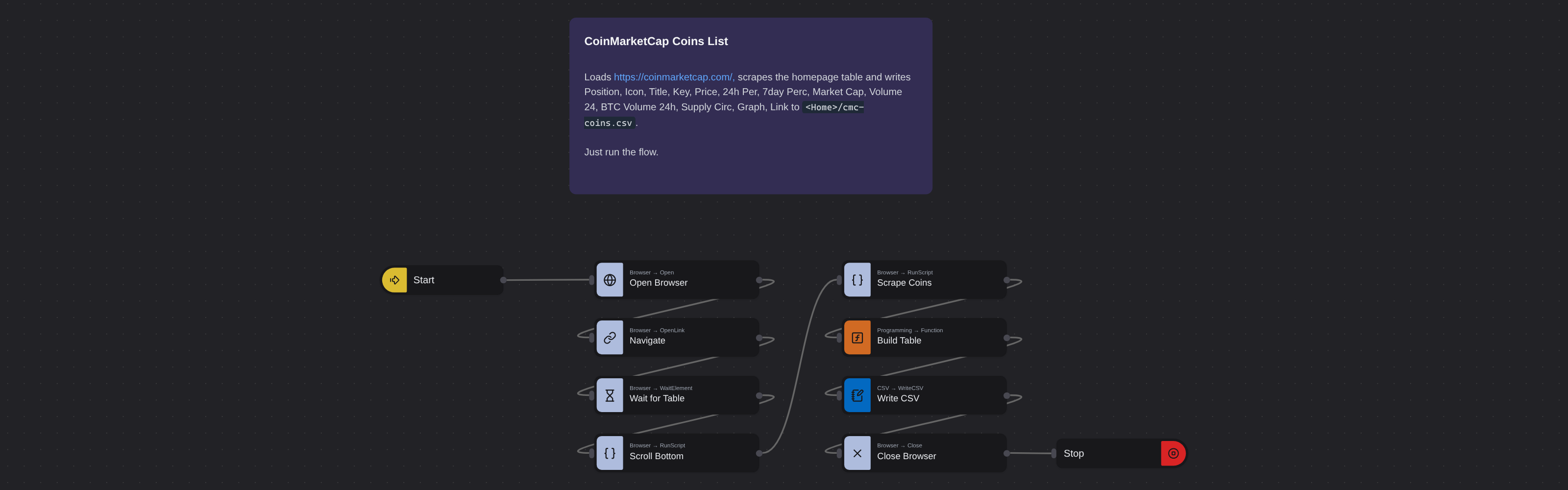
What it extracts
- Position — The coin's rank in the CoinMarketCap market cap rankings.
- Icon — The cryptocurrency's logo or icon image.
- Title — The full cryptocurrency name.
- Key — The trading symbol or ticker (e.g., BTC, ETH, SOL).
- Price — The current market price at extraction time.
- 24h Per — Percentage price change over the last 24 hours.
- 7day Perc — Percentage price change over the last 7 days.
- Market Cap — Total market capitalization.
- Volume 24 — Total trading volume in the last 24 hours.
- BTC Volume 24h — Trading volume in Bitcoin equivalent over the last 24 hours.
- Supply Circ — The number of coins currently in circulation.
- Graph — The price chart or historical graph visualization.
- Link — Direct URL link to the coin's detail page on CoinMarketCap.
What you can do with it
- The full cryptocurrency rankings - hundreds of coins with prices, market caps, and volumes - in a structured spreadsheet instead of a browser page.
- Daily market snapshots by scheduling extractions, giving you a time-series dataset for tracking price trends and market cap shifts.
- Portfolio analysis with real market data: merge your holdings with CoinMarketCap prices to calculate current values and allocations.
- Custom market screens by filtering the extracted data on any criteria - market cap range, volume threshold, price change percentage - in your own tools.
How it works
Just run the flow. It loads the source, extracts the fields listed above, and saves them as a CSV in your home folder.
Frequently asked questions
What is a crypto scraper?
A crypto scraper extracts structured cryptocurrency market data from websites like CoinMarketCap. This robot captures prices, market caps, volumes, rankings, icons, charts, and direct links from the CoinMarketCap listings page, delivering the data in spreadsheet-ready format for analysis and tracking.
How often should I scrape CoinMarketCap?
For market tracking, daily extraction gives you a solid time-series dataset. For portfolio tracking, more frequent runs (hourly or every few hours) keep your valuations current. Adjust based on how time-sensitive your use case is.
Can I extract all coins from CoinMarketCap?
CoinMarketCap lists thousands of coins across multiple pages. Queue multiple page URLs to capture the full rankings. Each page typically shows 100 coins.
Is this CoinMarketCap scraper free?
Browse AI's free tier includes credits to run this robot at no cost. For regular daily extractions, a paid plan provides more credits, but you can start free.
Can I get historical price data?
This robot captures current prices from the rankings page. By scheduling daily runs, you build your own historical dataset over time. Each extraction becomes a snapshot you can reference later.
How does this compare to the CoinMarketCap API?
The CoinMarketCap API requires registration and has rate limits and pricing tiers. This robot avoids those constraints by extracting directly from the website. For most research and portfolio tracking use cases, web extraction is simpler and more cost-effective.
More web scraping templates
See all 124 →- Amazon Product Search ScraperSearches Amazon from its search box and exports the products it finds (title, product link, price, rating, image) into a CSV, going through the result pages with Next.
- LinkedIn Company URL FinderFinds the LinkedIn company pages for a company name with LinkedIn's own company search: each result's page URL, name, industry and location, into a CSV.
- LinkedIn Job ScraperReads a LinkedIn job: its title, company, location and the About the job text, into a CSV.
- LinkedIn Post Commenter and Liker ScraperCollects the people who commented on a LinkedIn post and the people who reacted to it into one CSV: name, profile link, headline, and whether each one commented and/or reacted.
- LinkedIn Post Commenters ExportExports the people who commented on a LinkedIn post (name, profile link, headline, comment) into a CSV, scrolling for more.
- LinkedIn Post Likers ExportExports the people who reacted to a LinkedIn post (name, profile link, headline) into a CSV, from the post's reactions list.