API Health Check
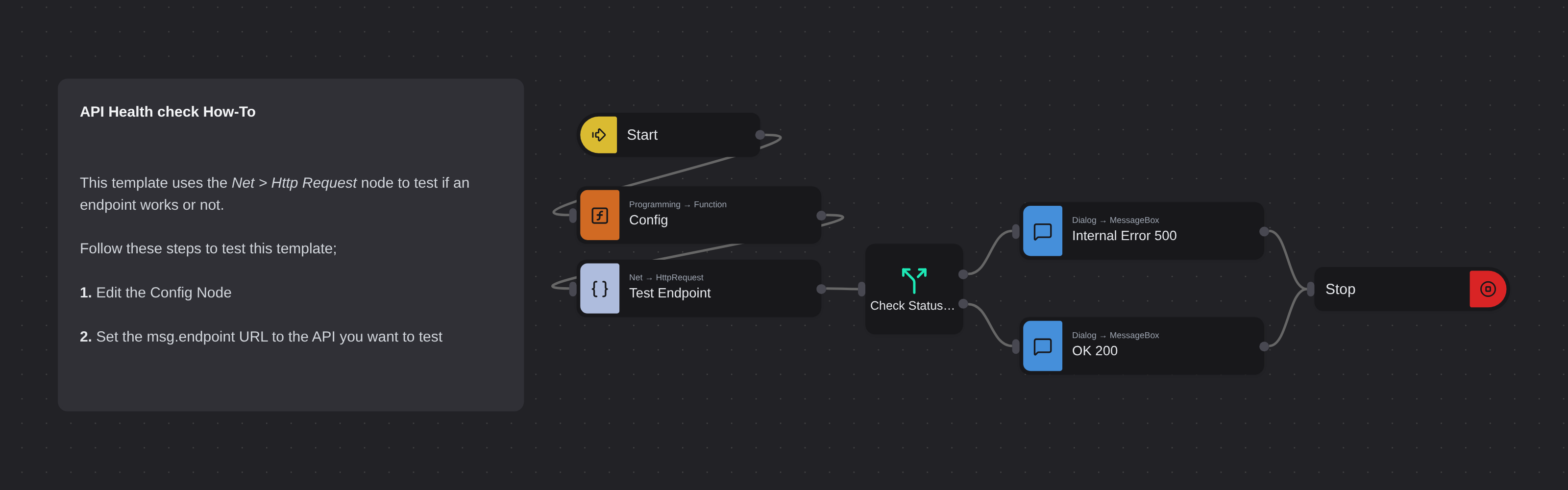
Overview
Monitors the operational status of API endpoints by sending HTTP requests and evaluating response status codes. Demonstrates how to test any service endpoint using the GET method.
API Health Check
API Health Check gives you a quick, automated way to verify whether your API endpoints are alive and responding correctly. Powered by Robomotion's HTTP nodes and a simple status code router, it replaces manual browser checks with a single click workflow.
When you run the flow, it sends a GET request to your target endpoint, inspects the HTTP status code, and immediately tells you whether the service is healthy or experiencing issues. No browser tabs, no curl commands, no guesswork.
What API Health Check can do
- Send an HTTP GET request to any API endpoint
- Detect successful responses (200) and server errors (500)
- Display a clear success or error dialog based on the result
- Extend easily to handle additional status codes like 401 or 404
Behind the scenes
The flow sends a GET request with a Content-Type: application/json header to the URL you configure. A Switch node inspects the response status code and routes execution to the appropriate dialog. A 200 triggers a success message while a 500 triggers an error alert. You can add more branches to the Switch node to cover other HTTP status codes as needed.
Configuration
Open the Config node and set:
| Variable | Description | Example |
|---|---|---|
msg.endpoint | URL to check | "https://api.robomotion.io/version" |