Substack Archive Posts
ओवरव्यू
Substack scraper extracts posts, dates, engagement data, and images from archives.
Substack Archive Posts
Substack has become the dominant platform for independent newsletter publishing, hosting thousands of writers who generate revenue directly from paid subscriptions. Each Substack publication has a public archive page listing every post - both free and paid - in reverse chronological order. Archive entries show the post position, title, publication date, description snippet, comment count, like count (hearts), featured image, and whether the post is free or behind the paywall.
What it extracts
- Position — The sequential order of the post in the archive listing.
- Title — Newsletter post headline.
- Description — Opening snippet or preview text of the post.
- Date — When the post was published.
- Number Of Likes — Hearts/likes from subscribers.
- Number of comments — Reader comments on the post.
- Link — Direct URL to the full post.
- Image URL — Thumbnail or featured image associated with the post.
What you can do with it
- Newsletter content catalog: Extract every post a Substack publication has ever made. Understand their content volume, publishing cadence, and how their approach has evolved.
- Free vs. paid content strategy: Substack archives distinguish free posts from paid-only content. Extract these labels to study how newsletters balance free content for growth with paid content for revenue.
- Engagement signals: Like counts and comment counts reveal which posts generated the most audience interaction. Extract these to identify topics and formats that drive subscriber engagement.
- Publishing frequency patterns: Extract dates across the full archive. Analyze whether a newsletter posts daily, weekly, or irregularly - and how frequency correlates with engagement.
How it works
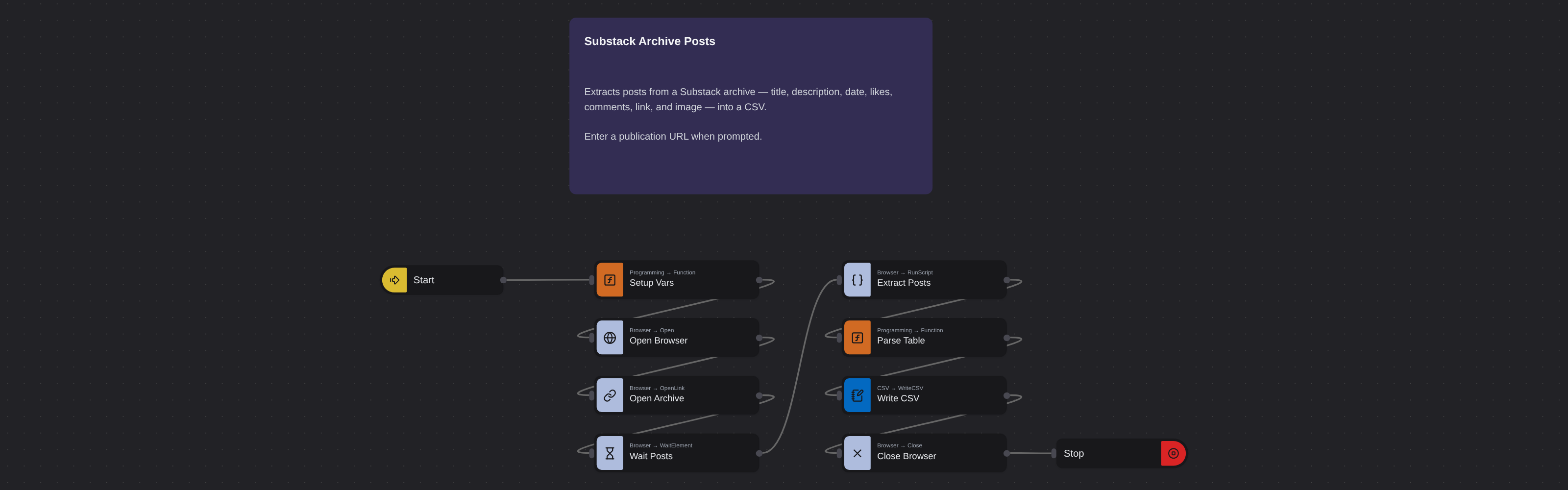
Just run the flow. It loads the source, extracts the fields listed above, and saves them as a CSV in your home folder.
Frequently asked questions
Can I see how many subscribers a Substack has?
Subscriber counts aren't typically shown on archive pages. Some publications display subscriber milestones on their About page, which can be extracted separately.
Does it extract paid post content?
The robot extracts archive listings - positions, titles, dates, and engagement data - for both free and paid posts. Full paid post content is only accessible to paying subscribers.
Can I track multiple Substack newsletters?
Yes. Run the robot on each newsletter's archive page. Schedule regular runs to track publishing activity across multiple Substack publications.
How does Substack compare to Medium for content analysis?
Substack focuses on newsletters with subscriber relationships. Medium focuses on articles in a social feed. Use both scrapers for complementary content platform analysis.
Is this Substack scraper free?
Browse AI's free plan includes credits to run this robot. No credit card required.
Web Scraping के और टेम्पलेट
सभी 124 देखें →- Amazon Product Search ScraperSearches Amazon from its search box and exports the products it finds (title, product link, price, rating, image) into a CSV, going through the result pages with Next.
- LinkedIn Company URL FinderFinds the LinkedIn company pages for a company name with LinkedIn's own company search: each result's page URL, name, industry and location, into a CSV.
- LinkedIn Job ScraperReads a LinkedIn job: its title, company, location and the About the job text, into a CSV.
- LinkedIn Post Commenter and Liker ScraperCollects the people who commented on a LinkedIn post and the people who reacted to it into one CSV: name, profile link, headline, and whether each one commented and/or reacted.
- LinkedIn Post Commenters ExportExports the people who commented on a LinkedIn post (name, profile link, headline, comment) into a CSV, scrolling for more.
- LinkedIn Post Likers ExportExports the people who reacted to a LinkedIn post (name, profile link, headline) into a CSV, from the post's reactions list.