सभी टेम्पलेट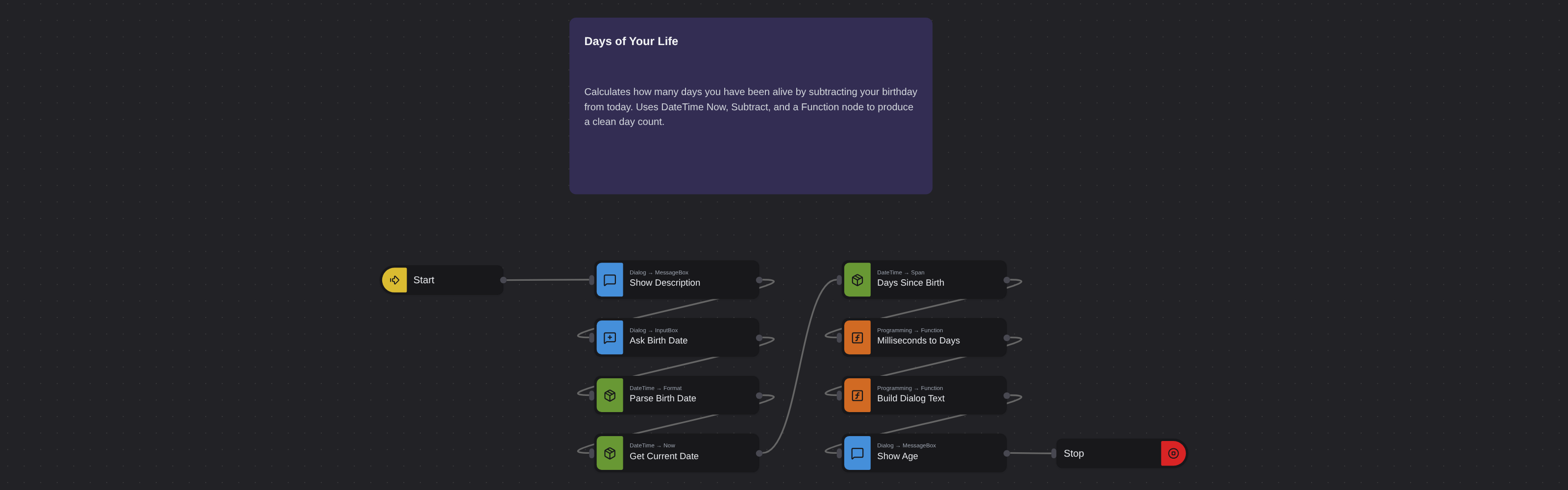
Date & TimeIntermediate
Days of Your Life
Robomotion•11 माह पहले अपडेट किया गया
ओवरव्यू
Calculates how many days you have been alive by subtracting your birthday from today. Uses DateTime Now, Subtract, and a Function node to produce a clean day count.
Days of Your Life
Handling datetime values can be challenging, as time-related data require absolute accuracy. Robomotion allows you to perform reliable calculations with datetime values and display results in various units.
What Days of Your Life can do
- Message Dialog (
Core.Dialog.MessageBox,optType: info) titledDescriptionexplains the flow to the user. - Input Dialog (
Core.Dialog.InputBox) titledPlease select your birthday..., promptSelect your birth date (YYYY-MM-DD):, default1990-01-01→msg.birth_date_text. - Parse birth date (
Robomotion.DateTime.Format, custom in-layout2006-01-02, out-layoutRFC3339) →msg.birth_date. - Get current date (
Robomotion.DateTime.Now,RFC3339,Local) →msg.current_date. - Days since birth (
Robomotion.DateTime.Span,RFC3339) frommsg.birth_datetomsg.current_date→msg.span_ms. - Milliseconds to days (
Core.Programming.Function) —Math.floor(msg.span_ms / 86400000)→msg.days_alive. - Build dialog text (
Core.Programming.Function) — composesToday is day #<days_alive>intomsg.dialog_text. - Message Dialog (
Core.Dialog.MessageBox,optType: info) titledAttention!showsmsg.dialog_text, thenCore.Flow.Stop.
Behind the scenes
- The flow has no explicit cancel branch — if the user cancels the input dialog, downstream nodes simply fail fast.
- Day counting is done by dividing the millisecond span (
Robomotion.DateTime.Spanreturns ms) by86400000and flooring — this matches a whole-days-elapsed semantic and avoids DST / timezone drift. - The birth-date string is normalised through
Robomotion.DateTime.Format(custom2006-01-02layout toRFC3339) soSpangets a well-formed timestamp regardless of how the user typed it.
Date & Time के और टेम्पलेट
सभी 6 देखें →- Convert Datetime to TextConverts a datetime value into a formatted text string using the Robomotion DateTime package. Demonstrates standard and custom output layouts for logging, filenames, and reports.
- Convert Text to DatetimeParses a text string like "2025-05-01 09:30:00" into a true datetime value the flow can work with. Shows how to declare an input layout so downstream nodes can format or compare the date.
- Get Current TimeReads the local date and time and formats it as a long time string (HH:mm:ss). Displays the result in an information dialog so you can verify the system clock at a glance.
- Get First Working Day of the Next MonthComputes the first business day of next month, skipping weekends. Useful for scheduling invoices, reports, or reminders that must fire on a working day.
- Get Previous Working DateWalks backwards from today to find the previous working day, handling weekends through conditional logic. A building block for backdated reports or audits.